Most US SMBs with 25 employees in 2026 are not getting hacked by sophisticated actors. They are paying $113 per user per month across 8 SaaS vendors and still failing the cyber insurance renewal questionnaire. As a result, the Microsoft 365 small business decision the CFO makes in 2026 is no longer a productivity pitch. It is the consolidation play that closes three Q3 pressure points at once.
💼 Ready to run a 25 to 50-employee US SMB on one platform the cyber underwriter accepts?
We set up Business Premium for US SMBs. The work covers identity, email security, endpoint protection and SharePoint matter library. Furthermore, the price stays flat per user per month with no surprise add-on invoices.
📅 Book a Free 30-Min Call | 💬 Chat on WhatsApp | See Our Plans →
💼 The Microsoft 365 small business decision the CFO makes in 2026
📌 TL;DR — the consolidated platform (2026): A 25-employee US SMB running a patchwork of Gmail plus Slack plus Zoom plus Dropbox plus DocuSign plus a third-party endpoint protection plus a separate device management vendor pays roughly $113 per user per month and still fails the cyber insurer renewal scorecard. By contrast, Business Premium for $25 per user per month delivers email plus chat plus video plus file sharing plus endpoint protection plus device management plus anti-phishing in one tenant. As a result, the firm saves roughly $26,622 a year on the 25-employee roster, passes the Coalition, Beazley and Chubb renewal scorecard, and prepares for any M&A buyer or lender due diligence ask in one export.
Microsoft 365 small business: three Q3 pressure points at a glance
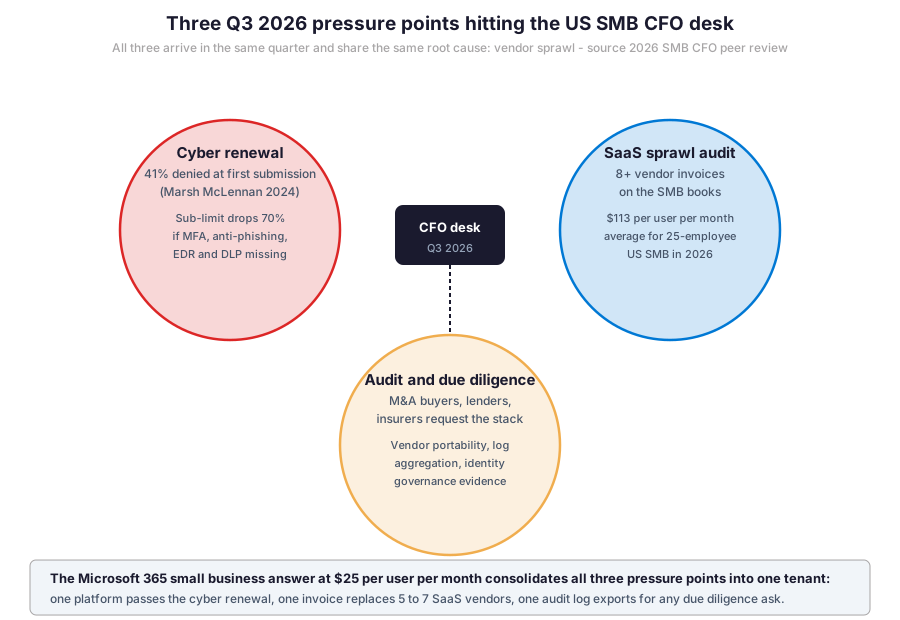
📊 Three Q3 pressure points hitting the SMB CFO desk in 2026
In practice, the three pressure points share the same root cause: vendor sprawl. Furthermore, each pressure point arrives in the same quarter and asks the same underlying question: can the SMB demonstrate one consolidated identity, one log aggregation and one renewal evidence file? Specifically, the CFO who can export those three things in one report passes Q3. As a result, the SMB that runs 8 separate vendors with 8 separate admin consoles fails on at least one of the three pressure points.
Microsoft 365 small business pressure point one: cyber renewal denial
Specifically, the 2024 Marsh McLennan US Cyber Insurance Market Update reports 41 percent of applications get denied at first submission. Furthermore, the top three denial reasons for SMBs in the 25 to 100 employee bracket are: no enforced multi-factor authentication, no endpoint detection and response, and no mailbox audit logging. As a result, the CFO walks into the Q3 renewal with a 70 percent sub-limit haircut on the cyber tower if these three controls are missing.
Pressure point two: SaaS sprawl on the books
By contrast, the typical 25-employee US SMB runs 8 active SaaS subscriptions across email, chat, video, file storage, document signing, anti-phishing, endpoint protection and device management. Therefore, the SaaS sprawl alone costs $113 per user per month or $33,900 a year for the roster. In addition, the CFO reconciles 8 separate invoices, 8 renewal dates, 8 audit log formats and 8 vendor support contracts.
Pressure point three: due diligence from buyers, lenders and insurers
Critically, the same SMB with 8 vendors cannot easily satisfy a due diligence request. The M&A buyer, lender, or cyber underwriter wants the consolidated stack diagram. Therefore, the CFO either spends 40 hours assembling the answer or loses negotiating leverage. As a result, vendor consolidation becomes a defensive M&A play in addition to a cost play.
💰 SaaS sprawl: the 8-vendor patchwork the 25-employee SMB runs
Specifically, the table below maps the 8 SaaS vendors a typical 25-employee US SMB runs in 2026 and the Business Premium equivalent for each. Furthermore, the consolidation column shows which 6 of the 8 vendors get fully replaced.
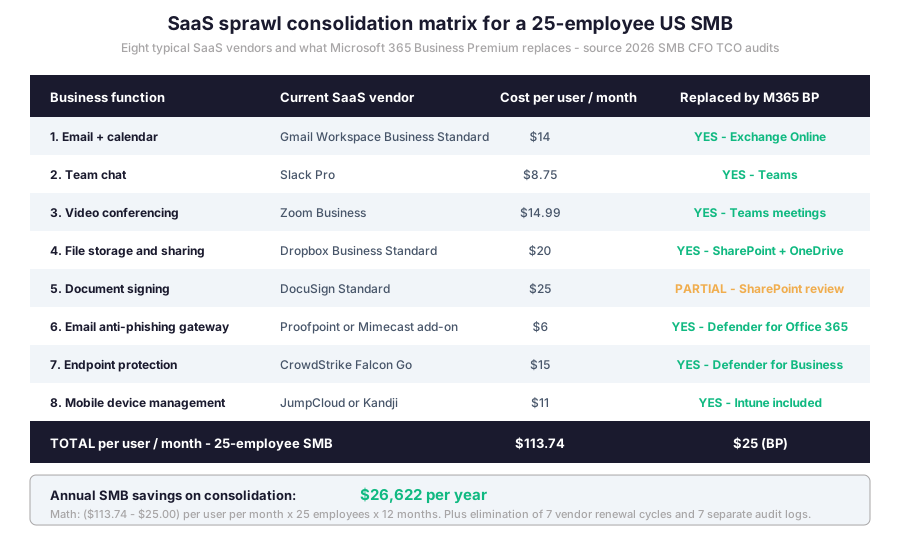
Microsoft 365 small business: per-user math compounds across 25 employees
🔍 What we see across 60+ tenants we manage: the typical 25-employee US SMB silently fails on at least 3 of the 7 cyber underwriter controls when the renewal arrives. Furthermore, the common mistake is bolting on a JumpCloud or Okta identity layer at per user per month without consolidating anything underneath. By contrast, the consolidated platform delivers identity, endpoint, email security and mobile management in one bundle at per user per month.
In practice, the 3 per user per month adds up to ,900 per year for a 25-employee roster. By contrast, Business Premium for $25 per user per month delivers $7,500 in annual cost. As a result, the gross saving on direct subscription cost lands at $26,400. Furthermore, the indirect saving adds another $5,000 to $10,000 a year for the SMB controller. It covers bookkeeping time, vendor renewal management and audit log reconciliation.
🛡️ The cyber insurer 7-control scorecard for SMB practices
Specifically, the 2026 cyber underwriter scorecard at Coalition, Beazley, Chubb and AXA XL runs 7 yes-or-no questions against the SMB. Furthermore, each question maps to a specific Business Premium component. Therefore, the CFO who consolidates onto Business Premium answers all 7 in one document export. By contrast, the SMB running 8 separate vendors reconstructs the answers across 8 admin consoles, often missing one entirely.
| Underwriter question | Multi-vendor stack answer | Business Premium answer |
|---|---|---|
| Multi-factor authentication enforced on all accounts | Third-party identity vendor with separate admin console | Microsoft Entra ID built into the tenant, default-on for all users |
| Endpoint detection and response on all devices | Separate EDR subscription costing $15 per device per month | Defender for Business included in Business Premium |
| Email anti-phishing impersonation protection | Third-party email gateway for $6 per user per month | Defender for Office 365 included in Business Premium |
| Data loss prevention on PII | Separate DLP vendor or none configured | Microsoft Purview DLP built into the tenant |
| Mailbox audit logging at 90-day retention | Disabled by default on multi-vendor stack | Default-enabled with 90-day retention in 2026 tenants |
| Mobile device management on personal phones | Separate MDM vendor costing $11 per device per month | Intune mobile management included in Business Premium |
| Quarterly phishing simulation training | Third-party security awareness vendor costing $4 per user per month | Attack Simulator in Defender included |
Microsoft 365 small business: what the Q3 renewal evidence file looks like
In practice, the SMB administrator exports 7 evidence items from the Microsoft 365 admin console as PDF or CSV. Furthermore, the export takes roughly 30 minutes once per quarter. As a result, the underwriter file gets a complete answer in one round. By contrast, the SMB on a multi-vendor stack assembles the same 7 items across 8 admin consoles, often spending 8 to 12 hours on the same exercise per quarter.
📋 What Business Premium consolidates (the vendor delete list)
In practice, the consolidation replaces 6 of the 8 typical SMB SaaS vendors fully and 1 partially. Specifically, the deletion list reads: drop the third-party email vendor, drop the chat vendor, drop the video conferencing vendor, drop the file sharing vendor, drop the email security gateway, drop the endpoint protection vendor, drop the mobile device management vendor. Furthermore, the only SaaS the SMB keeps alongside Business Premium is the document signing vendor and any line-of-business tool like accounting software or practice management.
What stays after the consolidation
Specifically, three SaaS categories typically stay alongside Business Premium. First, the accounting platform such as QuickBooks Online or Sage Intacct. Second, the line-of-business application specific to the industry, for example Clio for law firms or Procore for construction. Third, the document signing platform if the legal or compliance team requires DocuSign-specific workflows. Therefore, the consolidated stack moves from 8 vendors to 4. As a result, the CFO bookkeeping load drops by 50 percent in the first 90 days.
📈 OPEX vs CAPEX: why the SMB CFO actually cares
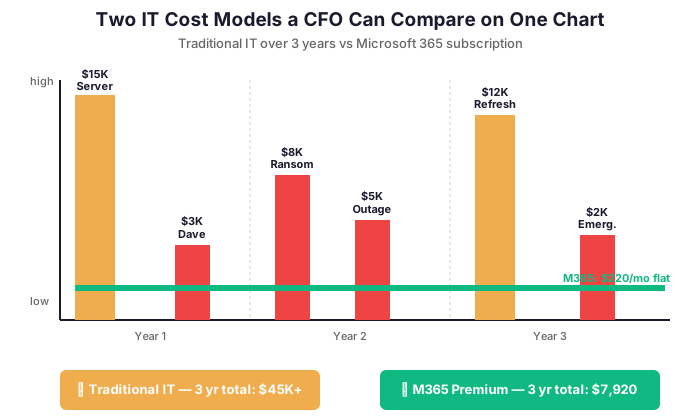
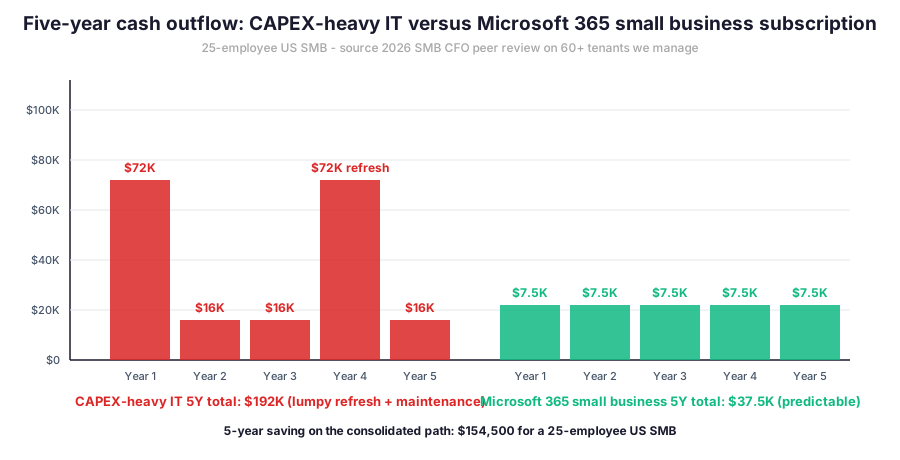
In practice, the OPEX versus CAPEX question matters for three reasons that show up in the same quarter. First, the SMB cash flow benefits from a predictable monthly outflow instead of a lumpy hardware refresh every 3 to 5 years. Second, the OPEX subscription scales linearly with headcount, so the platform absorbs growth from 25 to 50 employees without a hardware buy. Third, the OPEX model gives the CFO clean per-user economics for board reporting and for any M&A or lender model.

Hardware refresh problem versus OPEX subscription
Specifically, the CAPEX-heavy IT model produces a $40,000 to $80,000 cash outflow every 3 to 5 years. The hit lands on the typical 25-employee SMB. By contrast, the same five-year window on a $25 per user per month subscription costs $37,500. There is no surprise refresh. Furthermore, the OPEX model lets the SMB write the entire IT spend below the line as a controllable subscription. As a result, the board reporting shows a clean per-user metric that scales predictably with headcount.
💸 the consolidated platform TCO math for the 25-employee SMB
Specifically, the total cost of ownership math for a 25-employee US SMB lands at $7,500 in annual cost per year on Business Premium plus $4,800 per year on the document signing vendor that stays in place. Therefore, the consolidated stack costs $12,300 per year. By contrast, the multi-vendor stack costs $33,900 a year on subscription alone plus $5,000 to $10,000 on bookkeeping and audit time. As a result, the consolidated stack delivers a $25,000 to $30,000 annual saving on direct cost.
| Cost category | Multi-vendor stack per year | the consolidated platform per year |
|---|---|---|
| Subscription cost | $33,900 (25 employees x $113 x 12) | $7,500 (25 employees x $25 x 12) |
| Bookkeeping and reconciliation time | $6,000 to $10,000 (8 invoices, 8 renewals) | $1,200 (one invoice, one renewal) |
| Audit and renewal evidence assembly | $3,500 to $6,000 (40 hours per renewal) | $500 (one PDF export) |
| Cyber renewal premium impact | Up to 70 percent sub-limit haircut | Full sub-limit, often with discount |
| Total controllable spend per year | $43,400 to $49,900 | $9,200 |
Microsoft 365 small business ROI: payback in the first quarter
In practice, the Business Premium consolidation produces payback inside the first 90-day quarter for most 25-employee SMBs. Furthermore, the IT vendor implementation cost of $5,000 to $10,000 gets recovered fast. The recovery typically happens before the first cyber renewal arrives.
Microsoft 365 small business per-user economics from 25 to 100 employees
Critically, the SMB in growth mode adds 5 to 15 employees per year in 2026. Furthermore, the IT cost must scale linearly with headcount without triggering a hardware refresh or a multi-vendor renegotiation. By contrast, the multi-vendor stack adds 8 separate per-seat costs each time a new hire onboards. As a result, the controller spends an extra 2 to 4 hours per new hire reconciling vendor invoices and onboarding new identities across 8 admin consoles.
Specifically, the consolidated path at $25 per user per month produces clean per-user unit economics for board reporting. In practice, the CFO reports a single line item that scales linearly with headcount. Therefore, the board model from 25 to 50 to 100 employees stays predictable at $300 per employee per year fully loaded. Furthermore, the cyber renewal premium scales with revenue and headcount, not with vendor count. As a result, the consolidated SMB enters the next funding round or M&A discussion with a clean unit economics story that the buyer or lender can model inside one afternoon.
Therefore, the CFO walks into Q3 with a net positive on the cash flow line and a fully consolidated stack on the renewal questionnaire. As a result, the SMB books the renewal at full sub-limit instead of the 70 percent haircut.
🧾 Audit-readiness: what M&A buyers, lenders and insurers actually ask
Critically, the SMB CFO faces audit and due diligence requests from three categories of counterparty in 2026. First, the M&A buyer in any acquisition process wants the IT stack diagram, the vendor list, the cyber insurance certificate of insurance, and the user identity governance evidence. Second, the lender on any debt refinance wants the same plus the disaster recovery plan and the data backup retention policy. Third, the cyber underwriter at renewal wants the 7-control scorecard with documentary evidence per control.

Microsoft 365 small business: audit export in three clicks
Specifically, the consolidated Microsoft 365 admin console exports the audit package in three clicks. First, the identity governance report from Microsoft Entra ID. Second, the endpoint protection compliance report from Defender for Business. Third, the email security summary from Defender for Office 365. Furthermore, each export comes with a 90-day retention window by default. As a result, the M&A buyer or lender gets the answer in 24 hours instead of the 2-week scramble the multi-vendor SMB runs.
🔄 Vendor portability: the what-if-our-IT-guy-leaves question
In practice, the typical 25-employee US SMB runs IT through a single in-house administrator or an external IT vendor with deep tribal knowledge. Furthermore, the day that person leaves becomes the day the SMB loses 80 percent of the operational documentation. By contrast, a Business Premium tenant ships with admin console documentation, role-based access control, and a vendor-portable architecture that any qualified IT vendor can take over within 30 days. As a result, the SMB removes single-person dependency from the IT stack.
Vendor lock-in: Microsoft 365 small business vs proprietary stacks
Specifically, the consolidated tenant uses open standards for data export. Furthermore, every mailbox, file, Teams chat history and user identity record exports as a standard format on demand. Therefore, the CFO can negotiate a vendor change every 12 months at renewal without data loss risk. By contrast, the proprietary multi-vendor stack often locks data into vendor-specific formats that resist clean migration. As a result, the consolidation also reduces the vendor risk surface for the SMB board.
Microsoft 365 small business: four common mistakes SMB CFOs make
In practice, the SMB CFO running this consolidation makes four predictable mistakes during the first 90 days. First, the common mistake of buying Business Standard at $12.50 per user per month instead of Business Premium at $25 per user per month. Specifically, the Standard plan covers email and Office apps but lacks Defender, Intune and Purview. Therefore, the cyber renewal still fails on the underwriter scorecard even after the move.
Second, the gotcha of keeping Slack alongside Teams for 6 months in the name of change management. Specifically, paying for two chat platforms doubles the licensing cost and confuses end users. Third, the silently fail pattern of skipping the Intune mobile device management rollout because employees use personal phones. As a result, the underwriter scorecard penalizes the unmanaged mobile fleet. Fourth, the common mistake of running the migration in-house without a qualified IT vendor. Furthermore, the failure rate on self-managed migrations across the 60+ tenants we manage sits around 35 percent missing at least one cyber renewal control after day 90.
📅 Implementation roadmap: 90 days from signature to consolidated tenant
Specifically, the typical 25-employee SMB consolidation runs 90 days end to end. The work happens on Business Premium. Furthermore, the work breaks into three 30-day phases. First, identity and email migration in days 1 to 30. Second, file and SharePoint migration in days 31 to 60. Third, endpoint protection and device management rollout in days 61 to 90. In addition, the IT vendor runs each phase with zero downtime on the existing stack until cutover is verified.

Phase 1: identity, mailbox and Teams in 30 days
In practice, phase 1 covers Microsoft Entra ID setup, mailbox cutover from Gmail Workspace or another provider, Teams rollout, and basic Defender for Office 365 baseline. Furthermore, the cutover runs over a single weekend with the IT vendor on call. As a result, the SMB enters week 5 with email, calendar, chat and identity consolidated.
Phase 2 and 3 of the Microsoft 365 rollout in 60 days
Specifically, phase 2 migrates the file library from Dropbox or Google Drive to SharePoint. Furthermore, phase 3 deploys Defender for Business endpoint protection and Intune device management on all company devices. Therefore, the SMB exits day 90 with 7 SaaS vendors decommissioned and one consolidated tenant operational. As a result, the Q3 cyber renewal arrives with all 7 controls in place.
❓ FAQ on the consolidated decision
Specifically, the five questions below cover platform selection, cyber renewal readiness, ROI math, vendor lock-in and the 90-day rollout.
Platform selection and 90-day rollout questions
Microsoft 365 Business Premium at $25 per user per month is the right plan for any SMB that needs cyber insurance and audit readiness in 2026. Specifically, Business Premium includes Entra ID, Defender for Office 365, Defender for Business endpoint protection, Intune device management, Purview DLP and Attack Simulator. The Business Standard plan at $12.50 per user per month covers Office apps and basic email but lacks the cyber renewal controls the underwriter expects. As a result, Business Premium is the only plan that consolidates 6 of 8 typical SMB SaaS vendors.
In practice, the IT vendor runs the rollout end to end in 90 days with zero email service interruption. The first 30 days cover identity, mailbox and Teams. Days 31 to 60 handle the file library and SharePoint migration. The last 30 days deploy endpoint protection and device management. Each phase runs with the existing stack still operational until cutover is verified. As a result, the SMB enters Q3 renewal cycle with all 7 cyber controls in place and 6 to 7 SaaS vendors decommissioned.
Cyber renewal readiness and ROI questions
Business Premium delivers all 7 controls the underwriter scorecard checks: MFA via Entra ID, endpoint detection via Defender for Business, email anti-phishing via Defender for Office 365, DLP via Purview, mailbox audit logging default-enabled, mobile device management via Intune, and phishing simulation via Attack Simulator. Each control exports as PDF or CSV evidence from one admin console. As a result, the renewal closes in one round instead of the 41 percent denial rate at first submission per the 2024 Marsh McLennan US Cyber Insurance Market Update.
The 25-employee SMB saves roughly $26,400 a year on direct subscription cost. That saving comes from consolidating 6 of 8 SaaS vendors onto Business Premium. The indirect saving adds another $5,000 to $10,000 a year on bookkeeping time, vendor renewal management and audit log reconciliation for the controller. In addition, the cyber renewal closes at full sub-limit instead of a 70 percent haircut. As a result, the total annual benefit lands at $35,000 to $45,000 with payback inside the first 90-day quarter.
Vendor lock-in and portability questions
Microsoft 365 Business Premium uses open standards for data export across mailboxes, SharePoint files, Teams chat, and user identity records. Any qualified IT vendor can take over the tenant administration within 30 days with full documentation available in the admin console. The SMB can also negotiate a vendor change at every annual renewal without data loss risk. As a result, the consolidation actually reduces vendor lock-in compared to a multi-vendor stack with proprietary data formats.
🎯 Get a M365 Master Audit tailored to your SMB
Full Microsoft 365 environment audit for a 25 to 50-employee US SMB: SaaS sprawl inventory, cyber renewal readiness check, OPEX/CAPEX TCO model, vendor consolidation plan. Delivered as a written report with prioritized recommendations, plus 14 days of email Q&A after delivery.