An Azure Storage Account is the namespace under which all your blobs, files, queues, and tables live. Specifically, this guide breaks down account types, performance tiers, redundancy options, lifecycle savings, and PowerShell setup. Moreover, every recommendation comes from what Wintive observed across 60+ Microsoft 365 and Azure tenant audits.
💡 Why your Azure Storage Account choice matters in 2026
Storage is rarely the most exciting line in an Azure bill. However, it is consistently the line where SMBs leak the most money. Specifically, default Hot tier with GRS redundancy on multi-year retention typically wastes 60 to 80 percent versus an optimized lifecycle policy.
Beyond cost, account type and redundancy lock you in early. Furthermore, swapping from LRS to GRS later requires data migration. Therefore, getting the SKU right at provisioning time saves multi-day operations 12 months down the line.
🛡️ Free: M365 Tenant Security Audit Checklist
17-page PDF with 50 hands-on checks covering Entra ID, Exchange Online, SharePoint, Teams, Intune, license waste, and audit logging. PowerShell commands included. Built from 60+ real tenant audits at Wintive.
🧱 Azure Storage Account types
Four account types exist in 2026. Specifically, General Purpose v2 (GPv2) handles 90% of workloads. In contrast, three Premium SKUs target specific high-IOPS scenarios.
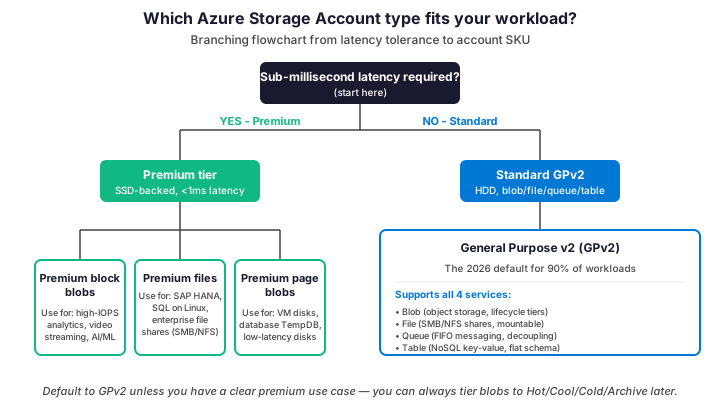
GPv2 supports all four storage services in one account: blobs, files, queues, and tables. Furthermore, it is the only account type with full lifecycle management for blob tiering. As a result, GPv2 is the safe default for any new SMB tenant.
Crucially, Premium SKUs trade flexibility for performance. Specifically, Premium block blobs deliver high IOPS for analytics and AI workloads. Notably, Premium files back enterprise SMB shares and SAP HANA. In contrast, Premium page blobs back high-IOPS VM disks and database TempDB.
⚡ Performance tiers: Standard vs Premium
Importantly, the performance tier sets the underlying media. Specifically, Standard runs on HDD-backed capacity. In contrast, Premium runs on SSD with millisecond-level latency targets. The table below summarizes the trade-offs.
| Dimension | Standard (HDD) | Premium (SSD) |
|---|---|---|
| Latency target | 10-100 ms | < 1 ms |
| Max IOPS / account | 20,000 | 100,000+ |
| Cost vs Standard LRS | 1x baseline | 4-7x baseline |
| Lifecycle tiering | Yes (Hot/Cool/Cold/Archive) | Hot only (no Archive) |
| Redundancy options | LRS, ZRS, GRS, GZRS, RA-GRS, RA-GZRS | LRS, ZRS only |
| Best for | Backups, archives, general blobs, file shares | VM disks, SAP HANA, low-latency apps, AI/ML |
Notably, most SMBs never need Premium. Indeed, the latency improvement matters only for IOPS-bound workloads like SAP HANA or high-throughput analytics. Therefore, start on Standard GPv2 and migrate workloads to Premium only when monitoring shows queue depth or IOPS saturation.
🛡️ Redundancy: LRS, ZRS, GRS, GZRS
Specifically, redundancy controls how many copies of your data Azure keeps and where. Specifically, six options exist in 2026: LRS (3 copies, single datacenter), ZRS (3 copies, separate zones), GRS (LRS plus a paired region), GZRS (ZRS plus a paired region), and the read-access variants RA-GRS and RA-GZRS.
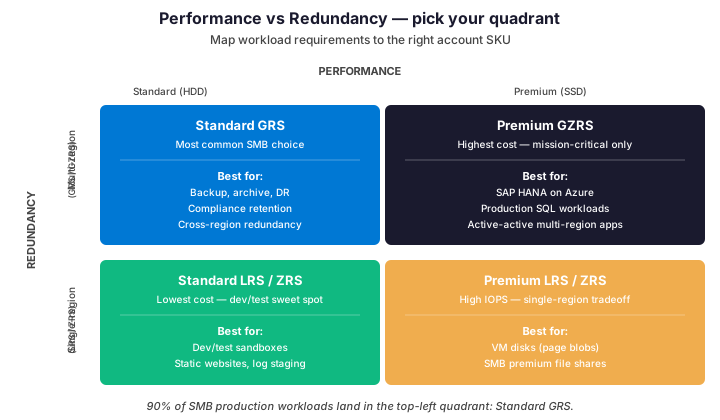
Indeed, for most SMB production workloads, GRS is the right default. Indeed, geo-replication survives a full region outage with a few hours of RPO. Furthermore, the cost premium over LRS is roughly 2x — small enough to justify for any data you cannot easily rebuild.
Use LRS or ZRS only for dev/test sandboxes, static websites, or short-lived log staging. In contrast, reserve GZRS for mission-critical workloads where both region failover and zone redundancy matter. Notably, GZRS pricing reaches 3x LRS, so the use case must justify the spend.
🎯 Access tiers: Hot, Cool, Cold, Archive
Notably, access tiers are the single biggest cost lever in any Azure Storage strategy. Specifically, blobs that age into colder tiers cost up to 95% less than Hot. Furthermore, lifecycle management policies move blobs automatically based on age or last access date.
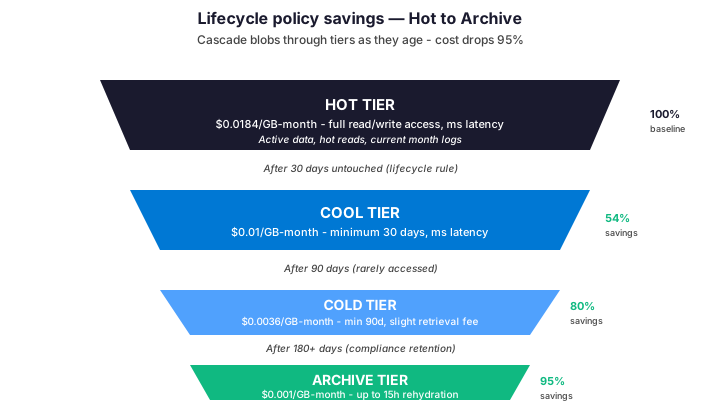
Hot vs Cool vs Cold pricing
First, Hot tier serves active workloads at $0.0184/GB-month. In contrast, Cool tier drops to $0.01/GB-month with a 30-day minimum retention. Furthermore, Cold tier sits at $0.0036/GB-month with a 90-day minimum — an 80% saving versus Hot. Therefore, build lifecycle rules that move blobs through these tiers automatically.
However, one trap matters here: each tier has a minimum retention period. Specifically, deleting a Cool blob before 30 days incurs the Hot tier rate retroactively. Notably, the same applies to Cold (90 days) and Archive (180 days). As a result, do not tier blobs you may need to delete shortly — you will pay more, not less.
Archive tier rehydration trap
Importantly, the Archive tier reaches $0.001/GB-month, a 95% reduction from Hot. However, retrieval is not instant. Specifically, rehydration takes up to 15 hours for standard priority and adds a per-GB read charge. Consequently, archive only fits compliance retention or true cold backup data — not anything you might need within a workday.
Therefore, for data with unpredictable access patterns, prefer Cold over Archive. Indeed, Cold offers ms-level retrieval at $0.0036/GB-month versus 15-hour rehydration at $0.001. Therefore, the 70% additional cost on Cold is often worth it for the ability to read on demand.
🌐 Storage Account endpoints
Notably, each storage account exposes one endpoint per service. Specifically, each endpoint follows the pattern {accountname}.{service}.core.windows.net. Furthermore, you can attach a private endpoint to keep traffic inside your VNet for compliance.
| Service | Endpoint pattern | Use case |
|---|---|---|
| Blob | {name}.blob.core.windows.net | Object storage, lifecycle tiering, static sites |
| File | {name}.file.core.windows.net | SMB / NFS shares mountable as drives |
| Queue | {name}.queue.core.windows.net | FIFO messaging between services |
| Table | {name}.table.core.windows.net | NoSQL key-value with flat schema |
| Data Lake (Gen2) | {name}.dfs.core.windows.net | Big data analytics with hierarchical namespace |
| Static website | {name}.z{N}.web.core.windows.net | Static site hosting from $web container |
💻 Configure with PowerShell
Specifically, for any production storage account, automation beats portal clicks. Specifically, the script below provisions a GPv2 account with GRS, secured-by-default, and tagged for cost reporting. Furthermore, the same pattern adapts to Bicep or Terraform with minimal changes.
# PowerShell: provision a hardened GPv2 storage account
# Prerequisites: Az.Storage module 5.x or later

Connect-AzAccount
Set-AzContext -Subscription 'your-subscription-id'

# Variables
$rgName    = 'rg-prod-storage'
$location  = 'eastus'
$storName  = 'storprod' + (Get-Random -Maximum 9999)

# 1. Resource group with mandatory tags
New-AzResourceGroup -Name $rgName -Location $location \`
    -Tag @{ CostCenter='IT-001'; Environment='prod'; Owner='alice@example.com' }

# 2. Storage account: GPv2, GRS, hardened
New-AzStorageAccount \`
    -ResourceGroupName $rgName \`
    -Name $storName \`
    -Location $location \`
    -SkuName Standard_GRS \`
    -Kind StorageV2 \`
    -AccessTier Hot \`
    -AllowBlobPublicAccess $false \`
    -MinimumTlsVersion TLS1_2 \`
    -EnableHttpsTrafficOnly $true

# 3. Apply lifecycle policy (Hot 30d -> Cool 90d -> Cold 180d -> Archive 365d)
$rule = New-AzStorageAccountManagementPolicyRule \`
    -Name 'TierAgedBlobs' \`
    -Action (New-AzStorageAccountManagementPolicyAction \`
        | Add-AzStorageAccountManagementPolicyAction -BaseBlobAction TierToCool -DaysAfterModificationGreaterThan 30 \`
        | Add-AzStorageAccountManagementPolicyAction -BaseBlobAction TierToCold -DaysAfterModificationGreaterThan 90 \`
        | Add-AzStorageAccountManagementPolicyAction -BaseBlobAction TierToArchive -DaysAfterModificationGreaterThan 365 \`
    ) \`
    -Filter (New-AzStorageAccountManagementPolicyFilter)
Set-AzStorageAccountManagementPolicy -ResourceGroupName $rgName \`
    -StorageAccountName $storName -Rule $rule
Crucially, three settings matter for security: AllowBlobPublicAccess=false blocks anonymous reads. Furthermore, MinimumTlsVersion=TLS1_2 enforces modern crypto. Finally, EnableHttpsTrafficOnly blocks plaintext HTTP. As a result, these three flags should default to true for any new account in 2026.
✅ Best practices for SMBs
Indeed, across 60+ tenant audits, Wintive sees the same patterns repeat. Notably, each row below has fixed an actual cost overrun or compliance issue at a real client.
| Practice | What to do | Why it matters |
|---|---|---|
| Default to GPv2 + GRS | New accounts: Standard GPv2 with GRS replication. | Covers 90% of workloads at 2x LRS cost — cheap insurance. |
| Apply lifecycle from day one | Hot 30d → Cool 90d → Cold 180d → Archive 365d. | Saves 60-80% on aged blobs versus flat Hot pricing. |
| Disable public blob access | AllowBlobPublicAccess=false at account level. | Blocks anonymous reads even when containers are misconfigured. |
| Enforce TLS 1.2 minimum | MinimumTlsVersion=TLS1_2 + HTTPS-only. | Compliance baseline for HIPAA, PCI, and ISO 27001. |
| Use private endpoints for sensitive data | Disable public network access, attach private endpoint. | Keeps traffic inside the VNet, satisfies data residency audits. |
| Tag every account | CostCenter, Environment, Owner, Application as required tags. | Monthly cost reports allocate cleanly — outliers surface fast. |
Among these six items, lifecycle tiering is the single biggest lever for typical SMBs. Indeed, switching a flat 7-year Hot policy to tiered (30d Hot, 90d Cool, 180d Cold, then Archive) on 1 TB saves roughly $130 per month on storage alone. Therefore, pull this lever first during cost optimization.
🚨 Troubleshoot common issues
Notably, most storage account incidents trace back to four root causes. Specifically, identity issues, network rules, lifecycle drift, and capacity exhaustion. The script below covers the Wintive triage workflow.
# PowerShell: storage account triage
# Replace with your account + RG names

$rgName    = 'rg-prod-storage'
$storName  = 'storprod001'

# 1. Account configuration
Get-AzStorageAccount -ResourceGroupName $rgName -Name $storName | \`
    Format-List Sku, Kind, AccessTier, AllowBlobPublicAccess, \`
        MinimumTlsVersion, EnableHttpsTrafficOnly

# 2. Network rules (firewall + VNet integration)
Get-AzStorageAccountNetworkRuleSet -ResourceGroupName $rgName -Name $storName

# 3. Lifecycle policy current state
Get-AzStorageAccountManagementPolicy -ResourceGroupName $rgName \`
    -StorageAccountName $storName | Select-Object -ExpandProperty Rules

# 4. Capacity + transactions (last 24h)
Get-AzMetric -ResourceId (Get-AzStorageAccount -ResourceGroupName $rgName \`
    -Name $storName).Id -MetricName UsedCapacity, Transactions \`
    -TimeGrain (New-TimeSpan -Hours 1) -StartTime (Get-Date).AddDays(-1)

# 5. Verify identity access (RBAC at account scope)
Get-AzRoleAssignment -Scope (Get-AzStorageAccount -ResourceGroupName $rgName \`
    -Name $storName).Id | Format-Table DisplayName, RoleDefinitionName
However, if access fails despite RBAC being correct, check network rules first. Specifically, default storage accounts after 2024 deny public network access — you must add VNet rules or private endpoints. Therefore, always verify NetworkRuleSet before chasing identity bugs.
❓ Storage Account — FAQ
Multiple accounts. Each account has hard limits (5 PB capacity, 20K IOPS for Standard) and a single redundancy setting. Splitting by workload (one account per app, environment, or data classification) gives you per-team RBAC, per-app cost reporting, and clean lifecycle policies tailored to each dataset.
Yes for most account types, with caveats. Standard accounts allow direct conversion via portal or PowerShell. Premium accounts require a manual migration to a new account. The conversion runs in the background and can take hours to complete on large datasets.
Both offer ms-level retrieval. The difference is minimum retention and cost: Cool requires 30 days at $0.01/GB-month while Cold requires 90 days at $0.0036/GB-month. Cold is the right choice for compliance retention you rarely access. Cool fits monthly archives still consulted occasionally.
Yes but Microsoft strongly recommends migrating. GPv1 lacks lifecycle management, has no Cool/Cold/Archive tiers, and pricing is structurally higher than GPv2. The migration is non-disruptive and free. Run it during your next maintenance window.
🔗 Keep exploring
This tutorial covered one focused Azure workflow. For a complete picture of how your full Microsoft 365 and Azure environment performs against best practices:
🔍 Want a complete audit of your Microsoft 365 tenant?
The Automated Tenant Health Check scans your M365 environment in under 10 minutes: license waste, security posture, MFA coverage, compliance gaps, license rightsizing opportunities. Full PDF report with prioritized recommendations delivered instantly.