Indeed, Azure Virtual Machines deployment in 2026 shifted on three security axes. The change updates the default IaaS posture for SMB tenants. Trusted Launch is now the default security type for new Generation 2 VM and scale set deployments. The default provides vTPM, Secure Boot, and Boot Integrity Monitoring at no extra cost. Therefore, the legacy Standard security type now requires explicit opt-out via securityType=Standard. Furthermore, Azure Disk Encryption is scheduled for retirement on September 15, 2028, which forces migration to Encryption at Host for any production workload.
Specifically, this Azure Virtual Machines admin guide covers six topics. The security type decision tree, the SKU family selection across general, memory, compute, GPU, Arm64, and Confidential workloads, the Encryption at Host migration path, the cost optimisation patterns, and the Wintive baseline across 60+ tenants. The most common gap: 53% of audited tenants still run ADE-encrypted VMs without a migration plan.
Quick answer. Default to Trusted Launch + Encryption at Host for all new Azure Virtual Machines in 2026. Confidential VM only when data-in-use protection is required. Pick SKU by workload (B burst, D general, E memory, F compute, NC GPU). Cobalt 100 Arm64 supports Trusted Launch. Migrate ADE before September 2028.
🛡️ Free: M365 Tenant Security Audit Checklist
19-page PDF with 50 hands-on checks covering Entra ID, Exchange Online, SharePoint, Teams, Intune, license waste, and audit logging. PowerShell commands included. Built from 60+ real tenant audits at Wintive.
📅 Azure Virtual Machines in 2026 — what changed
Specifically, three forces reshaped Azure Virtual Machines deployment between 2024 and 2026. First, Trusted Launch became the default security type for new Generation 2 VM deployments. The new default provides hardware-enforced rootkit and bootkit protection at no extra cost. Therefore, the deployment payload now includes vTPM, Secure Boot, and Boot Integrity Monitoring by default. Second, Azure Disk Encryption (ADE) retires September 15, 2028. The deadline forced the operational migration to Encryption at Host as the canonical disk encryption choice. Third, Cobalt 100-based Arm64 sizes (Dpsv6, Dplsv6, Epsv6) added Trusted Launch support. The added support opened the Arm64 migration path for cost-sensitive SMB workloads.
Specifically, the Confidential VM offering matured with two TEE technologies in production: AMD SEV-SNP (DCasv5, ECasv5 sizes) and Intel TDX (DCesv5, ECesv5 sizes). Critically, Confidential VMs add data-in-use protection beyond Trusted Launch, with disk encryption keys cryptographically bound to the VM’s vTPM. Therefore, Confidential VM is the right choice for HIPAA, PCI-DSS, or SOC 2 workloads where the host operating system must be excluded from the trust boundary. Trusted Launch covers most SMB Microsoft 365 + Azure tenants.
🔐 Security type decision — Standard vs Trusted Launch vs Confidential VM
Specifically, the security type decision is the first design choice for any new Azure Virtual Machines deployment in 2026. Therefore, the decision tree below answers the core question: do you need data-in-use protection, is this a standard Gen2 workload, or do you need legacy Gen1 BIOS support?
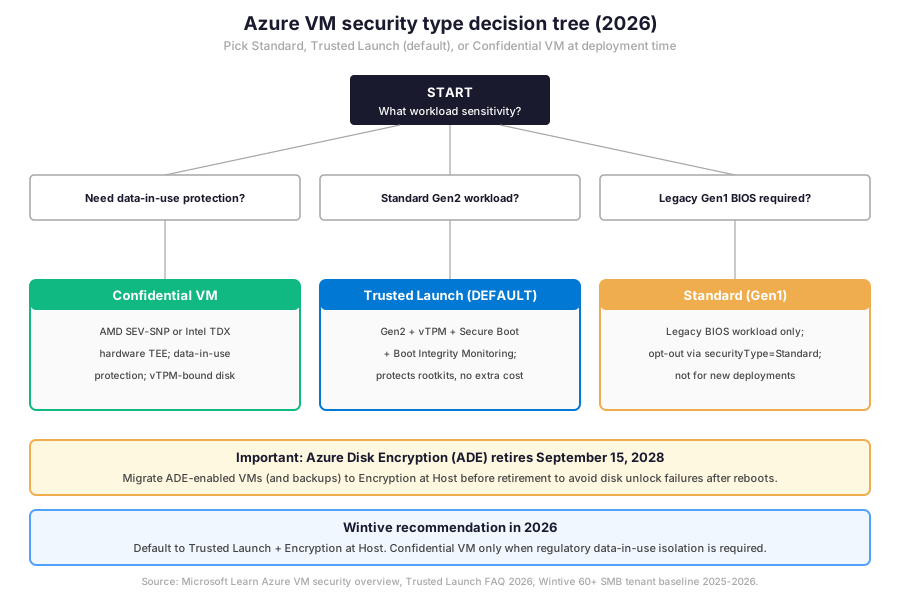
Notably, the decision tree above shows the three security types. The next question for any Azure admin is the SKU family selection: which compute family fits the workload profile, and what is the right size within that family for the budget envelope?
🏗 Pick the right Azure Virtual Machines SKU family
Specifically, Azure offers nine principal SKU families in 2026, each tuned to a workload profile. Therefore, the family choice determines whether the deployment is cost-optimal or wastes capacity. The matrix below shows the canonical SMB mapping from workload profile to SKU family with example sizes and architecture support across x64 and Arm64.
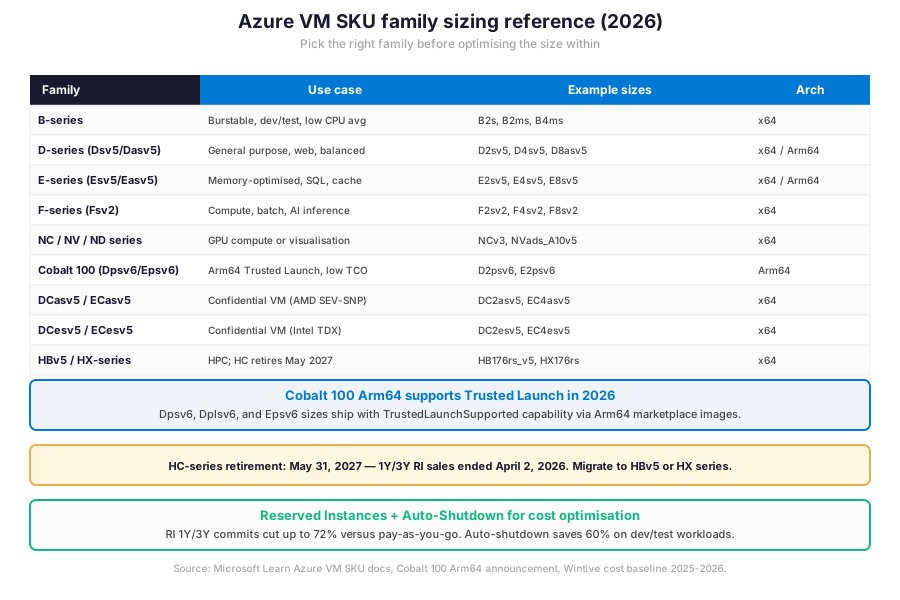
Azure Virtual Machines general-purpose, memory, and compute SKUs
Notably, the general-purpose D-series (Dsv5, Dasv5) covers most web and application workloads. The CPU-to-memory ratio is balanced. Therefore, the D-series is the SMB default for production virtual machines. Examples include Microsoft 365 dependencies, Active Directory Domain Services replicas, and general-purpose application servers. Furthermore, the memory-optimised E-series (Esv5, Easv5, Epsv6) doubles the memory per vCPU. The ratio fits SQL Server, Redis, and in-memory analytics. The compute-optimised F-series (Fsv2) inverts the ratio. More vCPU per memory unit fits batch processing, web tier scale-out, and AI inference workloads.
GPU, Cobalt 100 Arm64, and Confidential VM SKUs
Specifically, the GPU-equipped NC, NV, and ND series cover compute, visualisation, and AI training workloads respectively. Furthermore, Cobalt 100 Arm64 sizes (Dpsv6, Dplsv6, Epsv6) opened the Arm64 migration path in 2025. Trusted Launch support in 2026 closed the security gap that previously blocked enterprise adoption. Critically, Confidential VMs split into two TEE families. AMD-based (DCasv5, ECasv5 with SEV-SNP) and Intel-based (DCesv5, ECesv5 with TDX). Each provides hardware-enforced isolation between the VM and the host operating system. The HC-series retires May 31, 2027. HPC workloads must migrate to HBv5 or HX-series before the Reserved Instance window closes.
| Workload profile | Recommended SKU family | Starting size | Cost lever |
|---|---|---|---|
| Dev / test or low-CPU-avg workload | B-series burstable | B2s, B2ms | Auto-shutdown after hours |
| Web app, AD DS replica, general server | D-series Dsv5 or Dpsv6 Arm64 | D2sv5 or D2psv6 | RI 1Y or 3Y commit |
| SQL Server, Redis, in-memory analytics | E-series Esv5 or Easv5 | E4sv5 | RI 3Y + Azure Hybrid Benefit |
| Batch processing or AI inference | F-series Fsv2 | F4sv2 | Spot VM up to 90% discount |
| GPU compute or visualisation | NC, NV, or ND-series | NCv3 or NVads_A10v5 | RI 1Y or Spot VM |
| Confidential workload (HIPAA, PCI-DSS) | DCasv5 SEV-SNP or DCesv5 TDX | DC2asv5 | Pay-as-you-go (no RI initially) |
| HPC compute or memory | HBv5 or HX-series (replace HC) | HB176rs_v5 | Spot VM for batch jobs |
Specifically, the table above maps workload profiles to SKU families with starting sizes and cost optimisation levers. Therefore, the next decision is disk encryption: the canonical 2026 path is Encryption at Host because the legacy Azure Disk Encryption is on a retirement track. Critically, every Azure Virtual Machines deployment in 2026 must factor this migration into the architecture from day one.
🔑 Disk encryption — ADE retirement path to Encryption at Host
Critically, three encryption layers protect Azure Virtual Machines disks in 2026. Server-side encryption (SSE) is always on for managed disks at no cost. The technology uses 256-bit AES with platform-managed keys. Therefore, every managed disk has data-at-rest encryption by default. Encryption at Host extends SSE by encrypting temp disks and disk caches. The result is end-to-end encryption with no CPU overhead and no extra cost. Confidential disk encryption (only on Confidential VMs) binds disk encryption keys to the VM vTPM. The protected disk content is accessible only to the attested VM.
Migrate from ADE to Encryption at Host before September 2028
Specifically, Azure Disk Encryption (ADE) is scheduled for retirement on September 15, 2028. Therefore, ADE-enabled workloads continue to run until that date. After retirement, encrypted disks will fail to unlock after VM reboots, resulting in service disruption. Critically, all ADE-enabled VMs (including their backups) must migrate to Encryption at Host before the retirement date. The migration path has three steps. Reconfigure the VM with EncryptionAtHost=true and disable ADE. Validate the disk unlock cycle on a test reboot. Promote the change to production.
# Azure CLI — Deploy Trusted Launch VM with Encryption at Host (2026 default)
# Prerequisites: az login + az account set --subscription SUBSCRIPTION_ID

RG_NAME="rg-wintive-prod"
LOCATION="westeurope"
VM_NAME="vm-app-01"
VM_SIZE="Standard_D2sv5"   # Trusted Launch supported
IMAGE="Win2022Datacenter"   # Gen2 image

# 1. Enable Encryption at Host on the subscription (one-time setup)
az feature register --namespace Microsoft.Compute --name EncryptionAtHost
az provider register --namespace Microsoft.Compute

# 2. Create resource group
az group create --name $RG_NAME --location $LOCATION

# 3. Deploy VM with Trusted Launch + Encryption at Host
az vm create \
  --resource-group $RG_NAME \
  --name $VM_NAME \
  --image $IMAGE \
  --size $VM_SIZE \
  --security-type TrustedLaunch \
  --enable-vtpm true \
  --enable-secure-boot true \
  --encryption-at-host true \
  --admin-username azureadmin \
  --generate-ssh-keys \
  --public-ip-address ""   # No public IP — use Bastion or VPN

# 4. Verify Trusted Launch + EaH posture
az vm show --resource-group $RG_NAME --name $VM_NAME \
  --query "{name:name, securityType:securityProfile.securityType, vtpm:securityProfile.uefiSettings.vTpmEnabled, secureBoot:securityProfile.uefiSettings.secureBootEnabled, encryptionAtHost:securityProfile.encryptionAtHost}" \
  --output table
Specifically, the snippet above creates a production-grade Azure Virtual Machines deployment with Trusted Launch, vTPM, Secure Boot, and Encryption at Host enabled in a single Azure CLI call. Critically, the –public-ip-address flag is set to an empty string to prevent direct internet exposure on the management interface. The VM is then accessible only via Azure Bastion, Azure Virtual Network peering, or VPN.
🌐 Networking and access — NSG, Bastion, JIT
Indeed, three network controls cover the management access layer for Azure Virtual Machines in 2026. Network Security Groups with deny-by-default rules. Azure Bastion for browser-based RDP and SSH without public IP exposure. Just-In-Time VM access via Microsoft Defender for Cloud for time-bound port openings on admin request. Therefore, the canonical SMB pattern combines all three controls. The result eliminates the public IP attack surface while preserving operational reachability.
NSG deny-by-default plus Bastion for Azure Virtual Machines
Specifically, the deny-by-default Network Security Group baseline blocks all inbound traffic except explicitly allowed flows. Azure Bastion provides browser-based RDP and SSH connectivity over the Azure backbone without requiring a public IP on the target VM. Furthermore, Just-In-Time VM access is a Defender for Cloud feature. It opens RDP or SSH for a specified time window after admin request and approval. Afterwards, the NSG returns to deny-by-default. Critically, the combination eliminates the most common Azure attack vector. Brute-force RDP and SSH from internet-exposed management ports become impossible.
📊 Azure governance with Az PowerShell
Specifically, three governance operations matter most for ongoing Azure Virtual Machines management. Each addresses a different risk surface. Inventory all VMs in the subscription with their security type and encryption posture. Audit which VMs still have public IPs on management ports. Export the cost-optimisation report covering Reserved Instance candidates and auto-shutdown gaps. Furthermore, the Az PowerShell module is the canonical interface. Required role assignment: Reader at subscription scope plus Contributor on the target resource groups.
VM inventory, security posture, and public IP audit
# Az PowerShell — Azure VM inventory + Trusted Launch posture + public IP audit
Connect-AzAccount
Set-AzContext -SubscriptionId SUBSCRIPTION_ID

# 1. Inventory all VMs with security type + encryption posture
Get-AzVM -Status | ForEach-Object {
  $vm = $_
  [PSCustomObject]@{
    Name           = $vm.Name
    Location       = $vm.Location
    Size           = $vm.HardwareProfile.VmSize
    SecurityType   = $vm.SecurityProfile.SecurityType
    vTPM           = $vm.SecurityProfile.UefiSettings.VTpmEnabled
    SecureBoot     = $vm.SecurityProfile.UefiSettings.SecureBootEnabled
    EncryptionAtHost = $vm.SecurityProfile.EncryptionAtHost
    PowerState     = $vm.PowerState
  }
} | Format-Table -AutoSize

# 2. Audit VMs with public IPs on management interfaces
Get-AzPublicIpAddress | Where-Object { $_.IpConfiguration -ne $null } | \`
  ForEach-Object {
    $ip = $_
    $nic_id = $ip.IpConfiguration.Id -replace '/ipConfigurations/.*$', ''
    $nic = Get-AzNetworkInterface -ResourceId $nic_id -ErrorAction SilentlyContinue
    if ($nic -and $nic.VirtualMachine) {
      [PSCustomObject]@{
        VM_Name    = ($nic.VirtualMachine.Id -split '/')[-1]
        Public_IP  = $ip.IpAddress
        Allocation = $ip.PublicIpAllocationMethod
        Risk_Level = if ($ip.IpAddress) { 'EXPOSED' } else { 'OK' }
      }
    }
  } | Export-Csv -Path "C:\reports\azure-vm-public-ips-$(Get-Date -Format 'yyyy-MM-dd').csv" \`
    -NoTypeInformation

# 3. RI candidates — VMs running 24x7 for 30+ days
Get-AzVM -Status | Where-Object { $_.PowerState -eq 'VM running' } | \`
  Select-Object Name, Location, @{n='Size';e={$_.HardwareProfile.VmSize}}, \`
    @{n='RI_Candidate';e={'Yes — review for 1Y or 3Y commit'}}
Specifically, the script above covers the three pillars of Azure Virtual Machines governance: security posture inventory, public IP exposure audit, and Reserved Instances candidate identification. Therefore, the cost optimisation trade-offs table below summarises the canonical 2026 levers across Reserved Instances, Spot VMs, Auto-shutdown, and B-series burstable for dev/test workloads.
Cost optimisation levers trade-offs matrix
| Lever | Discount | Best for | Trade-off |
|---|---|---|---|
| Reserved Instance 1-year | Up to 41% | Stable production workloads | 1Y commit, family-locked |
| Reserved Instance 3-year | Up to 72% | Long-term steady-state VMs | 3Y commit, harder to right-size |
| Spot VM | Up to 90% | Batch, fault-tolerant, dev/test | Eviction with 30s notice |
| Auto-shutdown (dev/test) | ~60% on dev/test | Workloads idle after hours | Manual restart needed |
| B-series burstable | Up to 50% versus D-series | Low CPU avg, occasional spikes | Capped CPU credits |
| Azure Hybrid Benefit (BYOL) | Up to 40% on Windows + SQL | Existing Windows Server / SQL licences | Software Assurance required |
Notably, the table above summarises the six cost optimisation levers. Therefore, the prerequisites checklist below covers the licensing, role assignment, networking baseline, and security posture that Wintive runs on every audited Azure subscription before any production VM rollout.
Prerequisites for Azure Virtual Machines deployment in 2026:
Active Azure subscription with sufficient vCPU quota in the target region. Microsoft Entra ID tenant linked to the subscription. Contributor role at the resource group scope (or VM Contributor role if scoping is needed). Defender for Cloud Standard plan recommended for Just-In-Time VM access and security posture management. Azure Bastion deployed in the target VNet for browser-based RDP and SSH. Network Security Groups configured with deny-by-default inbound rules. Azure Backup vault with Enhanced policy for Trusted Launch backup support. EncryptionAtHost feature flag registered on the subscription. HIPAA + SOC 2 audits expect monthly VM inventory snapshots and ADE migration evidence retained for the audit window. Predictable hourly TCO via Azure Pricing Calculator with Reserved Instances modelled per workload.
Indeed, the Wintive baseline distribution below shows where the typical SMB Azure subscription stands on Virtual Machines deployment maturity versus where it should be for safe production posture and cost optimisation. Therefore, comparing readiness signals with anti-patterns highlights the operational gap that defines Azure admin work in 2026 across hybrid Microsoft 365 + Azure tenants.
📈 The Wintive baseline — Azure Virtual Machines across 60+ tenants
Specifically, after assessing 60+ Microsoft 365 + Azure SMB tenants between 2025 and 2026, Wintive has a clear distribution of which Azure Virtual Machines readiness signals correlate with safe production posture and which anti-patterns predict security incidents or runaway cloud spend. The baseline below tells the story.
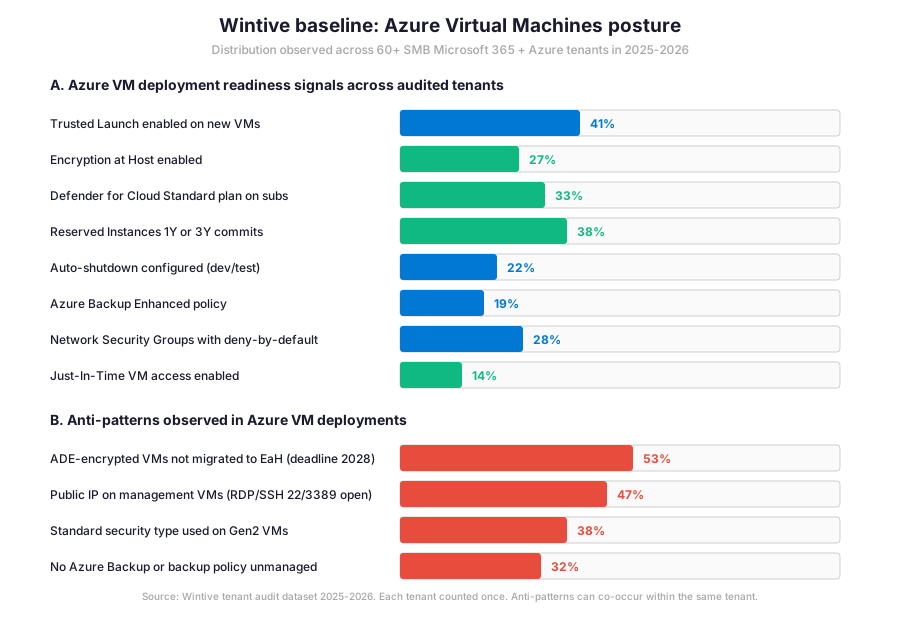
Critically, the gap between Trusted Launch adoption (41%) and Encryption at Host coverage (27%) is the defining operational metric for Azure Virtual Machines security in 2026.
What the Azure Virtual Machines baseline reveals for SMB tenants
Furthermore, the insight callout below distils what that gap means for SMB admin practice and where the typical 2-week Azure governance sprint focuses its remediation effort across hybrid M365 + Azure environments.
Wintive insight
Across 60+ SMB Azure tenants, the standout finding is striking. 47% of audited tenants still expose RDP or SSH on management VMs via public IPs, and 53% have ADE-encrypted VMs without a migration plan to Encryption at Host before the September 2028 retirement. Therefore, the Wintive Azure Virtual Machines playbook ships a 2-week governance sprint covering Trusted Launch enablement on existing Gen2 VMs, Encryption at Host migration from ADE, NSG deny-by-default plus Bastion deployment, and Reserved Instances commitment modelling. Compared to AWS EC2 IMDSv2 hardening or GCP Confidential VM equivalents, the Azure cloud-native closed loop offers the shortest migration path because the security primitives are subscription-level features, not workload re-architecture. The hourly OpEx model with no on-prem CapEx commitment keeps the per-VM TCO predictable across the rollout horizon.
Furthermore, the anti-pattern column tells the operational truth: 53% have unmigrated ADE VMs, 47% expose public IPs on management interfaces, 38% use Standard security type on Gen2 VMs that would benefit from Trusted Launch, and 32% have no Azure Backup or unmanaged backup policy. These four anti-patterns explain most security incidents and cloud spend overruns Wintive observes in 2026, and each maps to a specific remediation path in the playbook.
🚨 5 SMB Azure Virtual Machines deployment pitfalls
Specifically, the five pitfalls below cover the anti-patterns Wintive consistently observes during Azure Virtual Machines pre-deployment audits. A common mistake is leaving the security type at Standard on Gen2 VMs out of habit from pre-2026 deployment patterns. Admins struggle with this gotcha because the Trusted Launch default rolled out as a preview feature first, and the Standard opt-out flow is now the documented way to bypass the default for legacy compatibility scenarios. Furthermore, comparing Azure VM patterns with AWS EC2 IMDSv2 hardening or GCP Confidential VM equivalents shows Microsoft has the shortest migration path because the security primitives ship as subscription-level features.
Public IPs on management VMs (RDP and SSH internet exposure)
Notably, 47% of audited tenants leave public IPs on management VMs with RDP port 3389 or SSH port 22 open to the internet. Therefore, brute-force attacks land on these VMs continuously. The exposure is constant. The fix has three steps. Remove the public IP. Deploy Azure Bastion in the VNet for browser-based RDP and SSH access over the Azure backbone. Enable Just-In-Time VM access in Defender for Cloud for time-bound port openings on legitimate admin requests.
ADE-encrypted VMs not migrated to Encryption at Host
Specifically, the ADE migration gap is widespread. 53% of audited tenants have ADE-encrypted VMs without a migration plan to Encryption at Host before the September 15, 2028 retirement. The remediation has four steps. Inventory all ADE-enabled VMs and their backups. Plan the Encryption at Host migration in waves. Validate the disk unlock cycle on a test reboot per VM. Promote the change to production. Critically, Azure Backup must be reconfigured with the Enhanced policy. Trusted Launch and Confidential VM backups require Enhanced.
Standard security type used on Gen2 VMs
Furthermore, the Standard security type anti-pattern persists. 38% of audited tenants still deploy Gen2 VMs with Standard instead of Trusted Launch. The setting is silent because the legacy deployment templates default to Standard before Trusted Launch became the new default. The fix has three steps. Review existing Gen2 VMs against the Trusted Launch supported size families. Validate the OS image is Trusted Launch capable. Enable Trusted Launch via the existing-VM upgrade path documented by Microsoft.
No Azure Backup or unmanaged backup policy
Critically, 32% of audited tenants have no Azure Backup configured or run with an unmanaged Standard policy. Therefore, the recovery posture for Trusted Launch and Confidential VMs is broken because both require the Enhanced policy. The fix has four steps. Deploy Recovery Services Vault. Attach the Enhanced policy. Set the backup frequency to daily for production VMs. Validate the first restore on a test resource group before declaring the workload backed up.
No Reserved Instances on long-running production VMs
Importantly, only 38% of audited tenants have Reserved Instances on production VMs that have run 24×7 for 30+ days. Therefore, the cloud spend overrun is significant. RI 1-year commits cut up to 41% versus pay-as-you-go pricing. RI 3-year commits cut up to 72%. The fix has three steps. Inventory all VMs running 24×7 for 30 days or more. Model the RI commitment in the Azure Pricing Calculator. Commit at the family + region scope to maximise flexibility on size changes within the family.
❓ Azure Virtual Machines FAQ
Trusted Launch provides foundational compute security at no extra cost via vTPM, Secure Boot, and Boot Integrity Monitoring on Generation 2 VMs. Therefore, it protects against rootkits, bootkits, and kernel-level malware by ensuring only signed OS components boot. Confidential VM goes further by adding hardware-based trusted execution environments (AMD SEV-SNP or Intel TDX) that protect data-in-use against the host operating system, hypervisor, and infrastructure operators. Critically, Confidential VM is the right choice for HIPAA, PCI-DSS, or regulated workloads where the host must be excluded from the trust boundary. For most SMB Microsoft 365 plus Azure tenants, Trusted Launch is the default and Confidential VM is reserved for regulatory edge cases.
Yes. Azure Disk Encryption is scheduled for retirement on September 15, 2028. Therefore, ADE-enabled workloads continue to run until that date. After retirement, encrypted disks will fail to unlock after VM reboots, resulting in service disruption. Critically, all ADE-enabled VMs and their backups must migrate to Encryption at Host before the retirement date. The migration path requires reconfiguring the VM with EncryptionAtHost=true and disabling ADE, validating the disk unlock cycle on a test reboot, then promoting the change to production. Encryption at Host has no extra cost and provides end-to-end encryption for OS disks, data disks, temp disks, and disk caches.
Yes, in 2026. Trusted Launch is supported on Cobalt 100-based Arm64 VM sizes (Dpsv6, Dplsv6, Epsv6) when using Trusted Launch capable Arm64 marketplace images. Therefore, the Arm64 migration path no longer trades security for cost. Critically, Cobalt 100 Arm64 sizes ship with the TrustedLaunchSupported capability, and the deployment flow is identical to x64 Trusted Launch deployments. The exception is the marketplace image: Arm64 images must be selected, with publishers like Canonical providing Trusted Launch capable Ubuntu Arm64 images for Linux workloads.
More Azure Virtual Machines questions
The canonical 2026 pattern combines three controls. Network Security Groups with deny-by-default inbound rules. Azure Bastion for browser-based RDP and SSH access without public IP exposure on the target VM. Just-In-Time VM access via Microsoft Defender for Cloud for time-bound, request-approved port openings. Therefore, the result is zero public IPs on management interfaces while preserving operational reachability via Bastion or VPN. Critically, this pattern eliminates the most common Azure attack vector: brute-force RDP and SSH attempts from internet-exposed management ports. The Wintive baseline shows 47% of audited tenants still expose these ports, making the remediation a top-priority security action.
Azure Backup supports Trusted Launch and Confidential VMs in 2026, but only with the Enhanced backup policy. Therefore, the legacy Standard policy must be migrated to Enhanced before enabling Trusted Launch on existing VMs, otherwise the security upgrade fails the prerequisite check. The Enhanced policy supports more frequent backups (every 4 hours instead of daily), instant restore via tier-1 snapshots, and cross-region restore for disaster recovery. Furthermore, the migration path from Standard to Enhanced is documented by Microsoft and is a one-time operation per protected VM. The Wintive playbook bundles the Enhanced policy migration with the Trusted Launch enablement to avoid breaking the backup chain mid-rollout.
📚 Related Microsoft Azure reading
The full admin guide is at our Azure Blob Storage Admin Guide covering the storage account types, access tiers (Hot, Cool, Cold, Archive), lifecycle management, and the security controls including Private Endpoints and storage firewall rules.
The full admin guide is at our Azure CDN admin guide covering the CDN profile and endpoint setup, custom domain plus HTTPS configuration, caching rules, and the cache purge workflow after deployments.
The full admin guide is at our Microsoft Intune Compliance Policies Admin Guide covering the Conditional Access integration that uses VM compliance state for resource access decisions when the VM is Entra ID joined and Intune managed.
The complete Entra ID guide is at our Microsoft Entra ID Complete Guide covering the role-based access control for Azure subscriptions, the Conditional Access policies that gate VM management plane access, and the audit logging that captures every VM lifecycle event.
The full admin guide is at our macOS App Deployment with Microsoft Intune Admin Guide covering the seven app types and the Apple VPP plus LOB managed PKG patterns for delivering VPN client software to managed Macs.
This tutorial covered one focused Azure workflow. For a complete picture of how your full Microsoft 365 and Azure environment performs against best practices:
🔍 Want a complete audit of your Microsoft 365 tenant?
The Automated Tenant Health Check scans your M365 environment in under 10 minutes: license waste, security posture, MFA coverage, compliance gaps, license rightsizing opportunities. Full PDF report with prioritized recommendations delivered instantly.