🎯 What Microsoft Intune does in plain English
Microsoft Intune is Microsoft’s cloud-based endpoint management service for both mobile device management (MDM) and mobile application management (MAM). IT teams use it to enroll, configure, and secure Windows, macOS, iOS, and Android devices without on-premises infrastructure. It enforces compliance, pushes apps and profiles, and remotely wipes lost devices, all from the Microsoft 365 admin center.
So, what is Microsoft Intune? In short, it is a cloud service that enables mobile device management (MDM) and mobile application management (MAM). With Intune, IT teams can control how organizational devices are used. Furthermore, they can enforce compliance policies and protect company data — all without needing on-premises infrastructure.
🛡️ Free: M365 Tenant Security Audit Checklist
17-page PDF with 50 hands-on checks covering Entra ID, Exchange Online, SharePoint, Teams, Intune, license waste, and audit logging. PowerShell commands included. Built from 60+ real tenant audits at Wintive.
In 2026, device management is no longer optional for SMBs running hybrid or remote work. Still, across 60+ tenant audits at Wintive, we see the same gap repeat. SMBs with 50 to 500 employees pay for Microsoft 365 licenses that already include Intune, yet leave it unconfigured. As a result, laptops stay unmanaged, mobile access is wide open, and a lost device becomes a real breach risk.
When asked what is Microsoft Intune in plain English, the answer is simple: Intune lets IT administrators manage Windows PCs, Macs, iOS, and Android devices from a single cloud console. Furthermore, it integrates natively with Microsoft Entra ID, Microsoft Defender, and the rest of the Microsoft 365 ecosystem.
🔑 Key features of Microsoft Intune
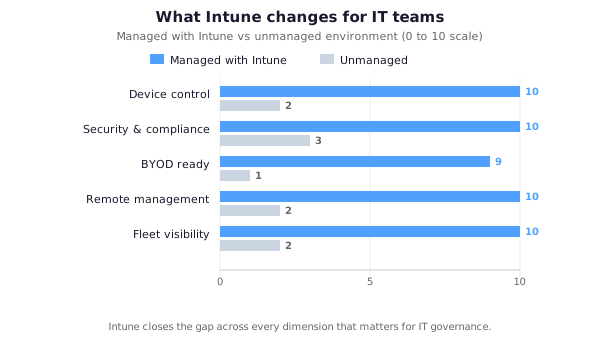
Intune’s core capabilities span four areas: device management, application management, conditional access, and compliance reporting. Device management covers enrollment, encryption, configuration profiles, and remote wipe. Application management lets admins deploy, update, and selectively wipe corporate data on BYOD. Conditional access blocks non-compliant devices from Microsoft 365 resources. Intune integrates natively with Microsoft Entra ID, Defender for Endpoint, and the rest of the Microsoft 365 stack.
Now you understand what Microsoft Intune does at a high level. Here is what it offers for modern device management. In short, these are the main features that make it the leading MDM solution for businesses:
📱 1. Mobile Device Management (MDM)
To begin with, Intune enrolls and manages devices running Windows, macOS, iOS, iPadOS, and Android. Once enrolled, administrators can push configuration profiles, enforce encryption (BitLocker, FileVault), require PINs and passwords, and remotely wipe lost or stolen devices. As a result, your organization maintains full control over every endpoint — regardless of its location.
📲 2. Mobile Application Management (MAM)
In addition to managing devices, Intune lets you manage applications on personal devices without enrolling the device itself. For example, you can protect Microsoft 365 apps like Outlook, Teams, and OneDrive with app protection policies. This means employees can use their personal phones for work while keeping company data completely isolated from personal data.
🔐 3. Conditional Access
Next, working alongside Microsoft Entra ID, Intune enforces conditional access policies. This means only compliant, enrolled devices can access corporate resources like Exchange Online or SharePoint. Specifically, if a device does not meet your security requirements, Intune blocks access automatically until the issue is resolved.
📤 4. App Deployment and Management
Moreover, Intune allows administrators to deploy apps silently to managed devices — including Microsoft 365 apps, line-of-business applications, and Win32 packages. Additionally, you can deploy apps to specific user groups, track installation status, and automatically update or remove applications as needed. Our article on our step-by-step guide on .exe application deployment covers this process step by step.
🛡️ 5. Endpoint Security and Compliance
Finally, Intune integrates with Microsoft Defender for Business to provide antivirus protection, threat detection, and security baselines. Compliance policies let you define rules that devices must meet — and automatically remediate or block non-compliant devices. Therefore, your organization always maintains a strong security posture without manual intervention.
⚙️ How does Intune work?
Intune runs entirely in Microsoft’s cloud. When a device enrolls — manually or via Windows Autopilot — it registers with Microsoft Entra ID. The device then receives configuration profiles assigned to the user’s groups and reports compliance status back continuously. Conditional access uses that signal to grant or block access to Microsoft 365 services. The cycle (enroll → assign → comply → access) repeats every few hours automatically.
The technical answer to what is Microsoft Intune starts here: at its core, it operates entirely in the cloud. When a device enrolls in Intune — either manually by the user or automatically through Windows Autopilot — it connects to the Intune service and receives its configuration. Here is how the process works:
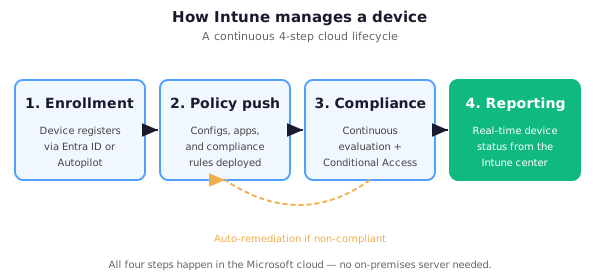
- Enrollment — The device registers with Intune via Microsoft Entra ID join, Hybrid Microsoft Entra ID join, or through Windows Settings. The user authenticates with their Microsoft 365 credentials.
- Policy assignment — Intune pushes configuration profiles, compliance policies, and app deployments to the device based on the Microsoft Entra ID groups the user belongs to.
- Compliance check — Intune continuously evaluates whether the device meets your defined security requirements. Non-compliant devices are flagged, and Conditional Access can block them from accessing company resources.
- Reporting — Administrators see real-time device status, compliance reports, and app inventory from the Microsoft Intune admin center.
Furthermore, if you need to bring unmanaged devices under Intune control, our detailed guide on how to take control of unmanaged PCs with Intune walks you through the enrollment options available.
⚖️ Intune vs. ConfigMgr (SCCM)
Intune is the cloud-native successor to ConfigMgr (SCCM). It manages Windows, macOS, iOS, and Android from anywhere with no on-premises servers. SCCM handles primarily Windows endpoints over VPN or LAN. Intune is included with M365 E3, E5, and Business Premium; SCCM requires a separate license. Most organizations now use co-management — running both in parallel — to migrate workloads gradually without disruption.
In practice, once IT admins understand what is Microsoft Intune, many organizations transitioning from on-premises management ask how it compares to Configuration Manager (formerly SCCM). The key differences are summarized below:
| Feature | Intune | ConfigMgr (SCCM) |
|---|---|---|
| Infrastructure | 100% cloud | On-premises required |
| Device types | Windows, Mac, iOS, Android | Primarily Windows |
| Remote management | Yes, from anywhere | VPN or on-site required |
| Licensing | Included in M365 E3/E5 | Separate license |
| Setup complexity | Low — managed by Microsoft | High — server infrastructure needed |
Consequently, many organizations now use co-management, running both ConfigMgr and Intune simultaneously. This lets teams migrate workloads gradually from ConfigMgr to Intune without disruption.
💰 Intune pricing and licensing
Intune is included with Microsoft 365 Business Premium, Microsoft 365 E3, Microsoft 365 E5, and the EMS E3 and E5 bundles. Business Premium covers up to 300 users. You can also buy Intune standalone as Microsoft Intune Plan 1 at roughly $8 per user per month. For SMBs, Business Premium is the cheapest path because it bundles Intune with Exchange, SharePoint, Teams, and Defender for Business.
A common follow-up to what is Microsoft Intune is pricing. Typically, it is included in the following Microsoft 365 plans:
- Microsoft 365 Business Premium — Includes Intune for up to 300 users. Ideal for SMBs.
- Microsoft 365 E3 and E5 — Full Intune capabilities for enterprise environments.
- Microsoft Intune Plan 1 — Standalone subscription at approximately $8/user/month.
- EMS E3 / EMS E5 — Enterprise Mobility + Security bundle that includes Intune, Microsoft Entra ID Premium, and Azure Information Protection.
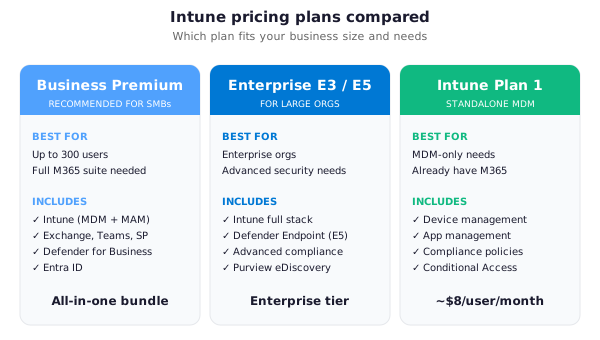
For small businesses, Microsoft 365 Business Premium is the most cost-effective option by far. It includes Intune alongside Exchange Online, Teams, SharePoint, and Microsoft Defender — everything your team needs in a single subscription. Explore our Microsoft 365 plans for small business to find the right fit.
🏢 Why Intune matters for SMBs
For small and mid-sized businesses, Intune solves remote-work security, BYOD separation, compliance reporting, and IT overhead in one platform. Autopilot zero-touch provisioning replaces manual device setup. Per-app data protection keeps personal devices usable for personal life while securing corporate data. Compliance dashboards produce audit-ready evidence for legal, finance, and healthcare frameworks. You get all of this without the cost of an on-prem MDM server.
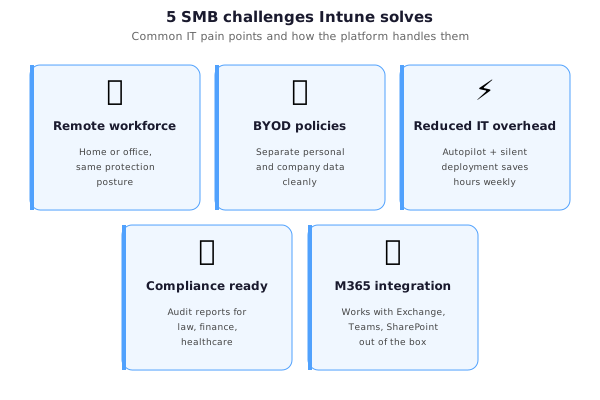
Beyond the formal definition of what is Microsoft Intune, the real question for SMBs is why it matters. For small and medium-sized businesses, Intune solves several critical IT challenges. Specifically:
- Remote workforce security — Employees working from home stay protected regardless of their network or device.
- BYOD policies — Intune separates personal data from company data on personal devices, making BYOD practical and safe.
- Reduced IT overhead — Automated enrollment via Autopilot, silent app deployment, and self-service tools reduce the burden on IT teams.
- Compliance requirements — Industries like legal, finance, and healthcare need demonstrable device compliance. Intune provides audit-ready reporting out of the box.
- Microsoft 365 integration — If you already use Exchange Online, Teams, and SharePoint, Intune adds device management without additional complexity.
🚀 Getting started with Intune
Start by setting Intune as your MDM authority in the Microsoft 365 admin center. Then enable automatic MDM enrollment in Microsoft Entra ID so joined devices register automatically. Build compliance policies for encryption, OS version, and password rules. Wire conditional access to enforce them. Deploy core apps to user groups. Enroll your first batch of devices via Autopilot or Windows Settings. Pilot 3–5 devices before scaling.
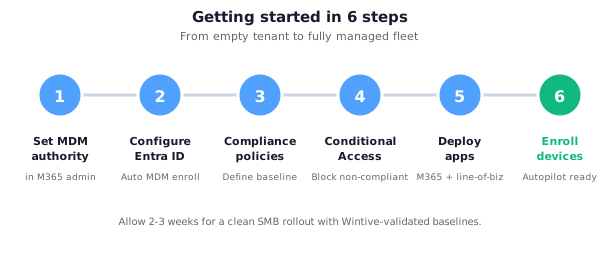
Now that you know what is Microsoft Intune in practice, here is how to get started. Typically, the setup involves the following steps:
- Set the MDM authority — In the Microsoft 365 admin center, set Intune as your MDM authority.
- Configure Microsoft Entra ID — Enable automatic MDM enrollment so devices that join Microsoft Entra ID automatically enroll in Intune.
- Create compliance policies — Define what a compliant device looks like (encryption, OS version, password requirements).
- Configure conditional access — Block non-compliant devices from accessing Exchange Online and SharePoint.
- Deploy apps — Assign Microsoft 365 apps and business applications to device or user groups.
- Enroll devices — Use Autopilot for new devices, or the Windows Settings method for existing devices.
At Wintive, we deploy and configure Intune for SMBs as part of our Microsoft 365 managed services. If you need help setting up Intune for your organization, contact us for a free consultation.
❓ Intune FAQ
💵 Is Intune free?
Technically, Intune is not free as a standalone product. However, it is included in several Microsoft 365 plans. For example, if your organization uses Business Premium, E3, or E5, you already have access at no extra cost.
🍎 Can Intune manage non-Windows devices?
Yes. In fact, Intune supports Windows 10/11, macOS, iOS, iPadOS, and Android. As a result, it is the ideal MDM solution for organizations with a mixed device environment.
🔄 What is the difference between Intune MDM and MAM?
Specifically, MDM manages the entire device — useful for corporate-owned hardware. In contrast, MAM only manages apps on the device without requiring full enrollment. Therefore, MAM is ideal for personal (BYOD) devices where employees want to keep their personal data private.
🔀 Does Intune replace Active Directory?
In practice, it works alongside Microsoft Entra ID, not as a replacement. Microsoft Entra ID handles identity and authentication. Meanwhile, Intune handles device configuration and compliance. Together, they provide a complete cloud-based management platform.
🏷️ Intune vs. Microsoft Intune: what changed?
Historically, Microsoft Endpoint Manager was the umbrella name that combined Intune and Configuration Manager. However, Microsoft has since rebranded. Specifically, the product is now simply called Microsoft Intune. Therefore, if you see references to MEM, Endpoint Manager, or the Intune admin center, they all refer to the same unified management platform.
🖥️ How to access the Intune admin center
Specifically, the Intune admin center is available at intune.microsoft.com. You need a Microsoft 365 account with a license that includes Intune (Business Premium, E3, or E5). From there you can manage devices, configure policies, deploy applications, and view compliance reports.
🤝 Is Microsoft Intune the same as MS Intune?
Yes. In short, MS Intune, Microsoft Intune, and Intune Microsoft all refer to the same product. “MS Intune” is simply an abbreviation commonly used by IT professionals and administrators when referring to Microsoft’s endpoint management solution.
📚 Explore our Intune tutorials
- How to deploy .exe applications (Win32) — Step-by-step guide to packaging and deploying Win32 apps through Intune.
- Take control of your unmanaged PCs with Intune — Enroll existing devices that are currently outside management.
Need help deploying Intune in your organization? Book a free 30-minute consultation with our Microsoft 365 experts.
🔗 Related articles
Read the tutorial: Take control of your unmanaged PCs with Intune
Follow the guide: Deploying .exe Applications with Microsoft Intune (Win32)
Discover the case: Microsoft 365 for Architecture Firms: Build a Better Back Office
Explore the benefits: Microsoft 365 for Law Firms: 12 Business Benefits
See also our guides on enrolling a Mac device, our guide on compliance policies, and deploying apps on macOS with Intune.