In 2026, Azure Backup remains the default Microsoft-native data protection service for any SMB or enterprise running workloads on Azure. Specifically, it covers Azure VMs, SQL, SAP HANA, Azure Files, and on-premises servers. This guide breaks down the architecture, pricing tiers, PowerShell setup, and best practices — based on what Wintive has observed across 60+ Microsoft 365 and Azure tenant audits.
💡 Why Azure Backup matters in 2026
Three forces explain renewed importance. First, ransomware groups now target backup repositories before encrypting production. As a result, vault immutability is no longer optional. In fact, Azure Backup ships with a 14-day soft delete window that cannot be disabled — a recovery path even when storage credentials leak.
Second, regulatory frameworks tightened: NIS2, SOX updates, HIPAA. Consequently, auditors now request quarterly restore test evidence pulled from vault job logs. On the cost side, the vault-archive tier sits at $0.0024 per GB-month versus $0.10 operational — a 42x gap. Therefore, tiered retention typically saves 60 to 80 percent on multi-year compliance archives.
🛡️ Free: M365 Tenant Security Audit Checklist
17-page PDF with 50 hands-on checks covering Entra ID, Exchange Online, SharePoint, Teams, Intune, license waste, and audit logging. PowerShell commands included. Built from 60+ real tenant audits at Wintive.
🔧 How Azure Backup works
Azure Backup uses a workload-aware extension on each protected resource. The extension snapshots data into a centralized Recovery Services Vault. Specifically, this vault stores recovery points, enforces backup policies, holds RBAC permissions, and replicates data. Furthermore, backups never traverse the public internet for Azure-native resources. As a result, the data path stays on the Microsoft backbone via private endpoints when configured.
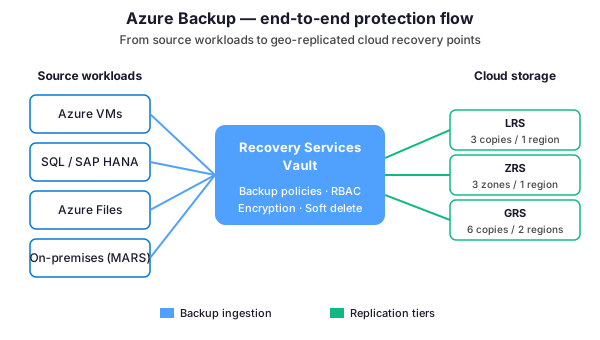
For Azure VMs, the backup extension takes a snapshot at the storage account level. Therefore, workload downtime stays at zero. Moreover, application-consistent backups are possible on Windows via VSS writers and on Linux via pre/post scripts. As a result, SQL Server, Exchange, and SAP HANA workloads can be backed up without quiescing the application beyond a few seconds.
For on-premises servers, the MARS agent handles the heavy lifting. Specifically, it pushes incremental backups to the vault from Windows file servers. However, MARS only handles files, folders, and system state — not full bare-metal recovery. In particular, full server protection on-premises requires Azure Backup Server (MABS) or System Center DPM. Notably, traffic is encrypted in transit and at rest using AES-256.
📦 Supported workloads & storage tiers
Not every Azure Backup configuration costs the same. Specifically, workload type and storage redundancy drive most of the bill. Furthermore, the matrix below summarizes which redundancy makes sense for each scenario.
| Workload | Backup method | Recommended redundancy | Vault-archive eligible? |
|---|---|---|---|
| Azure VM (Windows or Linux) | VM extension + disk snapshot | GRS for production | Yes (after 3 months hot) |
| Azure SQL Database | Native automated backup | RA-GRS recommended | Long-term retention only |
| SQL in Azure VM | Workload backup extension | GRS | Yes |
| SAP HANA in Azure VM | Backint integration | GRS | Yes |
| Azure Files (premium tier) | Snapshot-based | LRS or ZRS | No (operational only) |
| Azure Blobs | Operational tier only | LRS + soft delete | No |
| Azure Database for PostgreSQL | Native incremental | GRS | Yes |
| On-premises files / folders | MARS agent | GRS for offsite resilience | Yes |
| On-premises full server | MABS or DPM → vault | GRS | Yes |
GRS doubles storage cost vs LRS. However, it offers paired-region replication that survives a full region outage. So the choice comes down to one question. Specifically, would your organization survive a 6 to 48-hour RTO if Microsoft lost an entire region? For SMBs running production workloads with no other DR plan, GRS is the safer default.
💻 Configure Azure Backup with PowerShell
Production environments with more than three VMs deserve PowerShell or Bicep automation. Below is the exact pattern Wintive uses on greenfield Azure tenants. Specifically, the script creates a Recovery Services Vault, applies a daily backup policy with 30-day retention, and enables protection for a Windows VM.
Provision the vault and the policy
# PowerShell: configure Azure Backup end-to-end
# Prerequisites: Az.RecoveryServices module 7.x or later

Connect-AzAccount
Set-AzContext -Subscription 'your-subscription-id'

# Variables
$rgName     = 'rg-prod-backup'
$vaultName  = 'rsv-prod-eastus'
$location   = 'eastus'
$vmName     = 'vm-app-01'

# Create Recovery Services Vault with GRS redundancy
New-AzRecoveryServicesVault -ResourceGroupName $rgName \`
    -Name $vaultName -Location $location
$vault = Get-AzRecoveryServicesVault -ResourceGroupName $rgName -Name $vaultName
Set-AzRecoveryServicesBackupProperty -Vault $vault \`
    -BackupStorageRedundancy GeoRedundant

# Use the default daily VM policy as a starting point
Set-AzRecoveryServicesVaultContext -Vault $vault
$policy = Get-AzRecoveryServicesBackupProtectionPolicy -Name 'DefaultPolicy'

# Enable backup on the target VM
Enable-AzRecoveryServicesBackupProtection -ResourceGroupName $rgName \`
    -Name $vmName -Policy $policy

# Trigger first backup immediately
$item = Get-AzRecoveryServicesBackupItem -Container (Get-AzRecoveryServicesBackupContainer \`
    -ContainerType AzureVM -FriendlyName $vmName) -WorkloadType AzureVM
Backup-AzRecoveryServicesBackupItem -Item $item
This script creates a vault, sets it to GRS, applies the default daily policy, and forces an initial backup. Furthermore, the same pattern adapts to other workloads. To switch context, change the WorkloadType parameter to MSSQL, AzureFiles, or SAPHanaDatabase.
Watch out for the redundancy lock
One trap matters here. Specifically, the BackupStorageRedundancy property can only be modified before any item is registered with the vault. Once you start protecting a VM, the redundancy is locked.
Migration from LRS to GRS later requires a new vault, restored recovery points, and re-registered workloads. Therefore, that is an expensive multi-day operation on large estates. As a result, get the choice right at vault creation time.
🏛️ Recovery Services Vault structure
Understanding the vault as a layered model helps teams troubleshoot. Specifically, every backup operation traverses five distinct layers. Furthermore, each layer has its own configuration surface and failure modes. As a result, misconfigurations at upper layers (RBAC, policy) silently skip backups. However, issues at lower layers (encryption, replication) fail loudly during restore.
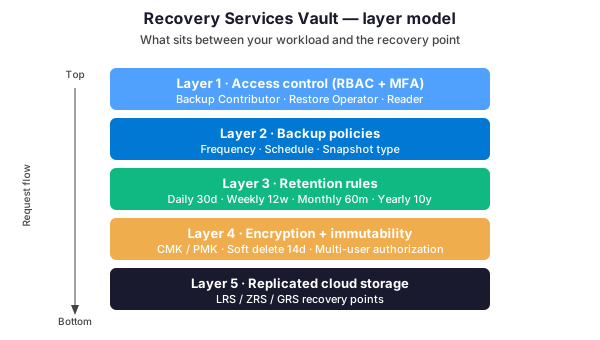
The access control layer uses Azure RBAC with three built-in roles. First, Backup Contributor offers full create/manage permissions. Next, the Operator role runs backups but cannot edit policies. Finally, audit-only access goes through the Reader role. Moreover, multi-user authorization adds an approval workflow on critical operations such as vault deletion or policy reduction.
The backup policy layer defines schedule and snapshot type. Indeed, this is the single most important layer for cost optimization. For instance, a daily policy with 7-year retention on a 500-GB SQL database in GRS is vastly more expensive than a tiered policy. Therefore, design retention rules with the vault-archive tier in mind from day one.
The encryption layer defaults to platform-managed keys (PMK). Additionally, it supports customer-managed keys (CMK) stored in Azure Key Vault. Specifically, CMK is the right choice for regulated workloads. However, key rotation must be coordinated with Azure Backup. As a result, losing the key means losing all encrypted recovery points permanently. In practice, most Wintive clients run PMK by default.
💰 Pricing tiers compared
Azure Backup pricing has two components. Specifically, protected instance fees are flat monthly fees per workload, scaled by source size buckets. Additionally, backup storage fees vary by tier and redundancy. Indeed, storage is where most of the optimization opportunity sits. Notably, vault-archive in 2022 changed the economics meaningfully.
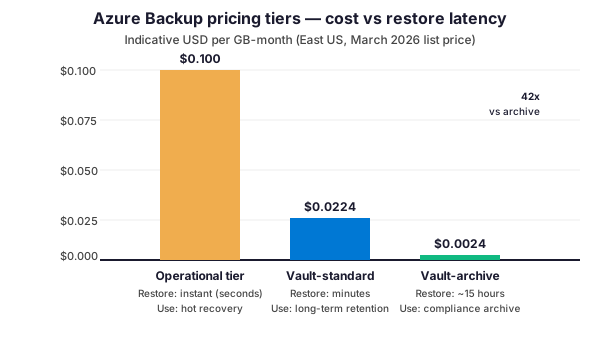
The operational tier sits closest to the workload. As a result, restores complete in seconds because recovery points stay attached to the source storage account. However, the price is the highest at roughly $0.10 per GB-month. Furthermore, data is not geo-redundant by default. Therefore, the operational tier is appropriate only for short retention windows. In particular, use it for the most recent 5 to 30 days when instant restore matters.
Next, the vault-standard tier is the workhorse. Specifically, recovery points move to vault-managed storage with LRS, ZRS, or GRS redundancy. Moreover, restore latency rises to minutes — acceptable for most disaster scenarios. As a result, the price drops to about $0.0224 per GB-month for LRS. Typically, retention beyond 30 days lives in vault-standard.
Finally, the vault-archive tier lands at $0.0024 per GB-month. Indeed, that is a 42x reduction versus operational. However, restore latency stretches to roughly 15 hours because data sits in cold storage. So vault-archive is the right home for compliance retention. In practice, move recovery points older than 6 months into vault-archive on long-term-retention policies.
✅ Best practices for SMBs
Across 60+ tenant audits, Wintive compiled a short-list of patterns. Each item has fixed an actual incident or recurring cost overrun.
| Practice | What to do | Why it matters |
|---|---|---|
| Lock the vault + soft delete | ARM lock on vault resource. Soft delete enabled (14d, non-disableable). | Survives accidental or malicious deletion attempts on backup repository. |
| Tier retention deliberately | 30d operational + 11mo standard + years 2-7 archive. | Saves 60-70% vs flat vault-standard policy on multi-year retention. |
| Private endpoints for sensitive data | Enable private-link for regulated workloads (health, finance, legal). | Compliance auditors increasingly demand network segmentation evidence. |
| Quarterly restore tests | Schedule recurring restore-to-isolated-environment exercise. Document RTO. | Auditors do not care backup ran — they care restore worked. |
| Tag by application owner | Apply CostCenter, Application, Owner, Environment tags consistently. | Monthly cost reports allocate cleanly. Outliers surface immediately. |
| Diagnostic logs to Log Analytics | Send vault logs to workspace. Alert on failed jobs + off-window changes. | Detect silent backup failures and unauthorized policy modifications. |
Of these six items, retention tiering is the single most impactful for typical SMBs. Switching a flat 7-year policy to tiered (30 days operational, 12 months standard, 6 years archive) on 1 TB saves roughly $850 to $1,100 per month. Pull this lever first during cost optimization.
↻ Restore & test workflows
Restores work in three modes for VM workloads. First, full-VM restore rebuilds from scratch in a new resource group. Next, disk restore reattaches a recovery-point disk to an existing VM. Finally, file-level restore mounts the recovery point as a temporary drive. In particular, file-level recovery is the most common scenario. For example, a user lost a folder yesterday and needs it back today.
# PowerShell: file-level restore from a VM recovery point
# Connects an iSCSI mount to access individual files without restoring the full VM

$rgName    = 'rg-prod-backup'
$vaultName = 'rsv-prod-eastus'
$vmName    = 'vm-app-01'

$vault = Get-AzRecoveryServicesVault -ResourceGroupName $rgName -Name $vaultName
Set-AzRecoveryServicesVaultContext -Vault $vault

# Find the latest recovery point
$container = Get-AzRecoveryServicesBackupContainer -ContainerType AzureVM \`
    -FriendlyName $vmName
$item = Get-AzRecoveryServicesBackupItem -Container $container -WorkloadType AzureVM
$rp = Get-AzRecoveryServicesBackupRecoveryPoint -Item $item | \`
    Sort-Object RecoveryPointTime -Descending | Select-Object -First 1

# Generate a temporary script that mounts the recovery point disks
$mount = Get-AzRecoveryServicesBackupRPMountScript -RecoveryPoint $rp
Write-Host "Run this script on a target machine to access files:"
Write-Host $mount.Filename
Write-Host "Password (valid 12 hours): $($mount.Password)"

# After file copy, dismount the recovery point
Disable-AzRecoveryServicesBackupRPMountScript -RecoveryPoint $rp
The mount script approach is preferred for file-level restore. Indeed, it does not consume the full VM disk. Specifically, only the iSCSI link to the recovery-point storage is used. As a result, the restore workflow takes minutes rather than hours. However, the mount has a 12-hour expiry and a single-machine constraint. Therefore, plan the restore session within that window.
For SQL workloads, the equivalent is Restore-AzRecoveryServicesBackupItem. Furthermore, use the RestoreToOriginalLocation switch or AlternateLocation. In particular, restoring SQL to an alternate location is the recommended pattern for quarterly test restores. As a result, production stays untouched. Moreover, the restored copy can be opened, queried, and dropped without operational risk.
❓ Azure Backup — FAQ
For most SMBs running a single Azure region, Azure Backup with GRS redundancy provides adequate disaster recovery. Specifically, GRS replicates recovery points to a paired region, so data survives a full region outage. However, Azure Backup does not orchestrate failover of compute or networking. Therefore, organizations with strict RTO requirements typically pair Azure Backup with Azure Site Recovery for the compute failover layer.
A typical 1-TB Azure VM estate with daily backups, 30-day operational retention, 12-month vault-standard in GRS, and 5-year vault-archive costs roughly $250 to $350 per month. Furthermore, this assumes a 30 percent daily change rate. Notably, the biggest cost driver is retention duration in vault-standard. As a result, reducing standard retention from 12 to 6 months and shifting earlier to vault-archive saves another 25 to 35 percent.
No. Azure Backup is for Azure resources and on-premises servers via MARS. Specifically, Microsoft 365 data (Exchange Online, SharePoint Online, OneDrive, Teams) is not in scope. As a result, M365 data protection requires a third-party SaaS backup product such as Veeam, Acronis, AvePoint, or Rubrik. Indeed, Microsoft itself does not provide a backup product for M365 despite the shared responsibility model.
Azure Backup creates point-in-time recovery copies for data restoration. By contrast, Azure Site Recovery (ASR) replicates entire workloads continuously for failover. So Backup answers “recover data from yesterday” and ASR answers “resume operations in another region within 15 minutes”. In practice, production environments use both: ASR for compute failover with sub-hour RPO, and Backup for granular file restoration with longer retention.
🔗 Keep exploring
Need help auditing or optimizing Azure Backup for your environment? Book a free 30-minute consultation with our Microsoft 365 and Azure experts.