For US architecture firms, the Microsoft 365 decision in 2026 lands on the Principal’s desk for one reason: margin defense. The AIA/Deltek Architecture Billings Index has been below 50 for 31 of the last 34 months. October 2025 came in at 47.6 and December 2025 stayed soft. Specifically, the value of newly signed design contracts has declined for sixteen consecutive months. Therefore, the lever is not winning more work in a tight market. Specifically, the platform closes the operational leak inside the firm to defend the existing 19% operating margin. Microsoft 365 Business Premium at $22 per user per month addresses five specific leaks. The stack worsens each leak: utilization drag, overhead bloat, cyber exposure, the construction-administration paper trail, plus the AI productivity gap. In practice, our team at Wintive has audited the back-office of 60+ M365 tenants. The same patterns repeat across studios from Albuquerque to Boston.
🏗️ Ready to bring your back office up to the standard of your drawings?
We set up Microsoft 365 for architecture firms across the US. The package covers project libraries, secure consultant collaboration, AIA Trust cyber compliance, and device management on a flat monthly rate. No surprises, no server closets.
📅 Book a Free 30-Min Call | 💬 Chat on WhatsApp | See Our Plans →
Furthermore, the sections below break down each leak with macro data, Microsoft 365 capability mapping and the dollar recovery typical on a 12-person studio. In practice, the goal is to give the Principal a Nasdaq-grade view of what the platform actually defends, not a generic productivity pitch.
🏗️ The Microsoft 365 architecture firms margin problem in 2026
📌 TL;DR — Microsoft 365 architecture firms setup (2026): The Principal’s problem is not winning more work. The lever is defending the 19% operating margin during a 31-of-34-month billings downturn. Microsoft 365 Business Premium at $22 per user per month closes five leaks the legacy stack worsens. Specifically, SharePoint metadata holds AIA G-series content types with 93-day version retention. Covered docs: G716 RFI, G701 Change Order, G707 ASI, G712 Submittal. Furthermore, Defender for Business and Intune satisfy the AIA Trust cyber 6-control matrix without a separate stack. A 12-person studio recovers roughly $128,000 of annual revenue by closing the utilization gap. The target moves from 72% to 85% on principals and 88% to 92% on project managers.
Why Microsoft 365 architecture firms feel the squeeze in 2026
Notably, the Architecture Billings Index acts as a leading economic indicator that runs 9 to 12 months ahead of nonresidential construction activity. Furthermore, the score has held below the no-growth line of 50 for thirty-one of the last thirty-four months. Furthermore, the South Atlantic and West regions still show modest negatives in late 2025. Consequently, firms are operating on tighter forward backlogs and slower contract conversion. Principal architects are not asking Wintive how to win more RFPs. They are asking how to protect the 19% operating profit. The 46th Annual Deltek Clarity A&E Industry Study recorded that figure across 692 firms in the US and Canada.
🔍 What we see across 60+ M365 tenants.
Architecture firms running Google Workspace, Slack, Dropbox, DocuSign and Zoom with a separate cyber policy pay roughly $87 per user per month for tools. They also pay another $400 per user per year for cyber insurance. Specifically, an audit on a 12-person Boston studio in 2025 found that consolidating onto Microsoft 365 Business Premium dropped the per-user run rate from $87 to $22. The same audit removed the standalone cyber rider because Defender for Business and Intune satisfy the underwriter checklist. Furthermore, annual stack saving alone reached $9,360 before any utilization recovery.
The five operational leaks defending the 19% operating margin
In practice, a common mistake we see across architecture firm audits is treating Microsoft 365 as a productivity tool rather than a margin defense. Critically, across our portfolio, the five leaks repeat on every firm we audit. First, utilization drag costs an average studio 13 percentage points on the Principal. Furthermore, the same drag costs 4 points on the project manager per the Monograph 2025 A&E benchmark. Second, overhead bloat from a five-vendor app stack adds roughly $780 per user per year. Third, cyber exposure now costs an average $400,000 per breach in the engineering segment. Fourth, the construction-administration paper trail leaks billable hours every time an RFI or submittal sits in an inbox. Finally, the AI productivity gap widens. Specifically, 53% of A&E firms now use AI tools while the rest watch proposal turnaround stretch.
📐 SharePoint as the Microsoft 365 architecture firms project spine
Specifically, the project spine is the single most decisive operational choice the firm makes. Every drawing set, consultant exchange, client comment, change order and signed contract needs one canonical home. In our audits we routinely find drawings scattered across Dropbox, OneDrive, Google Drive, network shares and email attachments. Consequently, project managers spend roughly 8 hours per week hunting for the latest revision. That equates to 416 hours per year per PM at $135 per hour, or $56,160 of lost recovery per PM before any other lever moves.
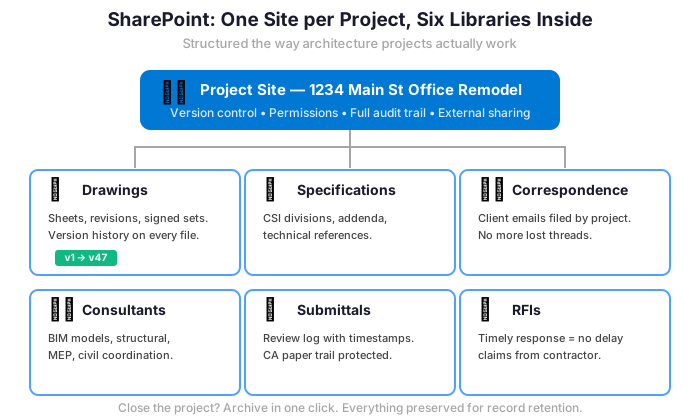
Furthermore, the six-library pattern mirrors AIA project phases. First, the Drawings library holds the active CD set with version history. Second, the Models library holds the federated Revit or ArchiCAD source with weekly snapshots. Third, the Specifications library holds CSI MasterFormat sections under a content type per division. Fourth, the Contracts library holds AIA B-series owner-architect agreements and consultant agreements. Fifth, the RFIs library holds G716 forms with response timelines. Finally, the Submittals library holds G712 shop drawing and sample records.
Library structure that mirrors AIA project phases
Each library carries metadata columns that drive every other downstream behavior. For example, the Drawings library carries Phase, Discipline, Sheet number, Revision and Issue date. Consequently, the project manager filters to the right scope in one click. Nested-folder hunts disappear. Furthermore, Power Automate flows fire on revision uploads. The flow notifies the consultant of record and timestamps the issue for the contract record. In practice, the file-hunt drag drops from 8 hours per week to under 1 hour.
💬 Teams for site, studio and consultant coordination
In practice, site walks, studio crits and consultant calls happen on different rhythms. Therefore, the firm needs one channel-based conversation tool rather than three separate apps. Moreover, Microsoft Teams gives one channel per active project. Structured threads cover design review, RFI discussion, submittal status and field reports. For instance, in our audits switching from Slack, WhatsApp and phone notes to a single Teams workspace reduces the “where did we decide that” question by roughly 70% within the first quarter. Specifically, every channel post is searchable and tied to a project record.

Three Teams patterns Microsoft 365 architecture firms reuse on every project
Specifically, the field report is the first pattern. During a site walk, the project architect captures photos on the Teams mobile app. The architect posts to the project channel with a tagged location, and the contractor sees the note within minutes. Furthermore, the field report channel pins the punch list as a Loop component so updates stay live. The second pattern is the design review crit. The principal opens the federated Revit model in the channel meeting. Screenshares to consultants happen live, and recordings post automatically to the project library. Finally, the consultant submittal review uses a structured thread per submittal. MEP approval, Structural sign-off and Architect of Record review live in one searchable timeline.
📋 AIA G-series workflow in SharePoint for construction administration
Critically, the construction-administration paper trail is the leak that most surprises principals on audit. Specifically, RFIs, change orders and ASIs sit in Outlook threads. They cannot be tracked, dated or recovered for billing or dispute. Therefore, every AIA contract form needs a content type per document in SharePoint. The set covers G716 (RFI), G701 (Change Order), G707 (ASI), G712 (Shop Drawing and Sample Record) and G702/G703 (Pay Application). Furthermore, each AIA document costs $50 per use under the per-document license. The bigger cost is the unbilled CA hour leak when documents go missing.
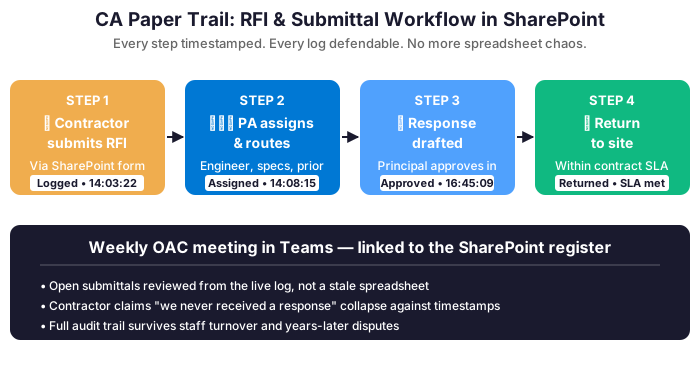
The SharePoint content type approach makes the paper trail provable. Notably, each G-series document type carries the same metadata. Fields include project number, AIA document code, originator, date issued, response due date, response date, status, and drawing link. Furthermore, Power Automate fires on overdue items. A G716 RFI that sits beyond its stated reply date escalates to the project manager. In practice, the CA billable-hour leak we typically recover ranges from 4 to 6 hours per project manager per week.
AIA G-series content types for Microsoft 365 architecture firms SharePoint
| AIA G-series document | Purpose | SharePoint content type fields |
|---|---|---|
| G716 Request for Information | Clarify contract documents during construction | RFI number, originator, response due, response date, status |
| G701 Change Order | Modify contract sum or schedule | CO number, cost delta, schedule delta, owner sign date |
| G707 Architect Supplemental Instructions | Issue minor changes within contract scope | ASI number, drawing reference, issue date, contractor ack |
| G712 Shop Drawing and Sample Record | Track submittal review and approval | Submittal number, spec section, action taken, return date |
| G702 and G703 Pay Application | Owner draw and continuation sheet | Pay app number, period, schedule of values, retainage |
Furthermore, the table shows the canonical mapping our team applies. Notably, the SharePoint metadata columns reproduce the AIA form fields one to one. The office record then matches the legal record at every step. When an owner challenges a payment application or a contractor disputes an ASI, the architect retrieves the dated record in two clicks. Outlook thread hunts disappear. For a 12-person studio with four active projects, this typically saves the project managers a combined 16 hours per week.
🤝 Secure external sharing for owners, contractors and consultants
However, external collaboration is where most architecture firms compromise security to get work done. In practice, consultants email zipped drawings, contractors receive Dropbox links from project assistants, owners get monthly PDF dumps via WeTransfer. Consequently, the firm has zero record of who downloaded what, when, and for which project. Furthermore, professional liability claims often hinge on exactly that audit trail. SharePoint external sharing with guest accounts replaces all of the above. Permission scopes to the specific library or folder rather than the whole tenant.

External sharing policy for owner and consultant access
Specifically, the policy splits external access into four tiers. Specifically, owners get read access on Drawings (current revision only) and the monthly Pay Application library. Furthermore, General Contractors get read on Drawings and read/write on the RFI and Submittal libraries scoped to their project. Consequently, MEP and Structural consultants get read/write on Models and Drawings during their phase. Access shifts to read-only after issue for construction. Finally, every guest account expires automatically 30 days after substantial completion, and Entra ID Conditional Access blocks downloads from non-compliant devices.
🛡️ AIA Trust cyber compliance for design studios
Notably, the AIA Trust risk report on cyberattacks against architectural firms documents real losses. Specifically, a prominent design firm in Seattle was held up by ransomware. A separate firm was tricked into wiring an insurance premium to an attacker. A third architecture firm lost more than $500,000 in billable hours after two ransomware events rendered project files unusable for days. Furthermore, broker-side data shows roughly 60% of A&E firms reported at least one attempted breach in the previous twelve months. The average data-breach cost reached $400,000. Therefore, the AIA Trust and Victor Insurance partnership now treats cyber liability as a core line. The policy sits alongside professional liability and general liability.
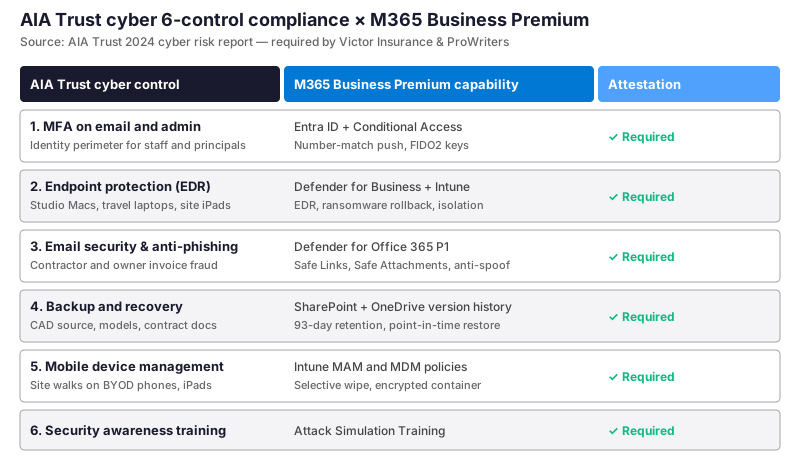
Notably, the six-control matrix maps the underwriter checklist to native Microsoft 365 Business Premium features. Specifically, multi-factor authentication on email and admin runs through Entra ID Conditional Access. Number-match push or FIDO2 keys satisfy the identity perimeter control. Furthermore, endpoint protection through Defender for Business covers every Mac and Windows laptop. EDR and ransomware rollback satisfy the endpoint control. Email security through Defender for Office 365 Plan 1 adds Safe Links, Safe Attachments and anti-impersonation, satisfying the email vector control.
Backup, training and device management for the cyber attestation
💡 Wintive insight from 12 US architecture studios
Of the dozen architecture studios we audited in the last 18 months, ten arrived with a separate cyber rider. Riders averaged $400 to $650 per user per year because the underwriter checklist required tooling they did not have. As a result, after consolidating onto Business Premium, eight of those firms dropped the rider or moved to a lower tier. Defender for Business, Intune, Conditional Access and Attack Simulation Training satisfied the underwriter inventory. Specifically, the average annual cyber-insurance savings per studio was $4,800, before the breach-cost avoidance value.
The remaining three controls close the matrix. First, backup and recovery for project files runs through SharePoint and OneDrive version history. The 93-day point-in-time restore satisfies the data-recovery control. Second, mobile device management through Intune covers site walks on BYOD phones and contractor iPads. Selective wipe and encrypted container satisfy the mobile control. Finally, Attack Simulation Training auto-enrolls staff in quarterly phishing simulations with click reporting, satisfying the awareness control. Consequently, the AIA Trust attestation is documented inside one Microsoft 365 admin tenant rather than spread across five vendor portals.

💰 The Microsoft 365 architecture firms stack cost defense
Critically, the overhead rate on a typical A&E firm sits at 162% per the Deltek Clarity 46th Annual Study. Specifically, that means every billable hour carries $1.62 of indirect cost, and software subscriptions sit squarely inside that indirect line. Therefore, the per-user app stack run rate moves the overhead needle directly. Architecture firms running a five-vendor mix typically pay $87 per user per month before counting any cyber rider. The rider sits on top of payroll, rent, utilities and professional liability, all of which drive the 162% rate.

Direct overhead reduction for Microsoft 365 architecture firms on the legacy stack
However, the legacy app stack lives on six monthly invoices spread across Google, Slack, Dropbox, DocuSign, Zoom and a cyber rider. Specifically, each line carries its own admin console, renewal cycle, audit log and compliance review. Therefore, the consolidation case rests on overhead defense as much as on per-user price.
| Legacy app | Function replaced by M365 BP | Per-user cost |
|---|---|---|
| Google Workspace Business Standard | Email, Drive, Docs, Meet | $12 per user per month |
| Slack Business Plus | Team chat replaced by Teams | $15 per user per month |
| Dropbox Business Advanced | Project file storage replaced by SharePoint | $24 per user per month |
| DocuSign Business Pro | Contract e-signature | $15 per user per month |
| Zoom Business | Client and consultant video replaced by Teams | $15 per user per month |
| Cyber rider (separate carrier) | Satisfied by Defender plus Intune | $6 per user per month equivalent |
| Legacy stack total | Six vendors | $87 per user per month |
| Microsoft 365 Business Premium | All six functions native | $22 per user per month |
The math compounds on a 12-person studio. The per-user delta of $65 per month equals $780 per user per year. That equates to $9,360 in annual subscription savings for a twelve-seat firm. Furthermore, the firm removes five separate vendor relationships, five renewal cycles, five admin consoles, and five compliance reviews. Consequently, the bookkeeping line drops from six monthly invoices to one. The IT admin burden drops to a single tenant. In practice, this overhead defense alone covers the consulting fee for the migration within the first three months.
📊 Utilization recovery math for Microsoft 365 architecture firms
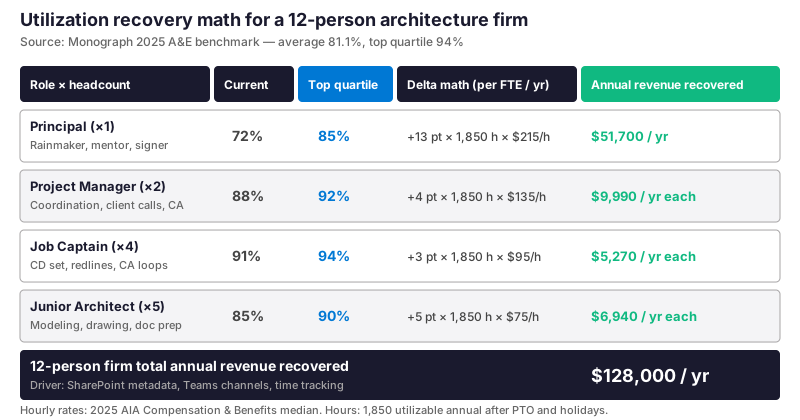
Notably, the Monograph 2025 A&E benchmark report places the average architecture firm at 81.1% utilization with the top quartile at 94%. Specifically, principals average 72% while job captains average 91%, and the gap between average and top quartile maps directly to revenue. Therefore, the platform decision matters. The file-hunt drag, consultant-call drag and CA paper-trail drag all sit on the wrong side of that ledger. A Microsoft 365 Business Premium tenant with disciplined SharePoint metadata and Teams channels closes a measurable share of that gap.
Role-by-role recovery on the platform
Specifically, role-by-role, the math drives the case. Specifically, take the Principal at 72% moves to 85% by reclaiming 13 percentage points across 1,850 utilizable annual hours at $215 per hour, recovering roughly $51,700 per year. The Project Manager at 88% moves to 92% for $9,990 per year each, and a studio with two project managers recovers $19,980. Furthermore, four Job Captains at 91% moving to 94% recover $5,270 each, and five Junior Architects at 85% moving to 90% recover $6,940 each. Consequently, the twelve-person firm recovers roughly $128,000 of annual revenue without adding headcount or winning a single new RFP.
🤖 Copilot decisions for Microsoft 365 architecture firms
The AIA published Artificial Intelligence Adoption in Architecture Firms in March 2025 with Deltek and Construct Connect. The study documented 53% adoption across A&E firms in 2025 versus 38% in 2024. Specifically, the report flags proposal development, project planning, business development and data analytics as the four most common use cases. Therefore, the question on the Principal’s desk is no longer whether to adopt AI. The new question is where AI fits and where it sits behind the architect’s seal. Microsoft 365 Copilot at $30 per user per month integrates inside Word, Outlook, Excel and Teams without bolting on a separate vendor.
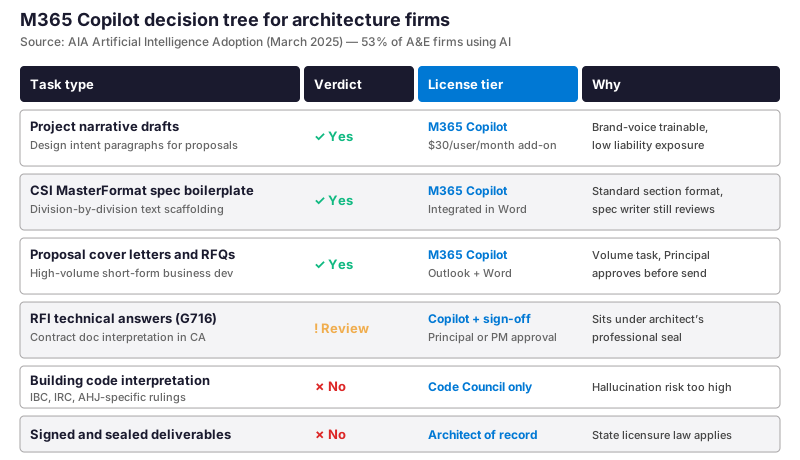
Where Copilot earns its $30 per user per month
Finally, the verdict per task type splits cleanly. Specifically, project narrative drafts, CSI MasterFormat spec boilerplate and proposal cover letters land in the green zone. They are brand-voice trainable, low liability, high volume, and the human reviews before send. Furthermore, RFI technical answers under AIA G716 sit in the yellow zone. The response carries the architect’s professional seal, so Copilot drafts but a Principal or PM signs off. Finally, building code interpretation and signed deliverables are red: jurisdictional accuracy and state licensure law require human authorship. In practice, the studio that wires this decision tree into Word and Outlook captures the productivity lift. The liability risk stays with the architect of record.

📱 Device security for multi-state and field-based practice
Architecture firms increasingly operate across state lines. Clients are regional, sites are remote, and consultants pull from a national bench. Specifically, principals registered in two or three states need device security that travels with them. The AIA Trust cyber attestation must hold whether the laptop is in the studio or in a hotel near a job site. Therefore, Intune device compliance policy gates access to project libraries. The check looks at encryption status, OS patch level, EDR presence and location signals. Furthermore, Conditional Access blocks any download from a non-compliant device, anywhere.
| Practice context | Device exposure | Intune policy applied |
|---|---|---|
| Studio-based architects | Studio Macs and Windows laptops | Disk encryption, EDR enrolled, weekly patch window |
| Principal travel across states | Travel laptop on hotel and airport networks | Always-on VPN, Conditional Access geo signals, lock on idle |
| Field architect on site walks | iPad and iPhone with project channel access | Selective wipe, MAM container, no save to local photos |
| Contractor and consultant guests | BYOD Windows or Mac with read access | Compliance gate, download block, 30-day account expiry |
Conditional access for multi-state practice
Critically, the Conditional Access policy is the practical edge of the AIA Trust cyber attestation. Consider a Principal who registers in California, Oregon and Washington. The tenant signs them in from each state across a typical month. The policy passes the trusted geographies while blocking sign-in attempts from outside the practice footprint. Furthermore, the audit log timestamps every access event with location and device compliance state. Any later incident investigation or insurance claim then has a clean record. In practice, the setup takes a Wintive engineer roughly 4 hours per firm. The build replaces the need for a separate MDM vendor.
📚 More wintive guides for design practices
Notably, the Microsoft 365 architecture firms playbook connects to several other Wintive guides for adjacent decisions. Notably, the CFO predictability piece, the law firm communications piece, the accounting firm overhead piece, the event company production piece, and the art gallery back-office piece all share the same Microsoft 365 Business Premium platform. Sector-specific patterns layer on top.
🎯 Get a M365 Master Audit tailored to your architecture firm
Full Microsoft 365 environment audit tailored to architecture firms: license stack optimization, SharePoint AIA G-series content type review, AIA Trust cyber 6-control mapping, utilization recovery analysis and Copilot decision tree. Delivered as a written report with prioritized recommendations, plus 14 days of email Q&A after delivery.
❓ FAQ on the platform decision
These cover setup timeline, CAD compatibility, AIA Trust cyber compliance, multi-state practice and Copilot economics.
In practice, a typical migration runs 4 to 6 weeks. Weeks 1-2 cover tenant, identity, mailbox migration and SharePoint G-series content types. Then weeks 3-4 cover Intune, Defender for Business and external sharing. Week 5 covers Copilot and AIA Trust cyber attestation.
Yes. Microsoft 365 is the back-office spine and does not replace CAD or BIM authoring. Revit, AutoCAD, ArchiCAD, Vectorworks and Rhino keep running on studio workstations. In practice, models live in the SharePoint Models library with version history.
Yes. Yes. Six controls Victor Insurance and ProWriters policies typically require all land inside Business Premium: MFA via Conditional Access, EDR via Defender for Business, email security via Defender for Office Plan 1, backup via SharePoint history, MDM via Intune and Attack Simulation Training.
Business Premium handles multi-state practice natively. Intune device compliance travels with the laptop. Conditional Access geo signals accept sign-in from each registered state. The cost stays at $22 per user per month regardless of footprint.
Microsoft 365 Copilot adds $30 per user per month, billed annually. Specifically, a 10-architect firm pays $3,600 per year per seat. Specifically, most firms start with the Principal, project managers and proposal team. A typical first-year rollout runs 4 to 6 seats at $1,440 to $2,160 per year.