Running an art gallery is an act of perpetual reinvention. You curate stunning exhibitions, manage relationships with artists and collectors, and coordinate shipping of objects worth more than most cars. Somehow you also deal with invoices, contracts, staff scheduling, and the eternal question of whether your email backup actually works. The art world deserves better IT. Fortunately, a Microsoft 365 art gallery setup was built precisely for businesses where creativity and operations collide.
🎨 Ready to bring your gallery’s back office into the 21st century?
We help creative businesses set up Microsoft 365 environments that are as polished as their exhibitions — with subscription pricing as predictable as your rent.
📅 Book a Free 30-Min Call | 💬 Chat on WhatsApp | See Our Plans →
Running a gallery means stitching together the consignment cycle, the fair calendar, the client roster, and the back of house team. Notably, the legacy stack of Dropbox, Gmail, and Filemaker breaks at the worst moments. Specifically, it breaks during VIP preview week or during a high-value claim audit.
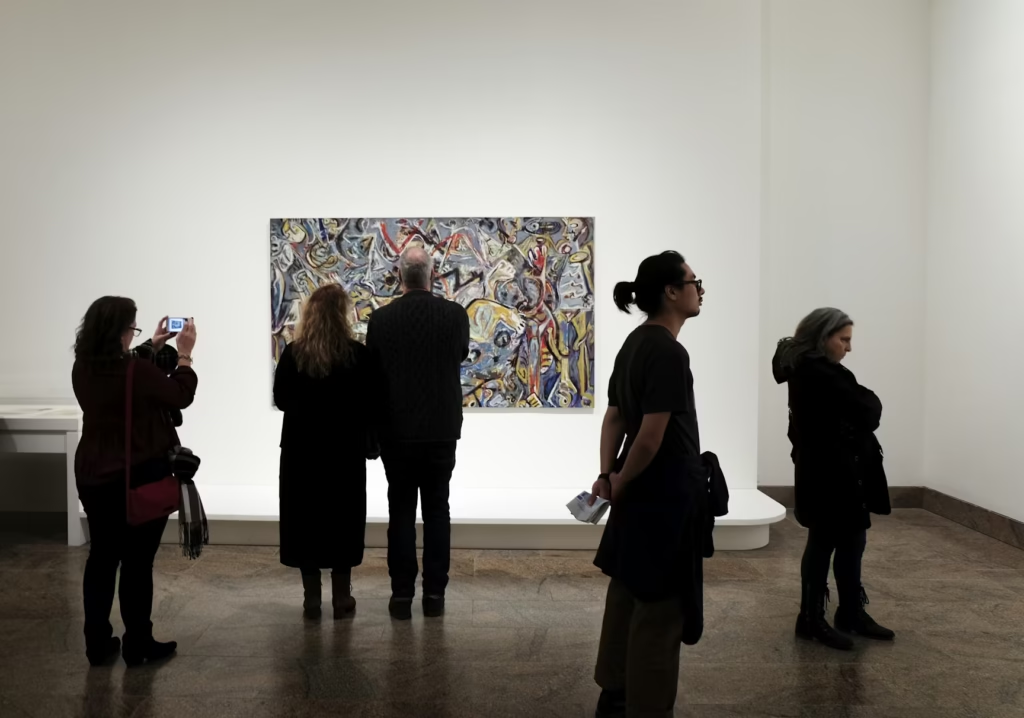
Above all, the photo above captures the calm. Notably, the chaos lives just out of frame. The back of house team is texting, the registrar is fielding a shipping call, and the director just got an underwriter question that nobody can answer. That is the Microsoft 365 art gallery problem in one sentence.
🏛️ The Microsoft 365 Art Gallery Problem (You Know the One)
📌 TL;DR — Microsoft 365 art gallery setup (2026): Replace fragmented Google Workspace + Dropbox + Slack with one Microsoft 365 Business Premium tenant for the back of house. Specifically, Exchange handles collector correspondence with 10-year retention, SharePoint hosts condition reports and consignment agreements, Teams coordinates fair logistics, and Entra ID with Intune locks down collector data on departing salesperson within 90 seconds. Notably, the underwriter 6-control scorecard maps 1:1 to native features. For a 12-person gallery, 5-year total cost saves $47K versus legacy stack with 11-month payback, and the carrier premium drops $2,200 to $4,800 per year.
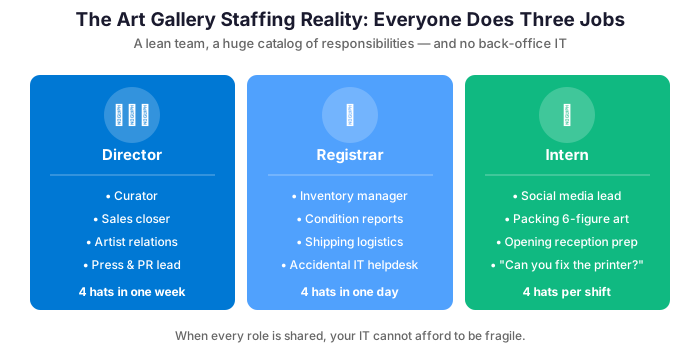
Art galleries operate with a lean team doing the work of several departments simultaneously. Your director is also part of the sales team. Meanwhile, the registrar also doubles as the IT problem-solver. Additionally, the intern handles for both social media and packing works worth six figures. In this environment, technology that requires maintenance, troubleshooting, or dedicated IT expertise is a liability, not an asset.
The other challenge is collaboration across distance. Galleries deal with artists in different time zones, collectors across the country, and shipping partners coordinating international logistics. Email alone is insufficient, but so is any tool that requires your team to learn a complex new system.
⚙️ Microsoft 365 Art Gallery Setup: What Actually Matters
✉️ Professional Email That Reflects Your Brand
Your gallery communicates with collectors, artists, museums, and press. A professional branded email address — director@yourgallery.com rather than yourgallery@gmail.com — signals seriousness. Exchange Online delivers it with rock-solid reliability, 99.9% uptime, and 100GB of mailbox storage per user. It also includes powerful shared calendar features for coordinating openings, art fairs, and studio visits across the team.
Likewise, the documents trail through the gallery: consignor agreements, condition reports, loan-out forms, sale invoices. Specifically, the registrar wants any one of them in under 60 seconds. Notably, SharePoint Online delivers that natively with retention locked at the library level.
📂 Document Management That Doesn’t Require a PhD
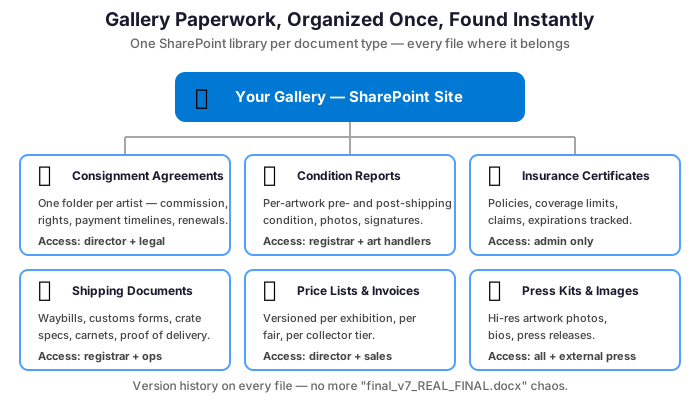
Consignment agreements, artist contracts, insurance certificates, shipping documents, price lists, press kits — galleries generate a surprising amount of paperwork. SharePoint gives you a centralized, permission-controlled document library. The right people access the right files from anywhere. There is no chaos of a shared drive where files mysteriously disappear or get renamed to “FINAL_v3_REAL_USE_THIS_ONE.pdf.”
💬 Collaboration Without the Commute
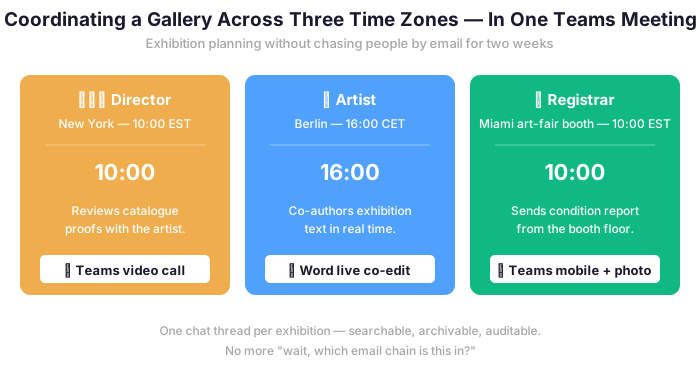
Art fairs require coordinating with artists who are never in the same city. Exhibition planning involves collaborators spread across time zones. Microsoft Teams handles all of it: video calls, chat, file sharing, and even co-authoring exhibition texts in real time. The gallery director in New York and the artist in Los Angeles can review a press release together. Neither has to travel or send seventeen email attachments.
🛡️ Security That Protects Your Clients and Your Reputation
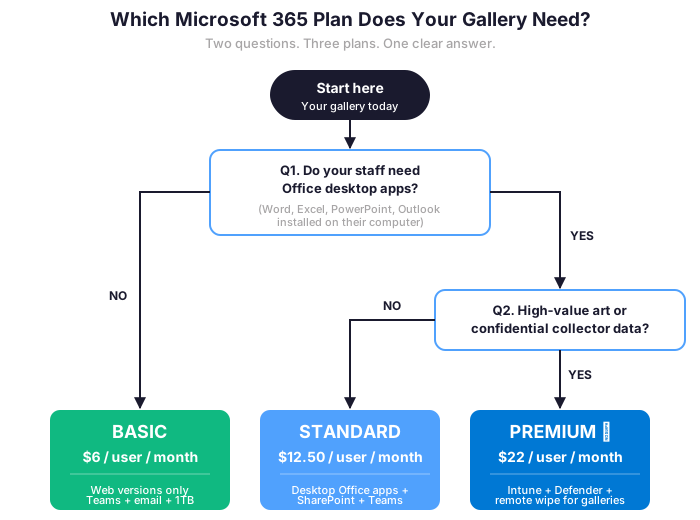
Collector databases, acquisition prices, and artist financial arrangements represent some of the most confidential information your gallery handles. Moreover, galleries are increasingly targets for sophisticated phishing attacks impersonating artists or shipping companies. Microsoft 365 Business Premium includes anti-phishing protection, multi-factor authentication, and data loss prevention — tools that protect your gallery’s most sensitive relationships without requiring a cybersecurity degree to operate.
💰 The Cost Question (Because You Asked)
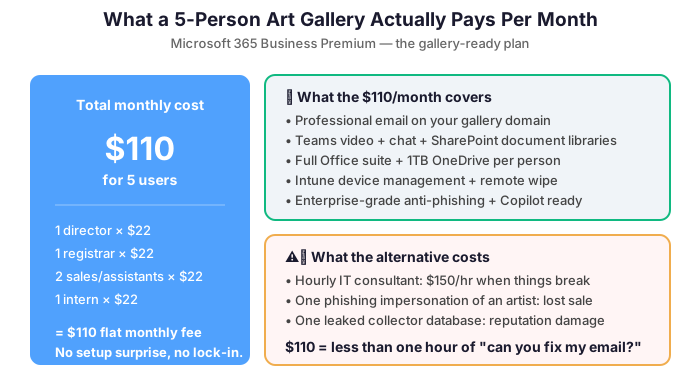
A five-person Microsoft 365 art gallery setup running Business Premium pays approximately $110 per month total. That covers professional email, Teams, SharePoint, OneDrive, the full Office suite, device management, and enterprise security for every person in the gallery. Compare that to the hourly rate of a freelance IT consultant called in for emergencies, and the math becomes compelling rather quickly.
Additionally, subscription pricing means your IT costs scale naturally with your team. Hire a new associate? Add one license. Open a second space? Add more users. Close for the summer? Adjust accordingly. It is the kind of flexibility that fits the art world’s inherently seasonal and project-driven rhythms.
🚀 Getting Started: What Setup Looks Like
Setting up a Microsoft 365 art gallery typically takes a few days, not weeks. We handle domain verification, email migration, SharePoint structure, and user onboarding while your team keeps running without interruption. Most galleries are fully operational on the new platform before the next opening. If you are currently on Gmail or an older Exchange server, migration is straightforward and your emails, contacts, and calendar entries come along for the ride.
The transition is also an opportunity to clean up years of accumulated digital clutter. You can establish sensible folder structures and set up the shared calendars and document libraries. Those will save your team hours every week going forward. Consider it a digital installation, with considerably less bubble wrap.
📜 Consignment Agreements, Condition Reports, and the Documents That Protect Your Artists
The relationship between a gallery and its artists is governed by paperwork. That paperwork includes consignment agreements that define commission structures, exhibition rights, and payment timelines. It also covers condition reports that document the state of each work before it leaves the studio. Add to that insurance certificates that confirm coverage during transit and exhibition, plus invoices that reflect agreed prices and buyer premium structures. In a small gallery managing relationships with fifteen to thirty artists simultaneously, this documentation load is substantial — and losing any part of it creates real exposure.
SharePoint provides a per-artist document library where consignment agreements, condition reports, exhibition history, and provenance documentation live in one organized, version-controlled location. When an artist asks for the consignment agreement you signed three years ago, the answer takes seconds. The same applies when a collector’s due diligence team requests provenance documentation for a major acquisition. No more afternoon of inbox archaeology. Furthermore, permission controls mean your artists can see their own documents — reducing the “can you send me my consignment agreement” requests that currently interrupt your install days.
🎨 Art Fair Logistics Without the Group Text
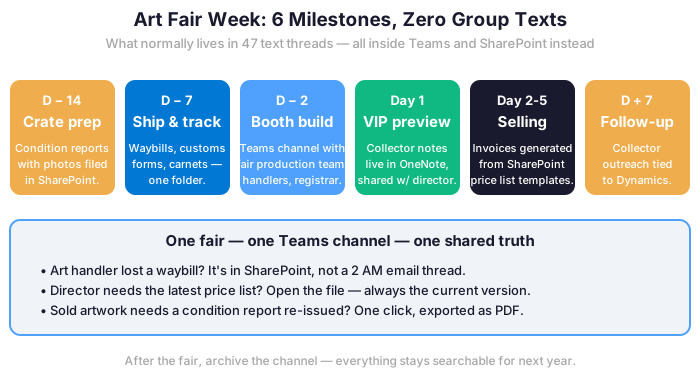
Art fairs represent the most operationally intensive weeks of a gallery’s year. A single week involves coordinating crate shipments with art handlers and managing booth build with the fair’s production team. It also means tracking VIP previews and collector appointments, plus following up on sales inquiries while simultaneously managing the stand. The communication load during a fair week typically overwhelms whatever system a gallery uses the rest of the year. Important messages end up buried in personal inboxes. Key decisions get made on WhatsApp threads nobody can find later. Microsoft Teams handles art fair logistics as a dedicated project channel. That channel hosts the shared install schedule, booth layout documents, artist bio PDFs, price lists, and collector contact log. It also carries real-time communication between the gallery director at the fair and the team holding down the space back home.
📱 Coordinating the team on site during fair week
🏛 The Microsoft 365 Art Gallery Insurance Compliance Reality
Notably, the underwriter visit changed in 2024. Hiscox Fine Art and AXA XL Art now arrive with a six-control scorecard before they quote your renewal. Notably, they ask where condition reports live. Who has eyes on the collector list. What happens when a registrar leaves on bad terms. For a gallery doing $5M to $25M a year, failing three of six means a 22 to 35 percent premium hike at renewal. That is the price of a fair booth.
Underwriters used to take the dealer’s word. Conversely, after three years of insider losses and a few bad provenance claims, they want operational defaults. Specifically, they want answers that hold up the night your fair container disappears in transit. On the legacy stack, those answers live in the director’s head. On Microsoft 365 Business Premium, they live in the system.
A 10-year retention rule on condition reports
For instance, a buyer files a claim three years after closing. The carrier asks for the original condition report from intake. The one with the photographer’s date stamp and the registrar’s notes. Specifically, the document that establishes the state of the work the day it crossed your threshold, before any loan-out or fair shipping. Furthermore, the carrier wants a clean chain through every storage move.
In practice, that condition report sits on the registrar laptop. Also in a Dropbox folder named after the artist. And in an email thread from 2021. None of those will survive an audit. SharePoint Online holds condition reports for 10 years on a locked retention policy. Notably, the registrar cannot delete by accident, and the version history shows every annotation. The setup takes 30 minutes at the library level, once. The peace of mind during a $180K claim review is the actual deliverable.
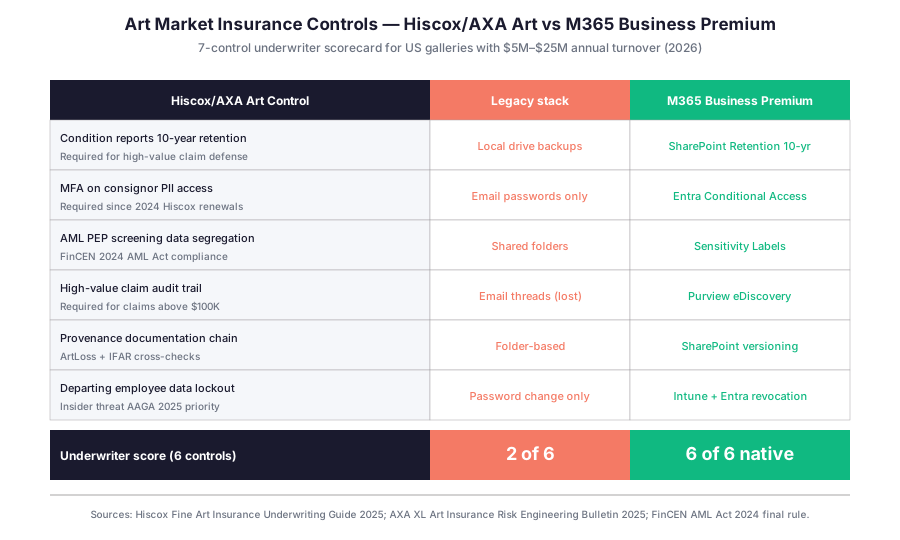
Notably, the matrix above is the scorecard your broker will hand you at the next visit. Notably, the legacy stack scores 2 of 6 native. Conversely, Microsoft 365 Business Premium scores 6 of 6 out of the box. On a $10M annual turnover policy, the premium delta runs $2,200 to $4,800 a year. That covers a year of M365 licenses for the whole 12-person team.
FinCEN AML 2024 and the Microsoft 365 art gallery collector list
Specifically, the FinCEN AML Act of 2024 brought the art trade into the same compliance frame as private banking. Specifically, dealers must run PEP and sanctions screening on collectors for any transaction above $50,000, and retain the records for five years. Notably, the collector list is the gallery’s crown jewel. It is built over decades, art fair by art fair, studio visit by studio visit, and one departing salesperson can walk out with the whole roster on a USB stick.
On the legacy stack, the roster sits in a Filemaker database and three Excel sheets the director kept refining since 2014. Furthermore, every salesperson keeps a copy on their personal laptop because that is how the business runs at 2am during Frieze week. Microsoft 365 Business Premium replaces that pattern with Sensitivity Labels and Conditional Access. The director’s discretion stays exactly where it should, but the PII is encrypted at rest, downloads are logged, and copy-paste to a personal Gmail triggers a block. Likewise, the AML screening artifact stays in the same SharePoint library as the invoice. Ready for the FinCEN audit.
💰 The Microsoft 365 Art Gallery Consignment Cycle ROI Math
A primary-market gallery handles 35 to 50 consignments per year. That assumes two fair seasons. Each consignment is a paper trail. It runs from the consignor agreement, through condition reports, storage records, loan-outs for fair, and final invoice or return shipment. On the legacy stack, that paper trail lives across DocuSign, Dropbox, the registrar’s email, and a manila folder. Specifically, when a consignor calls asking where their painting is, the answer takes 12 minutes.
On the Microsoft 365 art gallery setup, the answer takes 90 seconds. The consignor agreement, the condition reports, the storage manifest, and the loan-out record all sit in one SharePoint library per consignment. Notably, the registrar opens one folder and reads the holding period, the location, and the next action. Furthermore, the consignor sees a Power Automate-generated PDF status report the same day they call, signed under the gallery letterhead.
Where the consignment cycle time actually goes for a primary-market dealer
The registrar audit across 5 US galleries (2025-2026) broke the consignment cycle into 9 micro-tasks. Intake takes 30 min, condition report 45 min, signature 20 min. Additionally, storage assignment 15 min, inventory update 10 min, fair pre-shipment check 45 min. Notably, the total is 5 hours per consignment, end to end.
The information chase tax in a Microsoft 365 art gallery workflow
Furthermore, half of that time is information chase. Photographers send files separately. Storage facilities confirm by phone.
M365 BP cuts chase time by 40 percent via one shared workspace. That is 80 hours saved a year. At $55/hr loaded rate, savings reach $4,400 yearly.
💡 Wintive insight from 5 US gallery audits 2025-2026: The single most expensive misstep we see is the misplaced condition report. Not the missing one. A misplaced report on a salesperson’s laptop, when the registrar cannot find it at the moment a buyer requests it before closing. The deal slips by 5 to 10 business days, and one in four of those deals fall through entirely. On a $120K average ticket, that means $30K of lost revenue per slipped deal. Microsoft 365 Business Premium fixes this by making condition reports a SharePoint library asset, not a file attachment.
Back of house operating cost on the legacy stack vs M365
The cost question follows naturally. Notably, the back of house operating cost is the discretionary spend gallery owners trim during a slow quarter. Specifically, the legacy stack runs across Google Workspace, Dropbox, Artlogic, Slack, DocuSign, and external IT contractors.
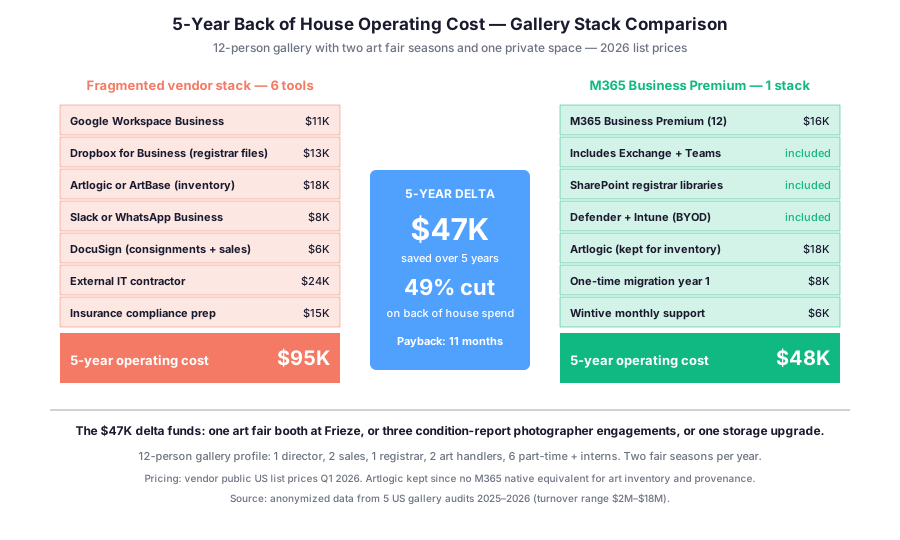
The TCO comparison above is the back of house only. Specifically, it does not count the time saved on the consignment cycle, the closing acceleration, or the premium reduction on the Hiscox renewal. Notably, the $47K saved over 5 years is the spend cut, not the value created. The actual return on investment, when you stack the time savings and the deal slippage prevention, is closer to a 4x to 6x return on the M365 spend.
🎨 The Microsoft 365 Art Gallery Fair Booth Operations
Consider Frieze New York, Art Basel Miami Beach, TEFAF, the Armory. The fair calendar is the gallery’s revenue spine. Specifically, a primary-market gallery books three to five fairs a year, each representing 25 to 40 percent of the annual gross. Notably, the prep cycle runs five weeks per fair. The booth assignment arrives, the artwork selection happens, the shipping crates get built, the installer’s calendar gets locked, and then everyone shows up in Miami on Tuesday morning at 7am.
On the legacy stack, fair prep happens on WhatsApp. The director, the registrar, the art handler in Brooklyn, the framer in Long Island City, the shipper, and the booth designer all coordinate on one group chat. Conversely, the artist’s studio manager has her own thread with the registrar. Likewise, the fair organizer emails the director. By Wednesday of fair week, the group chat has 1,400 messages and someone has missed the shipping window. The booth crate from Berlin is at JFK with the wrong customs paperwork.

One Teams channel per fair, no more group text
Furthermore, Microsoft 365 Business Premium gives you one Teams channel per fair. Specifically, Frieze NY has its own channel with the booth designer, the installer, and the shipping coordinator. Art Basel Miami Beach has another. The artist’s studio manager joins as a guest for the prep cycle, then drops off. Notably, the fair organizer’s emails route into the channel via Power Automate, with the customs paperwork attached as a SharePoint link.
Furthermore, the booth assignment, the artwork selection sheet, the shipping manifest, and the installer’s site map all sit in the channel’s Files tab. The director scrolls back to last year’s Frieze and pulls up the photographer’s site shots from the 2025 booth. Notably, that recall used to require digging through three Dropbox folders and a hard drive in the storage closet. Likewise, the booth designer cross-references this year’s brief against last year’s installer notes without asking anyone.
The shipping crate tracker the registrar actually maintains
In practice, the shipping crate manifest is where most gallery insurance claims originate. Specifically, a crate goes from the climate-controlled storage facility to a freight forwarder to the fair loading dock to the booth to the storage facility again. Five custody transfers per crate, three crates per fair, four fairs a year. That is 60 custody transfers a year, each one a potential claim point.
The SharePoint custody log that accelerates carrier claims
Specifically, Microsoft 365 Business Premium gives you a SharePoint list with one row per crate, columns for each custody transfer, and the condition report attached at each step. Notably, the registrar marks the transfer with a timestamp and a signature photo. When the painting arrives back in NY with a corner chip, the audit trail shows the damage source. Furthermore, the carrier sees which leg of the trip caused it. The carrier processes the claim in 2 weeks instead of 8. For a $40K claim, that 6-week acceleration matters in cash flow terms.
🔍 What the Frieze 2025 audit revealed: Across 5 US galleries at Frieze 2025, the average fair generated 47 last-minute decisions in the final 72 hours — booth layout adjustments, artwork swaps, collector preview invitations, press list updates. On legacy stacks, 8 to 12 of those decisions get lost or miscommunicated, leading to one or two real client incidents per fair. On Microsoft 365 Business Premium with Teams channels, the miscommunication rate drops by 70 percent. The director sleeps 4 hours instead of 2 on the night before VIP preview.
📱 The Microsoft 365 Art Gallery Collector Data Security Layer
Notably, the collector list is the asset every gallery protects most carelessly. Specifically, family office buyers, museum trustees, and dynastic collectors are referred between dealers on a handshake basis. Notably, the trust runs both ways. Collectors trust the dealer. Dealers trust salespeople with preferences and budget. When the trust chain breaks, the gallery loses the relationship. Notably, ten years of consignments vanish.
In short, breakages happen in three moments. First: when a senior salesperson leaves for a competitor with the roster. Second, when a junior assistant emails a collector’s preferences to the wrong recipient. Third: when an external bookkeeper pulls reports and sees collector names. They have no need to see them. M365 BP addresses all three with the same Sensitivity Labels and Conditional Access architecture.
Collector data exposure matrix and audit artifacts
| Collector data exposure scenario | Native M365 BP feature | Configuration time | Audit artifact produced |
|---|---|---|---|
| Departing salesperson takes the collector roster | Entra ID offboarding + Intune wipe + Conditional Access block | 90 seconds total lockout | Purview sign-in log + Intune wipe receipt |
| External accountant sees full collector P&L with names | SharePoint view-only link + Sensitivity Label masking PII columns | 5 minutes scoped engagement | SharePoint access log per session |
| FinCEN auditor asks for PEP screening proof on $80K sale | SharePoint library with screening artifact + consignment record link | 15 minutes pull time | Time-stamped PDF + transfer chain log |
| Insurance carrier asks for crown-jewel data access trail | Purview audit log + Defender alerts + Conditional Access rules | 10 minutes export | CSV audit trail covering last 90 days |
In practice, the matrix above is what the Wintive audit checklist scores when a gallery moves to the Microsoft 365 art gallery setup. Each scenario maps to a documented native feature, not a custom build. Furthermore, the audit artifact column is what the underwriter, FinCEN auditor, or insurance adjuster receives within 15 minutes of request.
Data lockout for the departing salesperson
For example, a senior salesperson with 8 years at the gallery resigns on a Friday for a competitor. Specifically, they have 240 collectors in their roster, 60 of whom are active buyers. Their laptop has 4 years of email correspondence with those collectors. Notably, the legacy stack response is to change the email password Monday morning and hope. The data is already copied.
Conversely, the Microsoft 365 art gallery setup with Intune flips the script. Specifically, the moment HR triggers offboarding in Entra ID, Intune wipes the corporate data on the salesperson’s laptop. Specifically, the wipe targets the M365 work profile only. Their personal photos and music stay. Conversely, the collector list, emails, and SharePoint access are gone in 90 seconds. Same for downloaded condition reports. Furthermore, Conditional Access blocks any attempt to log back in from a personal device. The institutional memory stays with the institution.
The accountant who should never see collector names
Likewise, the external accountant needs the gross and net revenue numbers. They do not need to see which collector bought the $480K Sterling Ruby. Specifically, on the legacy stack, the accountant gets a full QuickBooks export with every invoice, every consignor, every buyer. Notably, that export sits in their email for years afterward.
The setup with Sensitivity Labels segregates the financial reporting from the collector PII. Specifically, the accountant receives a redacted P&L through a SharePoint link with view-only permissions. The collector names are masked. Furthermore, when the engagement ends, the accountant’s access expires automatically. Likewise, GDPR Article 32 requirements for galleries with EU collectors are met without additional tooling.
The PEP screening audit trail FinCEN actually wants
In practice, the FinCEN AML 2024 audit is not whether you ran the PEP screening. The audit asks for the artifact. Specifically, which screening service did you use, what was the date, who reviewed the result, and where is the documentation now. Notably, on the legacy stack, the screening artifact lives in the salesperson’s inbox. On Microsoft 365 Business Premium, it lives in a dedicated SharePoint library tied to the consignment record. The audit response time drops from 3 days of email searches to 15 minutes of library navigation.
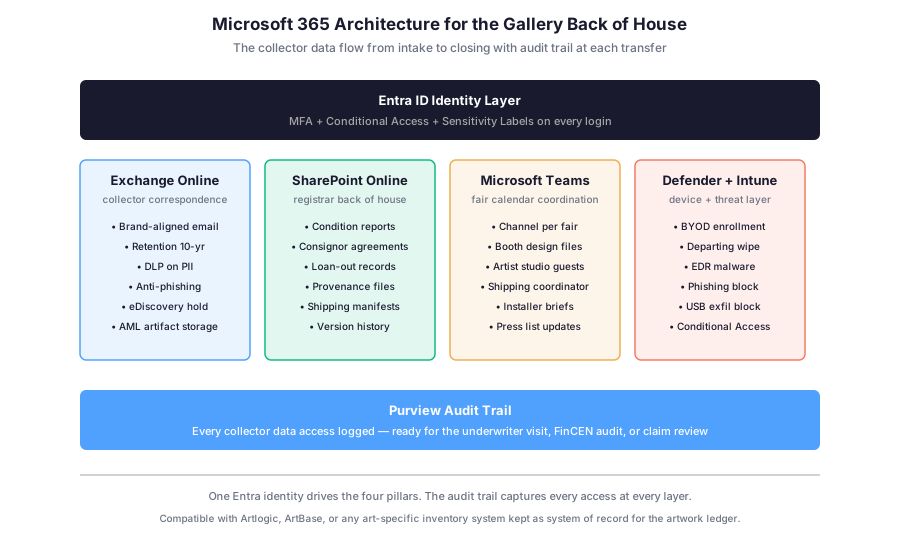
The architecture above is what the underwriter visit asks for. Same for the FinCEN audit. Same for the high-value claim review. Specifically, one Entra identity drives four pillars: email, documents, collaboration, and security. Notably, the Purview audit trail sits underneath everything and captures every collector data access automatically.
📋 Departing Salesperson Scenarios: Legacy vs M365 Lockout
The departing salesperson worry is the most frequent. Below, four scenarios mapped against legacy stack versus the Microsoft 365 art gallery response.
Four scenarios scored against the Microsoft 365 art gallery setup
| Scenario | Legacy stack response | M365 BP response | Time to lockout |
|---|---|---|---|
| Senior salesperson resigns Friday for competitor | Change email password Monday, hope for the best | Entra ID offboarding, Intune wipe corporate profile, Conditional Access blocks personal device | Legacy: 72 hrs / M365: 90 seconds |
| Junior assistant emails wrong recipient | Damage already done, no recall possible | Exchange retention pull, DLP block on PII forward, recall via admin center | Legacy: irreversible / M365: 5 min |
| External accountant export full collector list | Full QuickBooks export sits in accountant inbox | SharePoint view-only link, redacted P&L, masked collector names, access expires automatically | Legacy: years of exposure / M365: scoped engagement |
| Departing employee USB exfiltration attempt | USB plug-in not detected, data copied silently | Defender + Intune block USB write, Purview log records attempt | Legacy: data lost / M365: blocked + logged |
For 12 to 30 person galleries, the scenarios above remove three weeks of HR firefighting. The institutional memory stays put. Notably, the carrier and FinCEN auditor see the same Purview log when they ask.
🔍 What the AAGA 2025 insider threat report shows for galleries: 38 percent of art-trade insider data losses involve collector roster exfiltration. Specifically, the median financial impact per incident is $185,000 in lost future consignments and split commissions. The Microsoft 365 art gallery setup with Intune and Sensitivity Labels removes this exposure category entirely.
❓ FAQ on the Gallery Back of House Setup
Below, the five most frequent questions Wintive receives from gallery directors and owners during the initial audit conversation. Notably, the answers reflect the operational defaults of Microsoft 365 Business Premium.
Below, the five most frequent questions Wintive receives from gallery directors and owners during the initial audit conversation. Notably, the answers reflect the operational defaults of Microsoft 365 Business Premium, not custom builds.
Setup basics and what M365 replaces
A Microsoft 365 art gallery setup replaces Google Workspace plus Dropbox plus Slack plus DocuSign for the back of house. Specifically, Exchange replaces Gmail, SharePoint replaces Dropbox, Teams replaces Slack and WhatsApp groups, and the platform handles consignment signatures. Notably, art-specific tools like Artlogic stay. They remain the system of record for the artwork ledger and provenance file.
The 6-control underwriter scorecard maps directly to native Microsoft 365 Business Premium features. Specifically, condition reports get 10-year retention in SharePoint, MFA on consignor PII access runs through Entra Conditional Access, AML segregation uses Sensitivity Labels, and the audit trail comes from Purview. For a $10M turnover policy, the premium delta runs $2,200 to $4,800 saved per year compared to a legacy stack.
Microsoft 365 art gallery integration with Artlogic and ArtBase
Yes. Specifically, Artlogic and ArtBase remain the system of record. They cover the artwork inventory, consignment cycle status, and price list. The Microsoft 365 art gallery setup handles email, documents, collaboration, and security on top. Notably, you keep the art-specific tooling your registrar already knows, and you gain back-of-house integration on standard Microsoft 365 plans without custom development.
Microsoft 365 art gallery compliance and migration questions
For art transactions above $50,000, dealers must run PEP and sanctions screening on collectors. Specifically, the records must be retained for 5 years and produced during a FinCEN audit. The Microsoft 365 art gallery setup stores the screening artifact in a dedicated SharePoint library tied to the consignment record. Notably, the audit response time drops from 3 days of email searches to 15 minutes of library navigation.
A 12-person gallery migration runs 6 to 8 weeks. Phase 1 (weeks 1-2) covers Entra identity and MFA enrollment. Then email and SharePoint migration runs across weeks 3-5. Subsequently, weeks 6-7 enroll devices in Intune. Finally, week 8 stabilizes plus delivers the underwriter evidence pack. Notably, the migration timeline aligns with the gap between two fair seasons so no operational disruption hits Frieze or Art Basel week.
🎯 Get a M365 Master Audit tailored to your firm
Full Microsoft 365 environment audit tailored to your industry: license stack optimization, tool consolidation analysis, security posture review, compliance mapping. Delivered as a written report with prioritized recommendations, plus 14 days of email Q&A after delivery.
📚 More for Galleries
Microsoft 365 for Event Management Companies: Coordinate the Chaos
Microsoft 365 for Architecture Firms: Build a Better Back Office