Most US law firms running a 10-attorney practice in 2026 are not losing cases. They are losing the gap between what they bill and what they keep. The realization rate sits at 88 percent in the Clio 2025 Legal Trends Report. As a result, the difference between 88 percent and 100 percent is not lazy attorneys. Specifically, the IT support for law firms decision the Managing Partner makes in 2026 — who runs the Microsoft 365 stack, and to what audit standard — shapes how much of that 12 percent gap the firm recovers.
That gap is structural. Therefore, IT support for law firms is not a productivity pitch. It is audit-grade Microsoft 365. By contrast, it is the hub that defends three things at once. First, the realization rate. Second, the bar discipline exposure under ABA Rule 1.6(c). Third, the cyber underwriter scorecard. As a result, the underwriter decides every Q3 whether the firm renews professional liability.
🏛️ Ready to run a US law firm on one IT stack that the bar and the underwriter both accept?
We set up Microsoft 365 for US law firms. The work covers solo to 50-attorney practices. Furthermore, the work covers matter libraries, privilege controls, cyber compliance and BYOD device management. The price stays flat per attorney per month. As a result, the Managing Partner gets one bill, one vendor and one audit trail.
📅 Book a Free 30-Min Call | 💬 Chat on WhatsApp | See Our Plans →
In practice, the sections below break down each leak the platform addresses, the bar rule it satisfies, and the dollar recovery for a 10-attorney firm.

⚖️ The IT support for law firms problem in 2026
Specifically, the Managing Partner faces three parallel risks in 2026.
Microsoft 365 for law firms: TL;DR for the Managing Partner desk
📌 TL;DR — Microsoft 365 for law firms hub (2026): A 10-attorney US law firm running a patchwork of Gmail plus Dropbox plus Zoom plus DocuSign plus a standalone practice management system pays roughly $180 per attorney per month and still fails the cyber insurer questionnaire. By contrast, Microsoft 365 Business Premium at $25 per user per month delivers MFA, EDR, anti-phishing, backup, mobile device management and attack simulation in one tenant. As a result, the firm satisfies the Coalition, Beazley and Chubb underwriting scorecard, defends ABA Rule 1.6(c) on attorney-client privilege, and recovers $546,000 a year in realization gap for the 10-attorney roster. In addition, the platform serves as the hub for four specific decisions: client communication security, practice management hybrid, billable hours recovery and e-discovery readiness.
Specifically, the chart above shows the operational mapping in detail.
Microsoft 365 for law firms operational hub priorities
Specifically, four pressures hit the Managing Partner desk at the same time in 2026. First, the rate freeze: 36.9 percent of timekeepers at the largest corporate clients saw no rate increase in 2025 per the Wells Fargo Legal Specialty Group survey. Second, the realization rate stuck at 88 percent per Clio. Third, the cyber underwriter questionnaire: Coalition reports that 82 percent of denied ransomware claims involved organizations without MFA. Finally, the bar discipline exposure under ABA Model Rule 1.1 Comment 8 on technology competence. As a result, the IT stack is no longer an admin overhead line. By contrast, it is the operational defense layer for the practice itself.

Notably, the comparison above is not about email features. Instead, it is about where the bar discipline exposure sits. Specifically, an attorney sending a privileged communication from a personal Gmail address through a public WiFi at a court appearance is one screenshot away from a malpractice complaint. Furthermore, the same attorney sending the same communication from Outlook on a Microsoft 365 tenant with Conditional Access and DLP policies sits inside the firm safe harbor.
📊 The realization rate gap that the IT stack creates
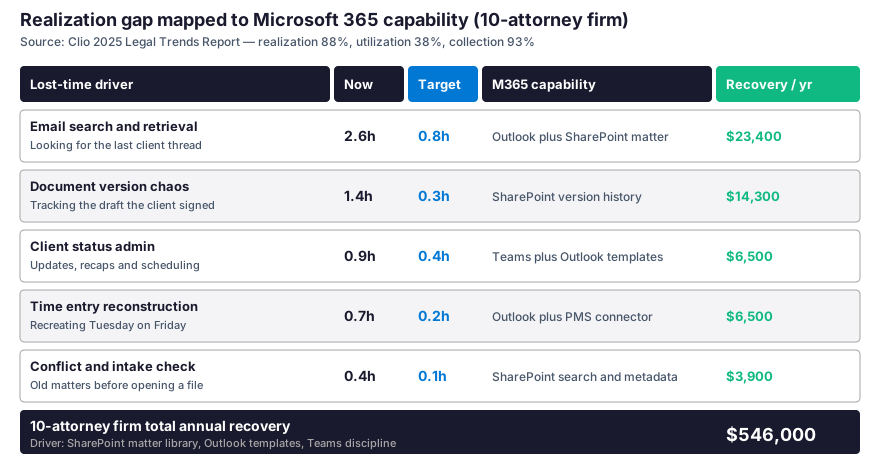
In practice, the gap between billed hours and collected hours sits at 12 percentage points industry-wide per Clio 2025. By contrast, the gap is not random. Specifically, five lost-time drivers absorb that 12 percent and a Microsoft 365 for law firms setup recovers most of them. Therefore, the math below shows where each driver lands and which platform capability closes the gap on a 10-attorney roster.
Furthermore, the structure shown above sets the platform standard for the firm.
💡 What we see across 60+ M365 tenants for US SMB law firms: The firms that move from Gmail plus Dropbox to Microsoft 365 Business Premium recover an average of 1.8 hours per attorney per day of previously lost time. Furthermore, the bulk of the recovery comes from email search collapsing from 2.6 hours to 0.8 hours once SharePoint matter libraries replace the inbox as the primary document store. In practice, a 10-attorney firm at a blended $250 hourly rate captures $546,000 a year of previously written-off time.
🛡️ The cyber insurer 7-control scorecard for SMB practices
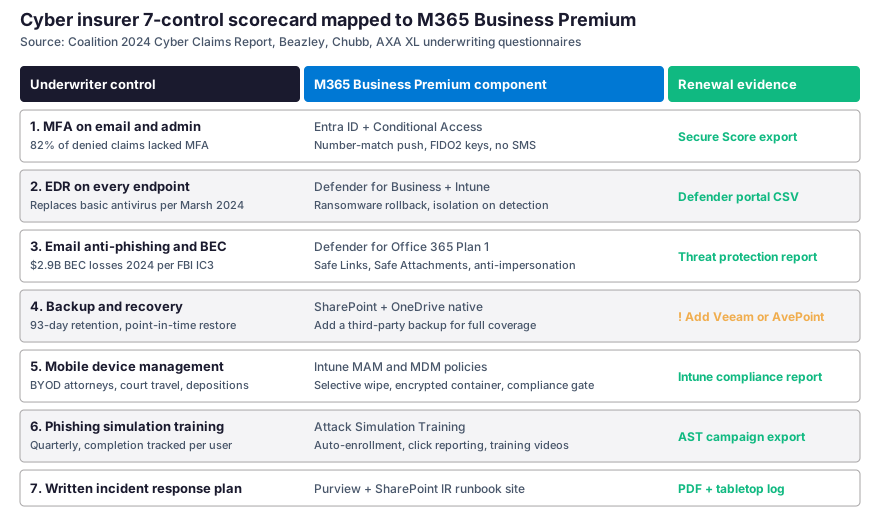
Specifically, the cyber insurer questionnaire is no longer a paper form in 2026. Furthermore, carriers including Coalition, Beazley, Chubb and AXA XL now act differently. Specifically, they deploy automated external scanning before they quote. As a result, an underwriter sees the firm tenant before the Managing Partner sees the underwriter quote. In addition, the Marsh McLennan 2024 report found that 41 percent of cyber insurance applications get denied on first submission. Notably, the top two reasons are missing MFA and inadequate endpoint protection. Therefore, the scorecard below shows which Microsoft 365 component satisfies which underwriter control.
The renewal evidence Managing Partners need on file
In practice, the underwriter does not accept a Managing Partner attestation alone. By contrast, the underwriter wants screenshots and exports per control. Specifically, Coalition asks for five exports. MFA needs the Microsoft Secure Score PDF. EDR needs the Defender for Business compliance CSV. Anti-phishing needs the Defender for Office 365 threat protection report. Mobile device management needs the Intune compliance report. Staff training needs the Attack Simulation campaign export. As a result, the firm that runs on a Microsoft 365 tenant generates all five exports in 20 minutes. Therefore, the renewal application that used to take three weeks of evidence assembly drops to one afternoon.
Microsoft 365 for law firms vs underwriter scorecard pitfalls
| Underwriter control | Common pitfall on legacy stack | Microsoft 365 fix |
|---|---|---|
| MFA on email and admin | SMS-based MFA on Gmail (insurer downgrade to $250K sub-limit) | Entra ID Conditional Access with number-match push and FIDO2 keys |
| EDR on every endpoint | Basic antivirus on personal laptops (insurer declination) | Defender for Business on every device through Intune enrollment |
| Email anti-phishing | Gmail filtering alone (no Safe Links, no anti-impersonation) | Defender for Office 365 Plan 1 with Safe Links and Safe Attachments |
| Backup and recovery | Dropbox sync mistaken for backup (deleted file = lost file after 30 days) | SharePoint 93-day retention plus third-party Veeam or AvePoint |
| Mobile device management | BYOD attorney iPhone with no remote wipe capability | Intune MAM with selective wipe and compliance gate |
| Phishing simulation | Annual generic compliance video (no completion tracking) | Attack Simulation Training with quarterly campaign and CSV export |
In addition, the workflow above illustrates the platform layer in practice.
📁 SharePoint as the matter operating system for the firm
In practice, the matter file is the operational unit of every US law firm. By contrast, the matter file lives in five places on the legacy stack: Gmail attachments, Dropbox folders, the desktop, a paralegal USB drive and the printer queue. Specifically, SharePoint consolidates all five into one matter library per client. The library uses document sets with native version history. Metadata tags every file by matter number. Retention policies map to the state bar record retention requirement. As a result, the conflict check before opening a new file drops to 30 seconds. The legacy process took 25 minutes of inbox searching. Furthermore, the document version that the client signed off on becomes deterministic, not anecdotal.

Matter library structure and records retention discipline
Critically, every state bar imposes a record retention period on closed matters. Specifically, the period ranges from 5 years in California to 10 years in New York. Furthermore, SharePoint applies the retention policy at the document library level. As a result, a closed matter cannot be deleted by an associate clicking the wrong file. In addition, the platform writes the disposition log when the retention window expires, which the firm needs if the bar audits the practice. By contrast, the same retention discipline on a shared Dropbox folder requires a manual checklist that nobody runs.

Therefore, the partner who runs the practice review sees the retention status of every closed matter in one dashboard.
💬 Teams for client calls, depositions and co-counsel coordination
Specifically, the production communication on a US law firm runs in three channels: client calls, deposition prep with co-counsel, and internal team coordination. Furthermore, Teams handles all three on one tenant with one audit trail. In practice, the deposition prep room is a Teams private channel with the partner, the associate, the paralegal and the expert witness. As a result, every recording, every chat message and every shared document sits in one place. Therefore, the trial six months later runs smoother. The associate retrieves the deposition prep folder in 10 seconds. The legacy process took 40 minutes of inbox archaeology.
Client meeting setup and time entry recovery
Notably, the Teams Premium add-on produces an automated meeting transcript. In addition, it generates an AI recap. Furthermore, the recap lands in the matter library, not in the inbox. As a result, the time entry rebuild gets easier. The associate forgot to record 4 PM Tuesday. On Friday, the meeting metadata reconstructs it. In addition, the firm satisfies the state bar timekeeping standard on contemporaneous records because the meeting timestamp is the time entry, not an after-the-fact estimate.
🔐 Attorney-client privilege under ABA Rule 1.6(c) on Microsoft 365
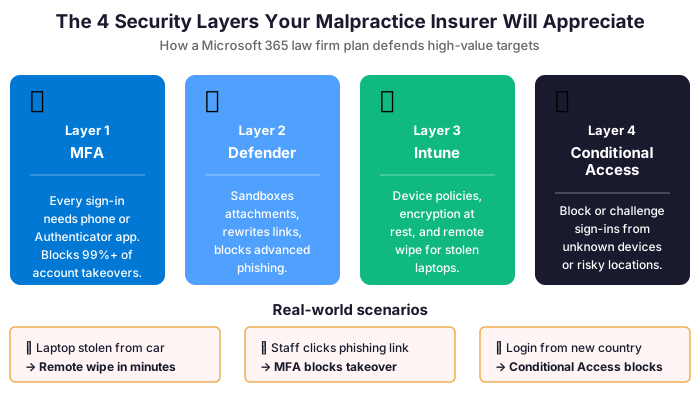
Critically, ABA Model Rule 1.6(c) requires the attorney to make reasonable efforts to prevent the inadvertent disclosure of client information. Furthermore, Comment 8 to Rule 1.1 on technology competence makes the IT stack itself a competence question. As a result, the consumer Gmail tenant is the wrong choice for a Managing Partner. There is no DLP policy. There is no Conditional Access. A malpractice claim brings a competence challenge. By contrast, the Microsoft 365 for law firms tenant ships with the right controls. It satisfies the prevention duty under 1.6(c). It also satisfies the competence duty under 1.1 Comment 8. Specifically, Microsoft Purview DLP policies block the transmission of privileged content outside the firm. In addition, sensitivity labels classify documents at creation by matter. Therefore, a privileged client memo cannot be forwarded to a personal address by accident, even if the associate tries.
Microsoft 365 for law firms privilege defense at departure
In practice, the departing associate is the second most common source of a privilege breach after BEC fraud. Specifically, an associate jumping firms takes the matter contact list, the case strategy memos and the client correspondence to the competing firm. Furthermore, Intune MAM applies selective wipe on the firm-managed device. The action takes 90 seconds when HR triggers the offboarding workflow. As a result, the associate retains the personal contacts and personal apps, but the matter library access is gone. In addition, the SharePoint audit log shows which matters the associate accessed in the 30 days before departure. The firm needs that log if a privilege claim follows.
💰 The Microsoft 365 for law firms stack cost defense
Specifically, the legacy stack for a 10-attorney US law firm runs $180 per attorney per month on average. By contrast, Microsoft 365 Business Premium runs $25.50 per attorney per month at list and drops to $22 per attorney per month with the annual commitment. Furthermore, the comparison is not about absolute cost. Instead, it is about TCO and the gap that the platform absorbs. As a result, the firm consolidating onto Microsoft 365 redirects $1,500 to $1,800 per attorney per year. The savings flow into the bottom line. Some firms reinvest into Copilot for legal research.
Microsoft 365 for law firms vs SaaS sprawl per attorney

As a result, the table above gives the Managing Partner the side-by-side comparison.
| Legacy SaaS line | Per attorney per month | Microsoft 365 component that absorbs it |
|---|---|---|
| Google Workspace Business Plus | $22 | Exchange Online + Outlook in Business Premium |
| Dropbox Business Advanced | $24 | SharePoint + OneDrive 1 TB per user in Business Premium |
| Zoom Pro plus webinars | $19 | Teams meetings and webinars in Business Premium |
| DocuSign Business Pro | $40 | SharePoint approvals + Power Automate flows |
| 1Password Business | $8 | Entra ID single sign-on with Conditional Access |
| Mimecast email security | $6 | Defender for Office 365 Plan 1 in Business Premium |
| CrowdStrike Falcon Go EDR | $8 | Defender for Business included in Business Premium |
| Standalone MDM (Jamf or Hexnode) | $15 | Intune included in Business Premium |
| KnowBe4 training | $8 | Attack Simulation Training included in Business Premium |
| Legacy stack total | $150 | $25.50 in one Microsoft 365 Business Premium SKU |
📈 The hourly rate freeze problem and the productivity gap
Specifically, the rate freeze landed hard in 2025. Furthermore, the Wells Fargo Legal Specialty Group survey reports that 36.9 percent of timekeepers at the largest corporate clients saw no rate increase that year, up from 19.8 percent in 2024. As a result, the firm cannot price its way to a higher revenue per attorney number. By contrast, the firm must close the gap on the productivity side. In addition, the Clio 2025 data shows that small firms adopting AI extensively report a 69 percent positive revenue impact. Therefore, the Microsoft 365 for law firms tenant becomes the safe substrate for Copilot. Furthermore, Copilot delivers brand-voice tuned drafts on letterhead Word documents. In addition, it produces boilerplate for engagement letters. It also runs email triage on the Outlook inbox. Critically, the privilege never leaves the firm tenant for a third-party model.
🔍 What the ABA 2025 TechReport shows on small firm tech adoption: 53 percent of US small law firms now use AI in some capacity, up from 27 percent in 2023. Furthermore, the 10 to 49 attorney bracket reports the highest cybersecurity incident rate at 29 percent. As a result, the firms that adopt AI without first consolidating onto a hardened Microsoft 365 tenant are walking into the cyber incident trap at speed.
⚖️ E-discovery, legal hold and the records the bar will ask for
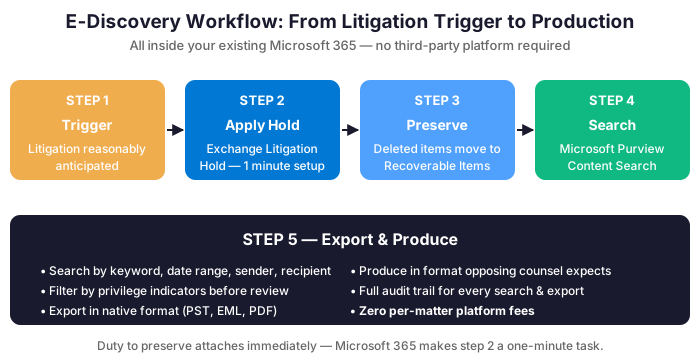
In practice, the bar audit, the malpractice claim and the discovery subpoena all ask the same question: produce the documents. Furthermore, Microsoft Purview makes the production trivial. Specifically, the litigation hold drops on the user mailbox and the SharePoint matter library in one administrative action. As a result, no document moves, no email gets deleted, no metadata changes. In addition, content search across the tenant returns every relevant communication with a single keyword query. Therefore, the e-discovery cost drops. The outside vendor billed $30,000 per matter. The same matter now takes one paralegal afternoon inside the firm.
🤖 Copilot decisions: yes for drafts, no for legal opinions
Specifically, the AI question for a US law firm is not whether to adopt. By contrast, the question is which tasks are safe to delegate and which tasks remain under the attorney professional seal. Furthermore, the ABA 2025 TechReport puts the line clearly: AI is acceptable for drafting where the attorney reviews before delivery, and AI is unacceptable for legal opinions that bind the firm. In practice, the decision tree for the Managing Partner is simple. As a result, the platform answers four operational questions and the attorney answers the legal question that remains.
| Task type | Microsoft 365 Copilot verdict | Why the rule applies |
|---|---|---|
| Engagement letter draft | Yes with attorney review before send | Brand-voice template, no client privilege exposure, low liability surface |
| Discovery response boilerplate | Yes with attorney review before service | Template-driven, attorney reviews the substantive content |
| Email triage and recap of client thread | Yes within the firm tenant only | Stays inside privilege boundary, no third-party AI exposure |
| Deposition prep summary | Review with mandatory partner approval | Substantive matter content, sensitivity label required |
| Legal opinion or advice memo | No, attorney work product only | Bar regulation, professional seal, malpractice exposure |
| Citation check and Bluebook formatting | No, dedicated legal research tool | Hallucination risk on case citations, Westlaw or Lexis required |
Why Copilot sits on top of the platform stack
Notably, Copilot for Microsoft 365 is a per-user add-on at $30 per attorney per month. Furthermore, the license requires the firm to run Microsoft 365 Business Premium first. As a result, the rate-freeze response in 2026 is sequential. Specifically, consolidate to Business Premium for the security and operational hub, then layer Copilot for the productivity gain. By contrast, the firm that buys Copilot before consolidating gets no security benefit and exposes the data to a third-party model without the privilege controls in place.
❓ FAQ on the Microsoft 365 for law firms decision
Specifically, the five questions below cover platform selection, cost, ABA Rule 1.6(c) compliance, cyber insurer readiness and the practice management hybrid decision.
Platform selection and cost questions
Specifically, Google Workspace meets the productivity bar but fails the cyber insurer questionnaire on three controls: native EDR, Intune-grade mobile device management and Attack Simulation Training. Furthermore, Coalition and Beazley both flag Workspace deployments for additional scrutiny in the 2026 underwriting cycle. As a result, the firm running on Workspace pays a premium load or accepts a sub-limit on ransomware coverage. By contrast, Microsoft 365 Business Premium ships all three controls in the base SKU.
In practice, Microsoft 365 Business Premium runs $25.50 per attorney per month at list and drops to $22 with the annual commitment. Furthermore, the price absorbs nine legacy SaaS lines that together total $150 per attorney per month on the average US small firm. As a result, the consolidation gain is roughly $1,500 to $1,800 per attorney per year. Notably, the price does not include Copilot, which sits as a $30 per user per month add-on for firms that want the productivity layer.
ABA Rule 1.6(c) and cyber insurer readiness
Critically, ABA Rule 1.6(c) requires reasonable efforts to prevent inadvertent disclosure of client information. Specifically, the Microsoft 365 tenant ships with Purview DLP to block transmission of privileged content, sensitivity labels to classify documents at creation, Conditional Access to gate access by device compliance, and audit log retention to prove the controls were active. Therefore, the firm running on the platform satisfies the reasonable efforts standard with documented evidence, not attestation alone.
In practice, six of the seven cyber insurer controls ship in Microsoft 365 Business Premium directly: MFA via Entra ID, EDR via Defender for Business, email anti-phishing via Defender for Office 365, mobile device management via Intune, phishing simulation via Attack Simulation Training and incident response runbooks via SharePoint sites. By contrast, the seventh control on backup needs a third-party tool like Veeam or AvePoint because SharePoint native retention is not a full backup solution. As a result, the firm passes the questionnaire on the platform plus one third-party backup line.
Practice management hybrid model decision
Specifically, the answer depends on whether the firm uses IOLTA trust accounting, conflict checking and time-and-billing as the primary operational layer. Furthermore, Microsoft 365 covers email, documents, calendar, communication, security and compliance. By contrast, Microsoft 365 does not replace Clio or PracticePanther on trust accounting or conflict checking. As a result, the hybrid model wins for most US SMB law firms: Microsoft 365 as the security and document hub, plus a surgical PMS like Clio Manage or PracticePanther for the trust accounting and billing functions. In addition, the integration runs through Entra ID single sign-on and a connector that lands time entries from Outlook calendar items.
🎯 Get a M365 Master Audit tailored to your law firm
Full Microsoft 365 environment audit tailored to a US law firm: license stack optimization, cyber insurer readiness review, ABA Rule 1.6(c) compliance mapping, attorney-client privilege control inventory. Delivered as a written report with prioritized recommendations, plus 14 days of email Q&A after delivery.