The Office 365 Security & Compliance Center where activity alerts originally lived no longer exists. Specifically, Microsoft retired the legacy portal in 2021-2022 and split its functions across the Microsoft Purview portal (compliance) and Microsoft Defender XDR portal (security). Furthermore, on March 24, 2025, Microsoft retired the Activity Alerts capability entirely. The replacement is a fragmented stack: Defender XDR alert policies, DLP alerts dashboard, and Insider Risk Management alerts. Therefore, every tenant still using the deprecated Activity Alerts cmdlets needs a migration plan, and most US blogs only cover one slice of the new landscape.
This guide covers what Activity Alerts were, why Microsoft retired them, and which Purview Alert Policies replacement fits each operator persona. Specifically, we walk through the migration matrix Wintive uses across 60+ tenants. Furthermore, we cover the Defender XDR Email & Collaboration alert policies for security teams. The DLP Alerts dashboard handles data protection officers. The Insider Risk Management alerts handle HR-adjacent compliance. Finally, audit log retention policies determine how long every alert stays visible. Therefore, by the end of this guide you will know which destination to pick for which use case, and how to migrate without losing alert continuity.
🛡️ Free: M365 Audit Checklist
19-page PDF with 50 hands-on checks covering Entra ID, Exchange Online, SharePoint, Teams, Intune, license waste, and audit logging. PowerShell commands included. Built from 60+ real tenant audits at Wintive.
📚 What Activity Alerts did before Purview alert policies
Activity Alerts were a 2017-era Office 365 Security & Compliance Center feature that let admins subscribe to specific user activities (mailbox forwarding rule created, file downloaded by user) and receive email notifications when they happened. Specifically, the configuration lived under Alerts > Activity alerts in the legacy portal. The backing cmdlets were New-ActivityAlert and Get-ActivityAlert in the ExchangePowerShell module. Furthermore, the technology was simple but limited: a flat list of activities, no severity classification, no aggregation, no integration with Defender XDR. Therefore, Activity Alerts were the right tool for the 2017 SMB use case but became increasingly inadequate as M365 tenants grew toward enterprise complexity.
Common Activity Alert subscriptions Wintive observed before Purview alert policies
The Wintive observation across 60+ tenant migrations is that most teams using Activity Alerts had only 3-5 active alert subscriptions. Specifically, the most common subscriptions were: external sharing of internal documents, mailbox forwarding rule creation by non-admin users, eDiscovery activity by anyone, and admin role assignment in Exchange Online. Furthermore, none of these original use cases require Activity Alerts specifically — all four map cleanly to Defender XDR alert policies or DLP Alerts in 2026. Therefore, the migration is rarely complex, but it does require knowing which destination to pick for each subscription.
Why these subscriptions had limited value before Purview alert policies
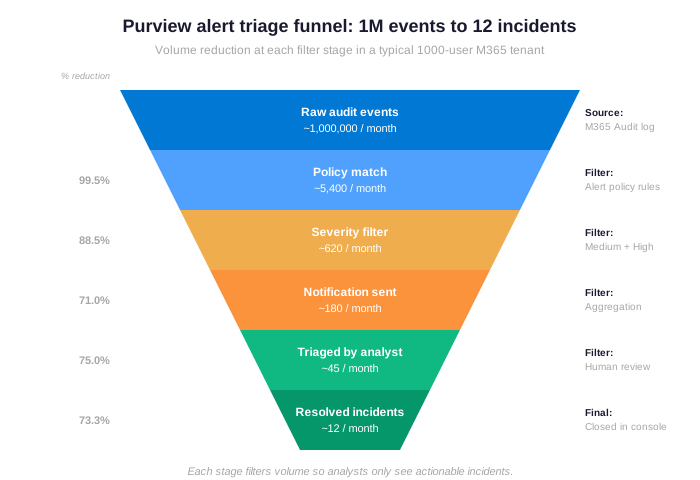
The funnel above shows what Activity Alerts could not deliver in 2026. Specifically, modern Purview Alert Policies handle the 99.5% reduction from 1 million raw events to 5,400 policy matches automatically, then aggregate matches into ~180 notifications instead of flooding analysts with every event. Furthermore, the severity classification (informational, low, medium, high) lets compliance teams focus the 45 monthly triage actions on the 25 critical alerts — the kind of high-signal triage that financial services and law firm clients require for SOC 2 attestation. Therefore, the modern alert stack is not just a rename of Activity Alerts — it is a fundamentally different architecture that scales to enterprise volumes.
Production insight from 60+ Wintive tenant migrations.
The most common Activity Alerts gotcha we discover is not active misconfiguration. Specifically, it is forgotten subscriptions: an alert created in 2018 by an admin who left the company, still firing notifications to a defunct distribution list every week. Furthermore, on Mar 24, 2025, when Microsoft retired the Activity Alerts feature, these zombie alerts silently failed without notification. Therefore, Wintive treats Activity Alert discovery as an audit-cleanup task first, and a migration task second. The migration target depends on what the team actually needs to monitor today — section 4 maps the four destinations.
⚠️ Why Microsoft retired Activity Alerts
Microsoft retired Activity Alerts on March 24, 2025 (per Microsoft Learn deprecation notice) for three converging reasons. Specifically, each reason mapped to a distinct successor in the modern alert stack. Furthermore, understanding which reason applies hardest in your environment helps choose the right migration target. Therefore, this section maps the three structural problems to the three replacement systems.
- Lack of severity classification — replaced by Defender XDR 4-tier severity
- No aggregation — replaced by DLP Alerts threshold-based aggregation
- No insider risk integration — replaced by Insider Risk Management ML correlation
The first problem was the lack of severity classification. Specifically, Activity Alerts treated every subscribed event as equally important — mailbox forwarding rule creation generated the same urgency as a mass file deletion. Furthermore, modern compliance frameworks (SOC 2, HIPAA, FINRA) require severity-based response procedures, which Activity Alerts could not deliver. Therefore, the successor for severity-driven alerting is the Defender XDR Alert Policy framework, which categorizes every alert as informational, low, medium, or high with separate response workflows per severity tier.
Aggregation gap and insider risk in Purview alert policies
The second problem was no aggregation. Specifically, Activity Alerts fired one notification per event, which led to alert fatigue when an external sharing pattern triggered 50 emails in an hour. Furthermore, modern alert systems aggregate matches into incidents based on user, time window, and activity pattern — reducing 50 events into 1 incident with attached evidence. Therefore, the successor for aggregation is DLP Alerts dashboard, where threshold-based aggregation (X events of type Y in Z minutes by user U) is a built-in capability that Activity Alerts could not replicate without third-party SIEM integration.
The third problem was no insider risk integration. Specifically, Activity Alerts could not correlate signals from multiple workloads (Exchange + SharePoint + Teams + Endpoint) to detect insider risk patterns like potential data theft before termination. Furthermore, modern alert systems use ML-based correlation across signals to surface true insider risk indicators rather than individual events. Therefore, the successor for insider-risk-aware alerting is Microsoft Purview Insider Risk Management, which subsumes the Activity Alert use case for terminating-employee monitoring and adds dozens of new detection patterns.
✅ Prerequisites: licenses, roles, and audit log retention
Each successor to Activity Alerts has different licensing and role requirements. Specifically, Defender XDR alert policies need Microsoft 365 E3 minimum, DLP Alerts need DLP-eligible licensing (E3 covers basic, E5 unlocks aggregation), and Insider Risk Management needs E5 or the M365 E5 Compliance add-on. Furthermore, audit log retention is the silent prerequisite — alerts only stay visible as long as their source events stay in the audit log, with E3 giving 1 year and E5 giving 10 years. Therefore, the box below summarizes what each migration target actually needs.
✅ License and role requirements per migration target
- Defender XDR Alert Policies — Microsoft 365 E3 covers basic policies, E5 unlocks Defender for Office 365 Plan 2 advanced policies, role: Manage Alerts or Organization Configuration
- DLP Alerts dashboard — any DLP-eligible SKU (E1, E3, E5, F1, G1, G3, G5), aggregation requires E3 + Defender for Office 365 Plan 2 OR E5, role: Manage alerts + Compliance Administrator
- Insider Risk Management — E5 or M365 E5 Compliance add-on ($12/user/month), role: IRM Admins or IRM Investigators
- Audit log retention — 1 year standard (E3), 10 years with E5 ($55/user/month upgrade), 1-year retention applies to default alert visibility
- Unified audit log — must be enabled in tenant via Set-AdminAuditLogConfig -UnifiedAuditLogIngestionEnabled $true (default off in tenants pre-2018)
- PowerShell modules — ExchangePowerShell for legacy Activity Alert discovery, Microsoft.Graph for new Defender XDR policy management
The licensing footprint depends on where the alert use case lives. Specifically, basic Defender XDR alert policies and DLP single-event alerts ship with Microsoft 365 E3, which covers the bulk of Activity Alert migrations. Furthermore, only Insider Risk Management requires meaningful additional spend, and only when the use case actually requires correlated signals across workloads. Therefore, most Activity Alert migrations stay within existing licensing, with E5 considered only when the discovery phase reveals genuine IRM use cases.
🎯 The three modern alert systems for Purview alert policies
Microsoft scattered the Activity Alerts replacement across three distinct alert systems, each with its own portal, role model, and aggregation logic. Specifically, Defender XDR alert policies handle email and collaboration security alerts (the bulk of Activity Alert use cases). Furthermore, the DLP Alerts dashboard handles data loss prevention with aggregation thresholds, and Insider Risk Management handles correlated insider threat patterns with ML-based detection. Therefore, picking the right destination is critical — the severity ring model below shows how alert volumes and severities map across the three systems.
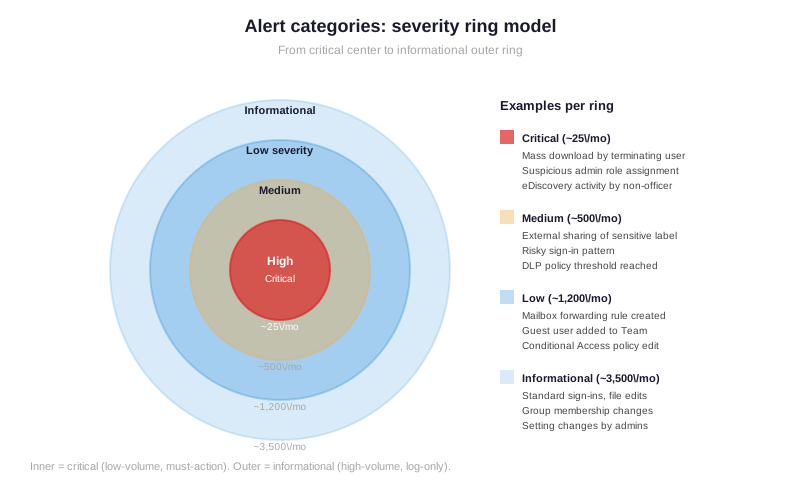
The ring model above shows the Wintive segmentation observed across 60+ tenants. Specifically, critical alerts (innermost ring) are rare but high-impact: ~25 per month for a 1000-user tenant, almost all routed to Defender XDR or Insider Risk Management for human triage. Furthermore, medium alerts handle most external sharing and DLP threshold matches via DLP Alerts dashboard, while informational alerts at ~3,500 per month never need a notification — they live in audit log only for forensic searches. Therefore, the alert architecture should match the volume distribution: human attention only for inner-ring critical alerts, dashboards for medium-ring DLP, and silent audit log for informational outer ring.
🛡️ Defender XDR alert policies for security teams
Defender XDR Email & Collaboration alert policies are the right migration target for most Activity Alert subscriptions. Specifically, the policies live at security.microsoft.com/alertpolicies, with backing cmdlet New-ProtectionAlert in Security & Compliance PowerShell. Furthermore, Defender XDR alert policies cover all the original Activity Alert use cases (external sharing, forwarding rules, eDiscovery, admin role assignment) plus dozens of new patterns Microsoft adds quarterly. Therefore, when in doubt, this is the destination Wintive recommends for the helpdesk and security analyst personas during PowerShell-driven migrations.
# Migrate an Activity Alert to a Defender XDR alert policy via PowerShell

# 1. Connect to Security & Compliance PowerShell
Connect-IPPSSession -UserPrincipalName admin@contoso.com

# 2. Discover legacy Activity Alerts (gotcha: deprecated cmdlet may silently fail)
$legacy = Get-ActivityAlert -ErrorAction SilentlyContinue
Write-Host "Legacy Activity Alerts found: $($legacy.Count)" -ForegroundColor Cyan
$legacy | Select Name, Severity, NotifyUser, Operation | Format-Table

# 3. Replace with new Defender XDR alert policy (uses New-ProtectionAlert)
New-ProtectionAlert -Name "External Sharing Alert (migrated from Activity Alert)" `
    -ThreatType Activity `
    -Operation FileSharedExternally,SharingInvitationCreated `
    -Severity Medium `
    -Category InformationGovernance `
    -NotifyUser "compliance@contoso.com" `
    -AggregationType SimpleAggregation `
    -Threshold 5 `
    -TimeWindow 60 `
    -Disabled $false

# 4. Verify the new policy is active
Get-ProtectionAlert -Identity "External Sharing Alert (migrated from Activity Alert)" |
    Select Name, ThreatType, Severity, Disabled, AggregationType, Threshold, TimeWindow

# 5. Decommission the legacy Activity Alert (safe-removal pattern)
$legacy | Where Name -like "*External*" | Remove-ActivityAlert -Confirm:$false
Defender XDR alert policy migration outcome from Activity Alerts
This migration pattern uses the Defender XDR alert policy framework as a drop-in replacement for legacy Activity Alerts with three structural improvements. Specifically, severity classification (Medium) drives notification routing, aggregation (SimpleAggregation with Threshold 5 + TimeWindow 60) prevents alert fatigue, and Category (InformationGovernance) drives RBAC visibility. Furthermore, every Defender XDR alert policy populates the unified Alerts page in the Defender portal with full incident context, while legacy Activity Alerts only sent emails. Therefore, this migration is rarely a like-for-like swap — it is a structural upgrade where compliance teams gain investigation tools they did not have under Activity Alerts.
🔒 DLP Alerts dashboard for data protection officers
The DLP Alerts dashboard is the right migration target when the Activity Alert use case involves sensitive data classification rather than generic activity tracking. Specifically, the dashboard lives at purview.microsoft.com under Data Loss Prevention > Alerts, with backing PowerShell via the New-DlpComplianceRule cmdlet. Furthermore, DLP Alerts ship two configurations: single-event alerts for highly sensitive low-volume events (one email with 10+ credit card numbers) and aggregated alerts for noisy patterns (200 documents matching a sensitivity label downloaded in 1 hour). Therefore, DLP Alerts replace the subset of Activity Alerts that were really data classification problems disguised as activity monitoring.
# Configure a DLP policy with aggregated alerts (replaces credit card download Activity Alert)
Connect-IPPSSession -UserPrincipalName admin@contoso.com

# 1. Create the DLP policy targeting Exchange + SharePoint + OneDrive + Teams
$policyName = "Credit Card Mass Download Detection"
New-DlpCompliancePolicy -Name $policyName `
    -ExchangeLocation All `
    -SharePointLocation All `
    -OneDriveLocation All `
    -TeamsLocation All `
    -Mode Enable

# 2. Add a rule with aggregated alert (>=10 credit cards in 60 minutes)
New-DlpComplianceRule -Name "$policyName - Aggregated Detection" `
    -Policy $policyName `
    -ContentContainsSensitiveInformation @(
        @{ Name = "Credit Card Number"; minCount = 10 }
    ) `
    -GenerateAlert $true `
    -AlertProperties @{
        AggregationType = "shallow"
        Threshold = 10
        Timespan = "PT1H"
        NotifyUser = "dpo@contoso.com","compliance@contoso.com"
        Severity = "High"
    } `
    -ReportSeverityLevel High `
    -GenerateIncidentReport SiteAdmin

# 3. Verify the rule is active and the threshold is correct
Get-DlpComplianceRule -Policy $policyName |
    Select Name, GenerateAlert, ReportSeverityLevel, Disabled

# 4. Test with a sample policy match (does not generate real alert in audit mode)
Test-DlpPolicy -Identity $policyName -InputObject (Get-Content -Path ".\test-document.txt")
DLP rule outcome for Purview alert policies sensitive content matching
This DLP rule replaces an Activity Alert “file downloaded” subscription with structurally better controls. Specifically, ContentContainsSensitiveInformation matches the actual sensitive data (credit cards) rather than any file download, AggregationType=shallow with Threshold=10 in 60 minutes prevents false positives from one-off legitimate access, and Severity=High routes the alert to the DPO and compliance officer rather than a generic distribution list. Furthermore, the GenerateIncidentReport parameter creates a full incident record in the Purview console with matched document samples, redacted content preview, and user activity timeline. Therefore, DLP Alerts handle the data-classification subset of Activity Alerts with audit-grade evidence that legacy Activity Alerts could not produce.
👤 Insider Risk Management alerts for HR-adjacent compliance
Insider Risk Management (IRM) is the right destination when the Activity Alert use case involves correlating signals across multiple workloads to detect insider threat patterns. Specifically, IRM lives at purview.microsoft.com under Insider Risk Management with backing PowerShell via Microsoft.Graph SDK. Furthermore, the killer feature missing from Activity Alerts is HR-data integration: IRM can ingest termination dates from Workday or SAP SuccessFactors and automatically increase risk scoring for users in their notice period. Therefore, IRM is the right destination for the “monitor a terminating employee” use case that financial services and law firm clients require for SOC 2 attestation.
# Configure an IRM policy for a terminating employee with elevated thresholds
Connect-MgGraph -Scopes "InsiderRiskManagement.ReadWrite.All"

# 1. Define the IRM policy template (Departing employee data theft)
$policyTemplate = @{
    name = "Departing Employee Data Theft Detection"
    description = "Monitors users in 30-day notice period for elevated risk"
    templateType = "departingEmployeeDataTheft"
    ingestion = @{
        hrConnector = "contoso-workday-connector"
        triggerEvent = "resignationDate"
        triggerWindow = "P30D"   # 30-day window before/after termination
    }
    indicators = @{
        emailAttachmentExfiltration = $true
        sharePointDownloadVolume = @{
            threshold = 50
            timespan = "PT24H"
            severity = "High"
        }
        usbAttachment = @{
            threshold = 1
            timespan = "PT24H"
            severity = "High"
        }
        cloudUploadToPersonal = @{
            threshold = 10
            timespan = "PT1H"
            severity = "Medium"
        }
    }
    notifyUser = "hr-compliance@contoso.com"
}

# 2. Submit policy via Graph API
$policyJson = $policyTemplate | ConvertTo-Json -Depth 5
$response = Invoke-MgGraphRequest -Method POST -Uri "v1.0/security/insiderRiskManagement/policies" -Body $policyJson

# 3. Verify the policy is enrolled and active
Invoke-MgGraphRequest -Method GET -Uri "v1.0/security/insiderRiskManagement/policies?filter=displayName eq 'Departing Employee Data Theft Detection'"
IRM policy outcome for terminating employee monitoring
This IRM policy replaces the “monitor terminating employee” Activity Alert with a structurally superior detection model. Specifically, the templateType=departingEmployeeDataTheft binds risk scoring to HR data (resignation date) so the elevated thresholds activate automatically when an employee gives notice. Furthermore, the indicators array bundles 4 distinct detection patterns into a single correlated detection: email attachment exfil, SharePoint download volume, USB attachment, cloud upload. Admins struggle to build this manually with Activity Alerts because correlation across workloads is not supported. Therefore, IRM delivers what the legacy Activity Alert “monitor user X” pattern was supposed to be in 2017 but never could deliver: a multi-signal correlated detection that surfaces real insider risk indicators.
📋 Audit log retention and alert visibility lifecycle
Audit log retention determines how long every alert stays visible in the Purview console after being generated. Specifically, alerts inherit the retention setting of their source events: if the audit log retains events for 1 year (E3 default), alerts generated from those events disappear from the console after the same 1-year window. Furthermore, this is a common gotcha — teams investigating alerts from 13 months ago find that the alerts vanished even though the audit log was searchable through Search-UnifiedAuditLog. Therefore, audit log retention policy configuration is a hard prerequisite for any compliance posture that requires alert evidence beyond 1 year.
# Configure custom audit log retention for compliance-driven alerts
Connect-IPPSSession -UserPrincipalName admin@contoso.com

# 1. Verify unified audit log is enabled (silent fail if not)
$config = Get-AdminAuditLogConfig
if (-not $config.UnifiedAuditLogIngestionEnabled) {
    Set-AdminAuditLogConfig -UnifiedAuditLogIngestionEnabled $true
    Write-Warning "Unified audit log was DISABLED - now enabled. Alerts will start populating in 24-48h."
}

# 2. Create a 10-year retention policy for high-severity alerts (E5 required)
New-UnifiedAuditLogRetentionPolicy `
    -Name "10-year retention for SOC 2 high-severity alerts" `
    -Description "Retains audit events feeding high-severity alerts for FINRA + SOC 2 evidence" `
    -RecordTypes ExchangeAdmin,SharePointFileOperation,AzureActiveDirectoryStsLogon,DataLossPrevention `
    -Operations FileDownloaded,FileUploaded,FileSharedExternally,UserLoggedIn,DLPRuleMatch `
    -RetentionDuration TenYears `
    -Priority 1

# 3. Verify the retention policy is active
Get-UnifiedAuditLogRetentionPolicy | Where Name -like "*SOC 2*" |
    Select Name, RetentionDuration, RecordTypes, Operations

# 4. Search audit log for events fed into a specific alert (forensic investigation)
Search-UnifiedAuditLog -StartDate (Get-Date).AddDays(-90) -EndDate (Get-Date) `
    -Operations FileSharedExternally `
    -ResultSize 5000 |
    Where { $_.UserIds -eq "investigated.user@contoso.com" } |
    Export-Csv "alert-evidence-$(Get-Date -Format yyyy-MM-dd).csv" -NoTypeInformation
Audit log retention outcome for compliance-driven Purview alert policies
This audit log configuration extends alert visibility to 10 years for compliance-driven scenarios. Specifically, the New-UnifiedAuditLogRetentionPolicy cmdlet (E5 only) creates a per-record-type retention rule that overrides the 1-year default for the specific event types feeding regulated alerts. Furthermore, the Search-UnifiedAuditLog cmdlet at the bottom is the forensic investigation tool teams reach for when an alert older than 1 year needs evidence reconstruction. This assumes the underlying events were retained. Therefore, the Wintive audit log retention pattern is to apply 10-year retention only to compliance-critical record types: DLP, file operations, sign-ins, admin actions. This balances storage cost with audit coverage rather than applying blanket extension.
📊 Alert volume tuning and seasonality monitoring
Alert tuning is the operational practice that separates a useful Purview alert policies stack from an alert-fatigue noise generator. Specifically, the volume trend chart below shows 12 months of alert generation across severity tiers in a typical 1000-user M365 tenant. Furthermore, the Q4 holiday spike (Nov-Dec) is a Wintive-observed pattern across multiple verticals: critical alerts up ~70% from offboarding plus year-end risk activities. Therefore, the alert tuning practice should account for seasonal volume variance rather than tuning to year-round flat thresholds.
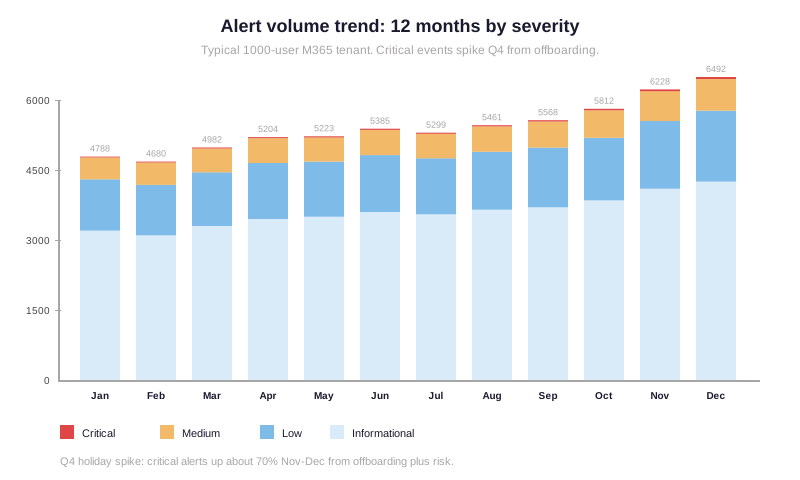
The trend chart shows three patterns Wintive observes consistently across SOC 2 audit cycles. Specifically, baseline alert volume sits around 4,800-5,000 per month for a 1000-user tenant in Q1-Q3, rising to ~6,500 in Q4 from terminating-employee offboarding patterns. Furthermore, the critical severity tier scales fastest (~70% Q4 increase) because mass downloads by departing users skew toward Q4 fiscal-year ends. Therefore, the Wintive tuning recommendation is to set alert thresholds at 80th percentile of Q3 baseline (typical) and adjust upward to 90th percentile from October through January to absorb the Q4 spike without losing detection.
📋 Activity Alert to Purview Alert Policies migration matrix
The migration matrix below maps the most common Activity Alert subscription patterns to the right successor system. Specifically, each row represents an operator persona Wintive observes in real tenant migrations, with the recommended target and the decisive selection criterion. Furthermore, the table is the artifact Wintive produces in the discovery phase to align stakeholders before any deployment work starts. Therefore, use the matrix below as a decision aid — the right answer for your team may combine multiple targets across operator personas.
| Activity Alert use case | Operator persona | Recommended target | Why |
|---|---|---|---|
| External sharing alerts | Compliance officer | Defender XDR alert policy | Severity + aggregation built-in |
| DLP credit card detection | Data protection officer | DLP Alerts dashboard | Sensitive content matching with thresholds |
| Terminating employee monitoring | HR-compliance team | Insider Risk Management | HR data integration + ML correlation |
| Admin role assignment alerts | Security analyst | Defender XDR alert policy | Native ThreatType=Activity coverage |
| eDiscovery activity tracking | Legal team | Audit log + Sentinel SIEM | Forensic searches outlive alerts |
The matrix shows that Activity Alerts served five distinct personas, each with a different right answer. Specifically, compliance officers and security analysts move to Defender XDR alert policies, data protection officers move to DLP Alerts dashboard, HR-compliance teams move to Insider Risk Management, and legal teams move to audit log + SIEM ingestion. Furthermore, recognizing this multi-persona reality is what separates a successful Activity Alert migration from a stalled one — this is a common mistake teams make when treating the migration as a single tool swap. Therefore, Wintive starts every migration engagement with a 30-minute persona inventory call before any tooling decisions are made.
🔒 Security gaps: Activity Alerts vs the three successors
The security comparison table below maps the structural gaps of Activity Alerts against each modern successor. Specifically, this is the gotcha-by-gotcha comparison Wintive walks through with financial services and law firm clients during migration scoping. Furthermore, the table makes clear why no single feature add-on could have saved Activity Alerts — the gaps are architectural, not configuration mistakes admins struggle to fix. Therefore, treat this comparison as the why-rebuild rationale, not a why-not-just-patch debate.
| Security control | Activity Alerts | Defender XDR | DLP Alerts | IRM |
|---|---|---|---|---|
| Severity classification | None | 4-tier native | Per-rule severity | Risk-score based |
| Aggregation | None (alert-per-event) | Threshold + window | Threshold-based | Pattern correlation |
| HR data integration | None | None natively | None natively | Workday + SAP native |
| SIEM forwarding | Email only | Sentinel + Graph API | Sentinel + Graph API | Sentinel + Graph API |
| Audit log retention | 1 year max | 10 years (E5) | 10 years (E5) | 10 years (E5) |
Five rows is enough to make the verdict clear. Specifically, every cell where Activity Alerts shows “none” is a control that auditors will flag during SOC 2, HIPAA, FINRA, or PCI-DSS reviews — gotchas that silently fail compliance even when the technical functionality “works.” Furthermore, the Defender XDR, DLP Alerts, and IRM columns each have at least four rows of native support, with the combination covering all five. Therefore, the structural conclusion is that Activity Alerts cannot be made compliant through configuration alone — rebuild is the only viable path, and Microsoft retiring the feature in March 2025 made the rebuild mandatory.
❓ Frequently asked questions
The most common questions teams ask before standardizing on a Purview alert policies migration target.
No. Specifically, Microsoft retired Activity Alerts on March 24, 2025 (per message center notification MC1006620). Furthermore, the Get-ActivityAlert and New-ActivityAlert cmdlets still exist in ExchangePowerShell but silently fail to deliver new notifications. Therefore, any tenant relying on Activity Alerts is generating zero alerts in production and needs immediate migration to Defender XDR alert policies, DLP Alerts, or Insider Risk Management.
Defender XDR alert policy with category InformationGovernance and severity Medium. Specifically, the New-ProtectionAlert cmdlet with Operation FileSharedExternally,SharingInvitationCreated covers the original Activity Alert use case with severity classification and aggregation. Furthermore, if the use case involves sensitivity-labeled content, DLP Alerts dashboard with ContentContainsSensitiveInformation is the better target because it surfaces the matched data, not just the action. Therefore, the right target depends on whether the question is “was this shared externally” (Defender XDR) or “was sensitive data shared externally” (DLP Alerts).
No. Specifically, basic Defender XDR alert policies and DLP single-event alerts ship with Microsoft 365 E3 ($23 per user per month). Furthermore, only DLP aggregated alerts (threshold-based detection) and Insider Risk Management require E5 or the M365 E5 Compliance add-on ($12 per user per month). Therefore, most Activity Alert migrations stay within E3 licensing — E5 is only justified when the discovery phase reveals correlated insider risk use cases that single-event alerts cannot detect.
Advanced Purview alert policies questions: AWS comparison, SIEM forwarding, historical data retention
AWS GuardDuty handles equivalent functionality for AWS workloads with continuous-monitoring threat detection and severity-based findings. Specifically, Purview alert policies cover the same use case for Microsoft 365 with category-driven severity scoring and aggregation. Furthermore, both technologies share the same architectural philosophy: replace flat alert subscriptions with continuous detection that surfaces correlated incidents rather than individual events. Therefore, multi-cloud teams typically run Purview alert policies for M365, GuardDuty for AWS workloads, and Defender for Cloud for Azure resources — matching each tool to its native cloud environment.
Yes. Specifically, Microsoft Sentinel has native connectors for Defender XDR alerts (no setup beyond data connector enabling) and DLP Alerts (via Office 365 connector). Furthermore, third-party SIEMs like Splunk and Datadog ingest alerts via the Microsoft Graph Security API endpoint with delegated app registration permissions. Therefore, the Wintive recommended pattern for compliance-driven tenants is Defender XDR alert policies generating native alerts + Sentinel ingesting them into a unified SIEM dashboard for correlation with non-Microsoft signals.
The historical Activity Alert configurations and notification history are deleted from Microsoft Purview. Specifically, the Get-ActivityAlert cmdlet may still return policy definitions but their fired notifications are no longer accessible. Furthermore, the underlying audit log events that fed the Activity Alerts are still retained per the tenant audit log retention policy (1 year E3, 10 years E5), so forensic investigation via Search-UnifiedAuditLog still works. Therefore, the migration playbook should export Activity Alert policy definitions to CSV before retirement (for documentation) and re-implement them via the appropriate successor system.
Related Wintive resources
PowerShell Web Access JEA Cloud Shell WAC migration — complementary tutorial covering another deprecated Microsoft technology with a fragmented successor stack.
M365DSC tenant configuration snapshot — capture full tenant state including Defender XDR alert policies, DLP rules, and IRM policies in versionable PowerShell DSC code.
License expiration notifications — Power Automate flow pattern for tracking SaaS licenses, SSL certificates, and Azure reservation renewals using SharePoint Lists and Teams adaptive cards.
$97 M365 Instant Audit validates Purview alert policy posture, DLP coverage, IRM scope, audit log retention, and 43 more audit points in 10 minutes — no PowerShell required.
This tutorial covered one focused Microsoft 365 admin task. For a complete picture of how your full tenant performs against best practices:
🔍 Want a complete audit of your Microsoft 365 tenant?
The M365 Instant Audit scans your M365 environment in under 10 minutes: license waste, security posture, MFA coverage, compliance gaps, license rightsizing opportunities. Full PDF report with prioritized recommendations delivered instantly.