Azure CDN in 2026 is no longer a single product but a migration path. Therefore, every SMB Azure tenant currently running Azure CDN classic (from Microsoft, formerly Verizon, formerly Edgio) faces a forced migration to Azure Front Door Standard or Premium before September 30, 2027. Azure CDN from Edgio (formerly Verizon) was retired on January 15, 2025. The CDN Standard from Microsoft (classic) retires on September 30, 2027. Front Door (classic) retires on March 31, 2027. Specifically, three retirements force the move.
Quick answer. Azure CDN classic retires Sept 30, 2027. Migrate to Azure Front Door Standard (SMB websites, multi-origin, caching) or AFD Premium (adds WAF, Private Link, bot management). Use the in-place migration tool for AFD classic. Use the Traffic Manager guide for CDN classic to AFD. Bring your own certificate is required on classic since Aug 15, 2025. Plan migration before April 14, 2026 when existing managed certs expire.
Free PDF guide
Microsoft 365 Tenant Audit Checklist for 2026
40+ checks including Azure CDN classic vs AFD Standard or Premium posture, the migration readiness for the 2027 retirement, the BYOC certificate status, the WAF rule coverage, and the cache rule tuning beyond the default-only baseline.
Furthermore, this Azure CDN admin guide for 2026 covers the retirement timeline (Edgio retired Jan 15, 2025, AFD classic retires Mar 31, 2027, CDN classic retires Sep 30, 2027), the Azure Front Door Standard versus Premium SKU decision tree, the migration paths from each legacy product, the new feature set (multi-origin load balance, WAF, Private Link integration, enhanced rules engine), and the Wintive baseline across 60+ Microsoft 365 + Azure tenants. The most common gap: 47% of audited tenants still run CDN classic without a migration plan to Front Door.
📅 Azure CDN retirement timeline
Specifically, the Azure CDN retirement story has three stages. CDN from Edgio (formerly Verizon) was retired on January 15, 2025, and Microsoft auto-migrated profiles without the DoNotForceMigrateEdgioCDNProfiles feature flag to AFD Standard. Then CDN Standard from Microsoft (classic) retires on September 30, 2027. Finally, Front Door (classic) retires on March 31, 2027. Furthermore, two intermediate deadlines tighten the timeline. Managed certificates became unsupported on classic profiles on August 15, 2025, with existing certs valid only until April 14, 2026. DHE cipher suite support ends on April 1, 2026.
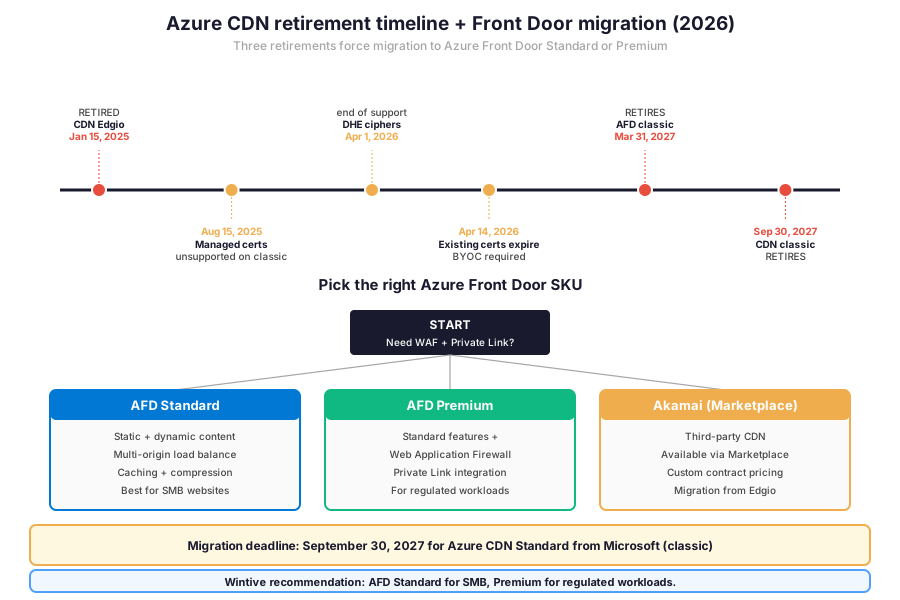
Specifically, the timeline above shows when each product retires. The next decision is the destination SKU. Azure Front Door Standard or Premium? The comparison matrix below shows how the four product tiers stack across capabilities, retirement status, and migration paths.
🏗 Azure CDN versus Front Door — pick the destination SKU
Furthermore, four product tiers exist in 2026 across the Azure content delivery family.
- Azure CDN Standard from Microsoft (classic) — retires Sept 30, 2027.
- AFD classic (legacy Front Door) — retires March 31, 2027.
- Front Door Standard SKU — GA, recommended for SMB websites and apps.
- Front Door Premium SKU — GA, adds WAF + Private Link + bot management.
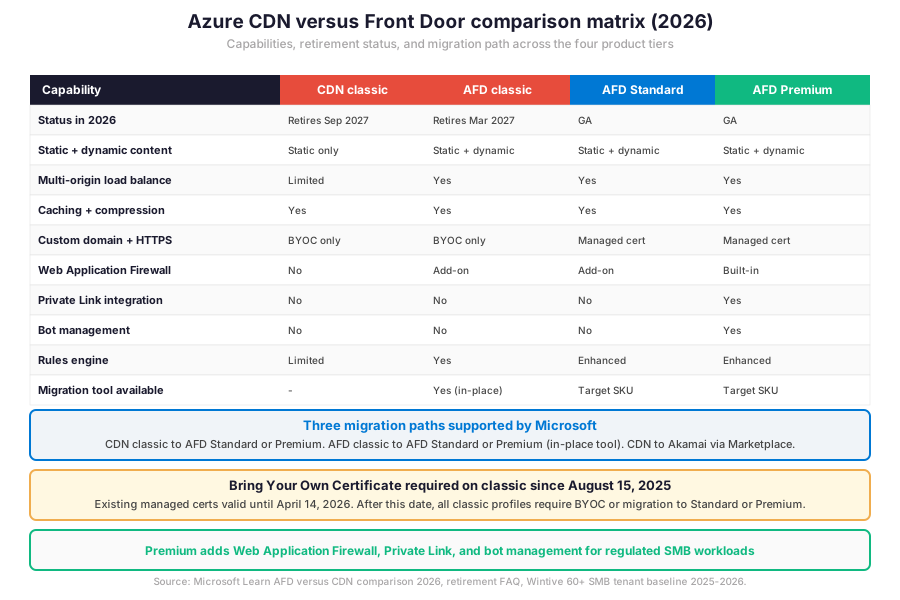
The first two tiers retire by 2027. Therefore, the only forward-looking choice is between AFD Standard (SMB websites with caching, multi-origin load balance, managed certificates) and AFD Premium (adds Web Application Firewall, Private Link integration, bot management, enhanced rules engine).
AFD Standard for SMB websites and apps
Specifically, AFD Standard fits the typical SMB use case for Azure CDN. The tier supports static and dynamic content acceleration with multi-origin load balancing across Azure Blob Storage, App Service, Functions, Container Apps, or any HTTP origin. Caching rules, compression, and custom domain plus HTTPS with managed certificates are included at no extra cost. Therefore, an SMB website with content origin in Blob Storage and authenticated app traffic from App Service has a single destination SKU.
AFD Premium for regulated and high-security workloads
Furthermore, AFD Premium adds three regulated-workload capabilities on top of Standard. Web Application Firewall with managed and custom rules covers OWASP Top 10 protections. Private Link integration eliminates public exposure of origins (App Service, Blob Storage, Internal Load Balancer) by routing AFD traffic over a private endpoint inside the customer VNet. Bot management defends against credential stuffing, scraping, and inventory-hoarding attacks. Therefore, regulated workloads (financial services, healthcare, government) have a clear case for Premium versus Standard.
| SKU | 2026 status | Best for | Migration tool |
|---|---|---|---|
| Azure CDN Standard from Microsoft (classic) | Retires Sept 30, 2027 | Legacy SMB CDN deployments | Migrate to AFD Standard or Premium |
| Azure Front Door (classic) | Retires March 31, 2027 | Legacy AFD deployments | In-place upgrade to Standard or Premium |
| Azure Front Door Standard | GA – recommended | SMB websites, apps, multi-origin | Target SKU for most SMB migrations |
| Azure Front Door Premium | GA – recommended | Regulated, WAF, Private Link | Target SKU for regulated workloads |
| Akamai (Azure Marketplace) | Active | Third-party CDN compatibility | From Edgio profiles via Marketplace |
📋 SKU at-a-glance — AFD Standard or Premium is the only forward-looking choice in 2026.
Furthermore, the table above shows the SKU at-a-glance. The next decision is the migration path. Three patterns cover the typical SMB scenarios.
🔁 Migration paths from CDN classic and AFD classic
Three Azure CDN migration patterns supported by Microsoft
Specifically, three migration paths are supported by Microsoft in 2026. Azure CDN classic to Azure Front Door Standard or Premium via Traffic Manager phased rollout. Azure Front Door classic to Azure Front Door Standard or Premium via the in-place migration tool. CDN to Akamai via Marketplace for tenants needing third-party CDN compatibility.
Three migration patterns covering all SMB scenarios
Critically, each path has a specific tooling profile that the SMB admin must understand before scheduling the migration window.
CDN classic to AFD via Azure Traffic Manager
Furthermore, the canonical CDN classic to AFD migration uses Azure Traffic Manager as the phased rollout layer. Traffic Manager initially routes all traffic to the Azure CDN classic endpoint. Then the admin sets up the AFD Standard or Premium profile with matching origin, caching rules, and custom domain. Then Traffic Manager incrementally shifts traffic to AFD over a few days. Therefore, the validation window catches compatibility issues before fully migrating. The approach requires custom domains on the CDN classic profile (without custom domains, clients must be updated directly).
AFD classic to Standard or Premium via in-place migration tool
Specifically, the AFD classic to AFD Standard or Premium migration uses the in-place migration tool documented by Microsoft. The tool preserves the existing endpoint URL, custom domains, and routing rules. Therefore, the migration is non-disruptive when followed correctly.
Az CLI deployment pattern for AFD Standard
Furthermore, the admin selects the target SKU based on WAF and Private Link requirements, validates the rule mapping, and confirms the upgrade. The tool reports any incompatible features before the upgrade so the admin can address them in advance. The snippet below shows the canonical Az CLI sequence for a fresh AFD Standard deployment.
# Azure CLI — Deploy Azure Front Door Standard with custom domain + caching
# Prerequisites: az login + az account set --subscription SUBSCRIPTION_ID

RG_NAME="rg-wintive-cdn"
LOCATION="global"
AFD_NAME="afd-wintive-prod"
DOMAIN="www.example.com"
ORIGIN_HOST="wintiveassets.blob.core.windows.net"
ORIGIN_PATH="/static"

# 1. Create resource group + AFD profile (Standard SKU)
az group create --name $RG_NAME --location eastus
az afd profile create \
  --resource-group $RG_NAME \
  --profile-name $AFD_NAME \
  --sku Standard_AzureFrontDoor

# 2. Create endpoint
az afd endpoint create \
  --resource-group $RG_NAME \
  --profile-name $AFD_NAME \
  --endpoint-name wintive-prod \
  --enabled-state Enabled

# 3. Create origin group + origin
az afd origin-group create \
  --resource-group $RG_NAME \
  --profile-name $AFD_NAME \
  --origin-group-name og-blob-static \
  --probe-request-type GET --probe-protocol Https \
  --probe-interval-in-seconds 60 --probe-path /healthcheck \
  --sample-size 4 --successful-samples-required 3

az afd origin create \
  --resource-group $RG_NAME \
  --profile-name $AFD_NAME \
  --origin-group-name og-blob-static \
  --origin-name origin-blob-1 \
  --host-name $ORIGIN_HOST \
  --origin-host-header $ORIGIN_HOST \
  --priority 1 --weight 1000 \
  --enabled-state Enabled

# 4. Create route with caching enabled
az afd route create \
  --resource-group $RG_NAME \
  --profile-name $AFD_NAME \
  --endpoint-name wintive-prod \
  --route-name route-static \
  --origin-group og-blob-static \
  --supported-protocols Http Https \
  --patterns-to-match '/*' \
  --forwarding-protocol HttpsOnly \
  --link-to-default-domain Enabled \
  --enable-caching True \
  --query-string-caching-behavior IgnoreQueryString

# 5. Add custom domain (BYOC required on classic, managed cert on Standard/Premium)
az afd custom-domain create \
  --resource-group $RG_NAME \
  --profile-name $AFD_NAME \
  --custom-domain-name www-example-com \
  --host-name $DOMAIN \
  --certificate-type ManagedCertificate \
  --minimum-tls-version TLS12
Az CLI deploy walkthrough explained
Furthermore, the snippet above creates a production-grade Azure Front Door Standard deployment in a single Azure CLI sequence. The AFD profile uses the Standard SKU. The origin group covers a Blob Storage static site with health probes. The route enables caching with query-string-caching-behavior set to IgnoreQueryString. Therefore, the canonical SMB pattern is captured end-to-end with managed certificate, TLS 1.2 minimum, and HttpsOnly forwarding.
🔍 Caching rules and origin shielding
Specifically, three caching levers control the origin offload from Azure Front Door. The default-only caching baseline (cache everything per Cache-Control headers from the origin) covers basic scenarios. Per-path caching rules tune the TTL by URL pattern (longer for /assets/ static images, shorter for /api/ dynamic responses). Query-string caching behaviour controls whether different query parameters create different cache keys. Therefore, the SMB admin must move beyond the default baseline because the matrix below shows the trade-offs across the three modes.
| Caching mode | Cache key behaviour | Best for | Trade-off |
|---|---|---|---|
| IgnoreQueryString | Query string ignored from cache key | Static assets (CSS, JS, images) | Variants with different query params share one cache |
| UseQueryString | Full query string in cache key | Dynamic responses with parameters | Cache fragmentation if many variants |
| IgnoreSpecifiedQueryStrings | Specified params excluded from key | Tracking params (utm_source, fbclid) | Per-rule maintenance burden |
| IncludeSpecifiedQueryStrings | Only listed params in cache key | Filter or sort APIs | Specification list must be exhaustive |
| Bypass cache (no-cache rule) | Origin always queried | /api/, /admin/, /auth/ paths | No origin offload for those paths |
📋 Caching mode trade-offs — tune per-path rules beyond the default baseline.
🛡️ Origin shielding and security baseline
Specifically, three security controls protect the Azure Front Door origin in 2026. Origin shielding via Private Link (AFD Premium feature) makes the origin Blob Storage account, App Service, or Internal Load Balancer accessible only via AFD. Origin authentication via SAS tokens or Microsoft Entra ID (for App Service origins) prevents direct access without the AFD identity. Furthermore, the storage firewall should be set to deny all networks except the AFD service tag for tenants on Standard SKU without Private Link. Therefore, the security baseline pairs an AFD layer (caching, WAF, rate limiting) with an origin layer (no public access, signed URLs, network filtering) so that requests bypassing AFD are blocked at the origin.
♻️ Purge cache after deployments
Why every Azure Front Door deployment needs a cache purge
Furthermore, every deployment that ships new static assets must be followed by a cache purge on the Azure Front Door endpoint. The purge invalidates the cached copies at the edge POPs so the next requests fetch the new origin content.
Purge timing and deploy pipeline integration
Critically, the purge is asynchronous (typically completes in 5 to 10 minutes globally), so the deployment pipeline must wait for the purge confirmation before declaring the rollout complete. Therefore, the canonical SMB pattern automates the purge step in the deploy pipeline (GitHub Actions, Azure DevOps, GitLab CI) using the Az CLI cache-purge command.
Az CLI cache purge automation
# Az CLI — Cache purge after deployment (run in CI/CD pipeline)

RG_NAME="rg-wintive-cdn"
AFD_NAME="afd-wintive-prod"
ENDPOINT_NAME="wintive-prod"

# Purge specific paths (asset versioning recommended)
az afd endpoint purge \
  --resource-group $RG_NAME \
  --profile-name $AFD_NAME \
  --endpoint-name $ENDPOINT_NAME \
  --content-paths '/index.html' '/assets/main.js' '/assets/main.css'

# Purge all paths under /static/ (use sparingly — cache stampede risk)
az afd endpoint purge \
  --resource-group $RG_NAME \
  --profile-name $AFD_NAME \
  --endpoint-name $ENDPOINT_NAME \
  --content-paths '/static/*'

# Wait for purge completion (poll status)
while true; do
  STATUS=$(az afd endpoint show \
    --resource-group $RG_NAME \
    --profile-name $AFD_NAME \
    --endpoint-name $ENDPOINT_NAME \
    --query 'provisioningState' --output tsv)
  if [ "$STATUS" = "Succeeded" ]; then
    echo "Purge complete"
    break
  fi
  echo "Purge in progress... ($STATUS)"
  sleep 15
done

# IMPORTANT — Bypass purge entirely with versioned filenames
# main.abc123.js + main.def456.css change with each build
# No purge needed because the URLs change per deploy
echo "Recommendation: use content-hash filenames to avoid purge entirely"
Purge automation patterns and CI/CD integration
Specifically, the cache purge automation snippet covers the canonical CI/CD pattern. Furthermore, the prerequisites checklist below covers the licensing, role assignment, networking baseline, and security posture that Wintive runs on every audited Azure subscription before any Azure Front Door rollout.
Prerequisites for Azure Front Door in 2026: Active Azure subscription. Microsoft 365 Business Premium or E3 / E5 licensing for tenants integrating with Microsoft 365 workloads. Defender for Cloud Standard plan recommended. Contributor role at the resource group scope. Microsoft Entra ID tenant linked to the subscription. DNS provider with CNAME or alias-record support for the custom domain. TLS 1.2 minimum on all custom domains. BYOC (PFX bundle) ready if running classic profiles past August 2025. Origin (Blob Storage, App Service, Functions) deployed in target region with health endpoint at /healthcheck or equivalent. HIPAA + SOC 2 audits expect monthly Front Door inventory snapshots and WAF rule evidence retained for the audit window. Predictable per-GB egress OpEx with no on-prem CapEx for any AFD component, with TCO modelled in the Azure Pricing Calculator before commitment.
Furthermore, the Wintive baseline distribution below shows where the typical SMB Azure subscription stands on Azure CDN and Front Door maturity. Specifically, comparing readiness signals with anti-patterns highlights the operational gap that defines CDN admin work in 2026.
📈 The Wintive baseline — Azure CDN across 60+ tenants
Specifically, after assessing 60+ Microsoft 365 + Azure SMB tenants between 2025 and 2026, Wintive has a clear distribution of which Azure CDN and Front Door readiness signals correlate with safe production posture and which anti-patterns predict outages or migration emergencies. Therefore, the baseline below tells the story.
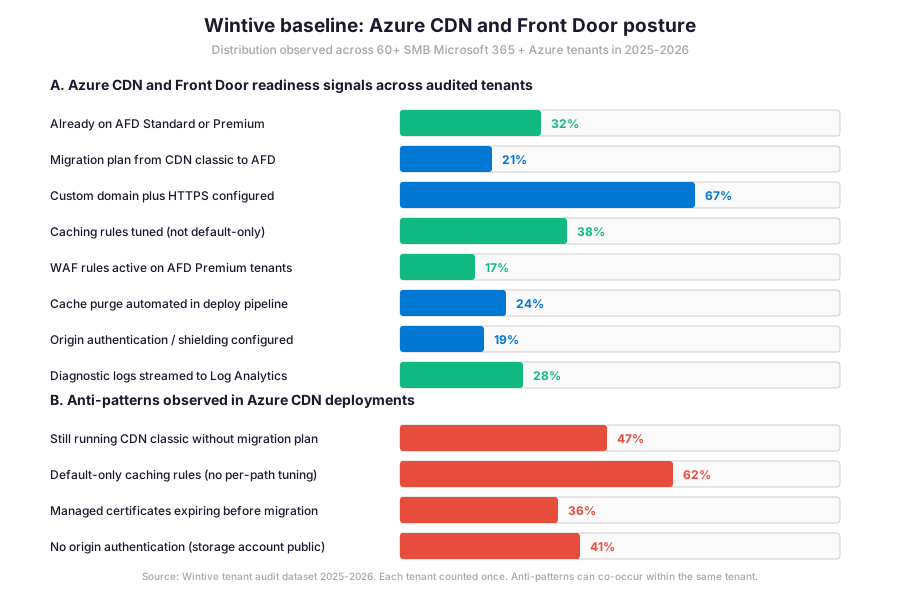
Furthermore, the gap between custom domain and HTTPS coverage (67%) and AFD Standard or Premium adoption (32%) is the defining migration metric for Azure CDN in 2026. Specifically, half of tenants have a configured CDN endpoint but have not started the migration to a forward-looking SKU.
What the Azure CDN baseline reveals for SMB tenants
Wintive insight
Specifically, across 60+ SMB Azure tenants, the standout finding is striking. 47% of audited tenants still run Azure CDN classic without a migration plan to Azure Front Door before the September 2027 retirement, and 36% have managed certificates expiring before that date with no BYOC plan in place. Therefore, the Wintive Azure CDN playbook ships a 2-week migration sprint covering the SKU decision (Standard vs Premium based on WAF and Private Link requirements), the Traffic Manager phased rollout for CDN classic to AFD, the in-place migration tool for AFD classic, the BYOC certificate setup, and the cache rule tuning beyond the default baseline. Furthermore, compared to AWS CloudFront price classes or GCP Cloud CDN cache modes, Azure delivers the most integrated security stack via AFD Premium. The hourly OpEx model with no on-prem CapEx commitment keeps the per-GB egress TCO predictable across the rollout horizon.
Furthermore, the anti-pattern column tells the operational truth. 47% are still on CDN classic without a migration plan. 62% run with default-only caching (no per-path tuning, leaving origin offload on the table). 41% have storage account origins with public access (no origin authentication, exposing the origin directly to the internet). 36% have managed certificates expiring soon without a BYOC migration plan. These four anti-patterns explain most of the migration emergencies Wintive observes for CDN in 2026.
🚨 5 SMB Azure CDN pitfalls in 2026
Specifically, the five pitfalls below cover the anti-patterns Wintive consistently observes during Azure CDN audits. A common mistake assumes the September 2027 retirement deadline is far enough away to delay the migration. Admins struggle with this gotcha because the certificate expiration on April 14, 2026, hits much sooner and breaks HTTPS for any tenant relying on managed certs. Furthermore, comparing Azure CDN with AWS CloudFront price classes or GCP Cloud CDN cache modes shows Microsoft is converging on a single product family (AFD Standard / Premium) which simplifies long-term posture but forces near-term migration work for the SMB admin.
Still on CDN classic without migration plan
Specifically, 47% of audited tenants still run Azure CDN classic without a migration plan to Azure Front Door before the September 2027 retirement. Therefore, the migration emergency lands in 2026 or early 2027 instead of being scheduled deliberately. The fix has three steps. Inventory all CDN classic profiles via Az CLI. Pick the destination SKU per profile (Standard for SMB, Premium for regulated). Schedule the Traffic Manager phased rollout with a 7 to 14 day validation window per profile. Critically, the migration must complete before the certificate expiration of April 14, 2026 if managed certs are in use.
Default-only caching rules (62% leave origin offload on the table)
Furthermore, 62% of audited tenants run with default-only caching rules. Therefore, the cache hit ratio is suboptimal and origin servers handle requests that should be served from the edge. The fix has three patterns. Long TTL on /assets/, /static/, /images/ paths (1 day or longer). Short TTL on /api/ dynamic paths (1 to 5 minutes). Bypass cache rule on /admin/, /auth/, /account/ paths. Furthermore, query-string caching behaviour should be set to IgnoreQueryString for static assets and UseQueryString or IgnoreSpecifiedQueryStrings for dynamic paths.
Origin storage account with public access (no origin authentication)
Specifically, 41% of audited tenants have Azure Front Door origins (typically Blob Storage static sites) with public access enabled at the container level. Therefore, the origin is reachable directly over the internet, bypassing the AFD layer that applies caching, WAF, and rate limiting. The fix has two paths. Origin shielding via Private Link (AFD Premium feature) makes the origin accessible only via AFD. Origin authentication via SAS tokens or Azure AD (for App Service origins) prevents direct access without the AFD identity. Furthermore, the storage firewall should be set to deny all networks except the AFD service tag.
Managed certificates expiring without BYOC plan
Furthermore, 36% of audited tenants have classic profile managed certificates that expire before April 14, 2026 without a BYOC migration plan. Therefore, HTTPS will break on the configured custom domains after that date unless the admin acts. The fix has two paths. Migrate the classic profile to AFD Standard or Premium, which uses managed certificates supported on the new SKUs. Switch to bring-your-own-certificate by uploading a PFX bundle to the classic profile, which keeps the classic SKU operational past April 2026 but still requires migration before September 2027.
No cache purge in deploy pipeline
Specifically, only 24% of audited tenants automate cache purge in the deploy pipeline. Therefore, post-deployment serves stale assets at the edge until the natural TTL expires (often hours later). The fix has two patterns. Az CLI cache purge in the CI/CD step after the deployment completes (covers /index.html and changed asset paths). Versioned filenames with content hash (main.abc123.js + main.def456.css change with each build, no purge needed because the URLs change per deploy). Furthermore, the second pattern is preferred because it eliminates the cache stampede risk that purge introduces.
❓ Azure CDN FAQ
Core Azure CDN migration questions
Azure CDN Standard from Microsoft (classic) retires on September 30, 2027. Therefore, all tenants running CDN classic must migrate to Azure Front Door Standard or Premium before that date. Specifically, AFD Standard fits SMB websites with caching, multi-origin load balance, and managed certificates. AFD Premium adds Web Application Firewall, Private Link integration, and bot management for regulated workloads. Furthermore, two intermediate deadlines tighten the timeline. Managed certificates became unsupported on classic profiles on August 15, 2025, with existing certs valid only until April 14, 2026. DHE cipher suite support ends on April 1, 2026. Azure CDN from Edgio (formerly Verizon) was already retired on January 15, 2025.
Azure Front Door Standard fits SMB websites and applications. The tier supports static and dynamic content acceleration with multi-origin load balancing across Azure Blob Storage, App Service, Functions, Container Apps, or any HTTP origin. Caching rules, compression, and custom domain plus HTTPS with managed certificates are included. AFD Premium adds three regulated-workload capabilities. Web Application Firewall with managed and custom rules covering OWASP Top 10 protections. Private Link integration eliminating public exposure of origins by routing AFD traffic over a private endpoint inside the customer VNet. Bot management defending against credential stuffing, scraping, and inventory hoarding attacks. Therefore, regulated workloads (financial services, healthcare, government) have a clear case for Premium versus Standard.
The canonical migration uses Azure Traffic Manager as the phased rollout layer. Traffic Manager initially routes all traffic to the Azure CDN classic endpoint. Then the admin sets up the AFD Standard or Premium profile with matching origin, caching rules, and custom domain. Then Traffic Manager incrementally shifts traffic to AFD over a few days. Therefore, the validation window catches compatibility issues before fully migrating. Specifically, the approach requires custom domains on the CDN classic profile (without custom domains, clients must be updated directly to point to the new AFD endpoint). Furthermore, the AFD classic to AFD Standard or Premium migration uses an in-place migration tool that preserves the existing endpoint URL, custom domains, and routing rules.
More Azure CDN questions
Specifically, Azure-managed certificates have been unsupported on Azure Front Door (classic) and Azure CDN from Microsoft (classic) since August 15, 2025. Existing managed certificates that were automatically renewed before that date remain valid until April 14, 2026. Therefore, after April 14, 2026, classic profiles with managed certificates will start failing HTTPS on the configured custom domains unless the admin acts. The fix has two paths. Migrate the classic profile to AFD Standard or Premium, which uses managed certificates supported on the new SKUs. Switch to bring-your-own-certificate by uploading a PFX bundle to the classic profile, which keeps the classic SKU operational past April 2026 but still requires migration before September 30, 2027.
Furthermore, the canonical pattern automates cache purge in the deploy pipeline using the Az CLI az afd endpoint purge command, scoped to specific content paths or wildcards. The purge is asynchronous and typically completes in 5 to 10 minutes globally. Therefore, the deployment pipeline must wait for the purge confirmation before declaring the rollout complete. Critically, an alternative pattern uses versioned filenames with content hash (main.abc123.js plus main.def456.css change with each build). The result is no purge needed because the URLs change per deploy. Specifically, the second pattern is preferred because it eliminates the cache stampede risk that purge can introduce on high-traffic origins.
📚 Related Microsoft Azure reading
The full admin guide is at our Azure Blob Storage Admin Guide covering the storage account types, the four access tiers (Hot, Cool, Cold, Archive), lifecycle management policies, and the Private Endpoints integration that pairs with AFD Premium origin shielding.
The full admin guide is at our Deploy Azure Virtual Machines Admin Guide covering the security type decision tree (Trusted Launch default, Confidential VM, Standard), the SKU family selection, and the disk encryption migration path from Azure Disk Encryption to Encryption at Host before September 2028.
The full admin guide is at our Microsoft Intune Compliance Policies Admin Guide covering the device-side compliance signals that gate access to the Azure portal and AFD management plane via Conditional Access for users on managed devices.
The complete Entra ID guide is at our Microsoft Entra ID Complete Guide covering the role-based access control for Azure subscriptions, the Conditional Access policies that gate AFD management plane access, and the audit logging that captures every routing rule and WAF policy change.
The full admin guide is at our macOS App Deployment with Microsoft Intune Admin Guide covering the seven app types and the LOB managed PKG patterns for delivering Azure CLI or Azure Storage Explorer to managed Macs, with Platform SSO providing the Microsoft Entra ID authentication for Azure portal access.
This tutorial covered one focused Azure workflow. For a complete picture of how your full Microsoft 365 and Azure environment performs against best practices:
🔍 Want a complete audit of your Microsoft 365 tenant?
The Automated Tenant Health Check scans your M365 environment in under 10 minutes: license waste, security posture, MFA coverage, compliance gaps, license rightsizing opportunities. Full PDF report with prioritized recommendations delivered instantly.