SharePoint Online intranet hub sites in 2026 anchor the modern intranet on a central communication site that aggregates news, navigation, theme, and search across associated department sites. Specifically, this Part 2 of the SharePoint Online intranet series covers the hub architecture, the 5 hub patterns Wintive sees most often in SMB tenants, the theme inheritance mechanism, the news roll-up flow, and the audience targeting for Entra ID groups.
Quick answer. SharePoint Online intranet 2026 builds on hub sites: communication sites aggregating up to 200 associated sites with shared nav, theme, news roll-up, and scoped search. Tenant limit 2,000 hubs. Hub-of-hubs allowed 2 levels. 67% SMB tenants still run classic publishing sites. 82% lack documented IA before hub creation.
Free PDF guide
Microsoft 365 Tenant Audit Checklist for 2026
40+ checks covering the SharePoint Online intranet architecture, the hub site association inventory, the theme inheritance configuration, the news roll-up via Highlighted Content, the audience targeting for Entra ID groups, the migration status from classic publishing sites, and the Viva Connections deployment status.
Furthermore, this SharePoint Online intranet hub guide covers the 5 patterns, the architecture diagram, the theme inheritance code, the audience targeting, and the Wintive baseline across 60+ SMB tenants.
📐 SharePoint Online intranet foundation: site types and setup
Specifically, before the SharePoint Online intranet hub architecture matters, the foundation choice is the site type for the central homepage. As a result, three modern site types ship in 2026 and each serves a distinct purpose. Therefore, picking the wrong one at creation time forces a complete recreate later because the URL slug cannot be renamed without breaking dependencies.
| Site type | Best for | Group attached | Wintive verdict |
|---|---|---|---|
| Communication site | Intranet homepage, news portal, broadcast pages | None | RECOMMENDED for the central intranet hub |
| Team site (group-connected) | Department workspace with two-way collaboration | Microsoft 365 Group + mailbox + Planner | Use for departments, NOT for the central intranet |
| Hub site (registration) | Aggregation layer over multiple sites | N/A (registration on top of Communication or Team) | Register the central Communication site as the intranet hub |
📋 Site types matrix — pick Communication site for the intranet homepage and register as hub.
Critically, the SharePoint Online intranet recommendation in 2026 is the Communication site for the central homepage because it does not auto-create a Microsoft 365 Group, mailbox, or Planner instance. Furthermore, native SharePoint covers 90% of what an SMB needs at no extra licensing cost. As a result, third-party intranet platforms like Unily, Valo, Bloomfire, or Simpplr (typically priced 5 to 15 USD per user per month) are unnecessary for an SMB under 500 seats with a Microsoft 365 license already in place.
Furthermore, the actual SharePoint Online intranet provisioning follows a 4-step sequence from a Communication site creation through the brand basics. Specifically, the steps below cover the GUI path (SharePoint admin centre) plus the PowerShell path (PnP and SPO modules) for code-as-config deployments.
Step 1 — Create the Communication site
Specifically, Step 1 requires a Global Administrator role or a SharePoint Administrator role on the tenant. Critically, granting yourself a temporary admin role just to create the intranet site is a governance red flag. Therefore, if the role is missing, the proper path delegates the creation to the actual admin instead of self-elevating.
- Open admin.microsoft.com and navigate to Admin Centers → SharePoint.
- Click Active Sites, then Create.
- Choose Communication site with the Blank template (Topic and Showcase pre-populate web parts that are usually removed).
- Fill in site name, web address, owner, language, and click Finish.
In addition, the same provisioning runs through PowerShell for repeatable deployments across staging and production tenants:
# Connect to SharePoint admin centre
Connect-SPOService -Url https://CONTOSO-admin.sharepoint.com

# Create a Communication site (Blank template)
New-SPOSite \`
  -Url https://CONTOSO.sharepoint.com/sites/intranet \`
  -Owner admin@CONTOSO.onmicrosoft.com \`
  -Title "HUB 365" \`
  -Template SITEPAGE \`
  -StorageQuota 1024

# Verify creation
Get-SPOSite -Identity https://CONTOSO.sharepoint.com/sites/intranet \`
  | Select-Object Url, Template, StorageUsageCurrent
Step 2 — Remove the default footer for cleaner branding
Furthermore, most SMB intranets render cleaner without the default footer. As a result, the toggle is a one-click operation. Specifically, click the gear icon (top right) then Change the look → Footer → toggle Off. Critically, keep the footer enabled when legal disclaimers or contact info must appear on every page; otherwise the extra visual weight competes with the actual content.
Step 3 — Upload the corporate logo
Specifically, Step 3 uploads the corporate logo via the SharePoint header configuration. As a result, the logo renders in the top-left corner of every intranet page automatically. First, click Change the look → Header → Edit. Next, upload the logo (PNG or SVG, 64 by 64 pixels minimum). Finally, pick the header layout (Standard, Compact, Minimal, or Extended). In addition, the same upload runs through PnP PowerShell for code-as-config:
# Connect with PnP PowerShell
Connect-PnPOnline \`
  -Url https://CONTOSO.sharepoint.com/sites/intranet \`
  -Interactive

# Upload logo to Site Assets and set as site logo
Add-PnPFile -Path .\logo.png -Folder "SiteAssets"
Set-PnPSite -LogoFilePath .\logo.png

# Set site title and description in one command
Set-PnPSite \`
  -Title "HUB 365" \`
  -Description "Your company intranet homepage"
Step 4 — Set a memorable site title
Furthermore, the default site title matches the site name entered at creation. Therefore, for a more distinctive intranet identity, give it a short memorable name such as HUB 365, Atlas, Pulse, or Nexus. As a result, the team reads it hundreds of times per week so the title carries brand identity. Specifically, navigate to Site Contents → Site Settings, then under Look and Feel click Title, description, and logo. Then enter the short distinctive title and click OK.
3 branding mistakes Wintive sees in tenant audits
- Logo too detailed. Square logos with fine text or thin lines render as mush in the 32 by 32 pixel app launcher tile. Use a bold monogram or stylised icon that stays legible at small sizes.
- Site name with spaces or accents. A name like Zürich Marketing generates a mangled URL (/sites/z_rich_marketing). Pick an ASCII slug at creation because the URL cannot be renamed later without recreating the site.
- No sensitivity label at creation. Set Internal or General from the start. Retrofitting labels across an active intranet with thousands of items is painful and generates user-facing access denials during the relabel sweep.
📜 The 5 SharePoint Online intranet hub patterns
Specifically, the SharePoint Online intranet hub topology decision drives the navigation, theme, and news aggregation experience for end users. As a result, the choice depends on the organisation size, the departmental autonomy, and the sensitivity classification per business unit.
Pattern 1: Single hub with all departments associated
Critically, the single hub pattern is the recommended starting point for SMB tenants under 200 sites. Specifically, all department sites associate to one central communication site that becomes the intranet hub. Furthermore, the shared navigation, theme inheritance, and news roll-up apply consistently across the entire intranet. Therefore, this pattern fits 70% of SMB use cases under 500 employees with one corporate identity.
Pattern 2: Hub-of-hubs hierarchy for divisional structure
Furthermore, the hub-of-hubs pattern fits organisations with distinct divisions or business units that each need their own brand identity, news cadence, and navigation. Specifically, each divisional hub aggregates its own department sites, and divisional hubs themselves associate to a parent corporate hub. Critically, the hierarchy is limited to 2 levels in 2026: parent hub plus child hubs, no third level. As a result, this pattern fits multi-division SMB tenants with 500 to 2,000 employees and clear divisional autonomy requirements.
Pattern 3: Specialised hub for regulated content
Specifically, the specialised hub pattern carves out a separate hub for regulated content such as legal documents, healthcare patient files, or financial reports. As a result, this hub uses a tighter sensitivity label container, restricts external sharing entirely, and applies stricter retention labels. Therefore, this pattern fits regulated industries (HIPAA, GDPR, financial services) where segments of the intranet need dedicated compliance posture without affecting the broader intranet experience.
Pattern 4: External-facing extranet hub for partners
Furthermore, the extranet hub pattern serves external partners, vendors, and customers via guest access. As a result, this hub aggregates only sites configured for B2B guest access, applies a distinct theme to visually separate from the internal intranet, and enforces stricter Conditional Access via Microsoft Entra ID. Critically, the extranet hub respects sensitivity label container restrictions and the SharePoint admin centre external sharing policy. Therefore, this pattern fits SMB tenants collaborating with 50+ external partners on shared documents and project sites.
Pattern 5: Departmental hub with team site associations
Specifically, the departmental hub pattern uses a department-level communication site as a hub aggregating multiple team sites belonging to that department. In addition, this pattern lets the department lead curate the news, the theme, and the navigation without affecting the corporate intranet hub. Therefore, the departmental hub fits scenarios where IT, HR, or Sales operate their own micro-intranet inside the wider intranet structure with semi-autonomous content governance.
📅 SharePoint intranet evolution from 2003 to 2026
Furthermore, understanding the SharePoint Online intranet evolution helps frame why hub sites and Viva Connections are the recommended pattern in 2026. As a result, the timeline below shows the major milestones from classic team sites in 2003 through hub site general availability in 2023 to AI-powered Viva Connections in 2026.
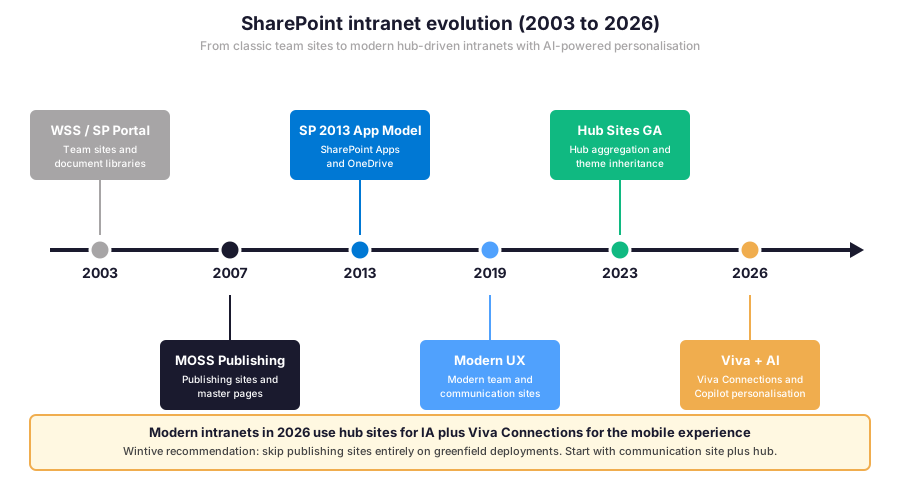
Critically, the Wintive recommendation in 2026 skips the classic publishing site era entirely on greenfield deployments. Therefore, new SharePoint Online intranet projects should start with a communication site as hub plus Viva Connections for the mobile experience, never the legacy publishing infrastructure with master pages.
🌐 SharePoint Online intranet hub architecture
Specifically, the SharePoint Online intranet hub architecture in 2026 uses a central communication site at the core with up to 200 associated department sites radiating outward. As a result, the radial spoke diagram below shows how a typical SMB intranet aggregates 6 department sites onto a single hub.
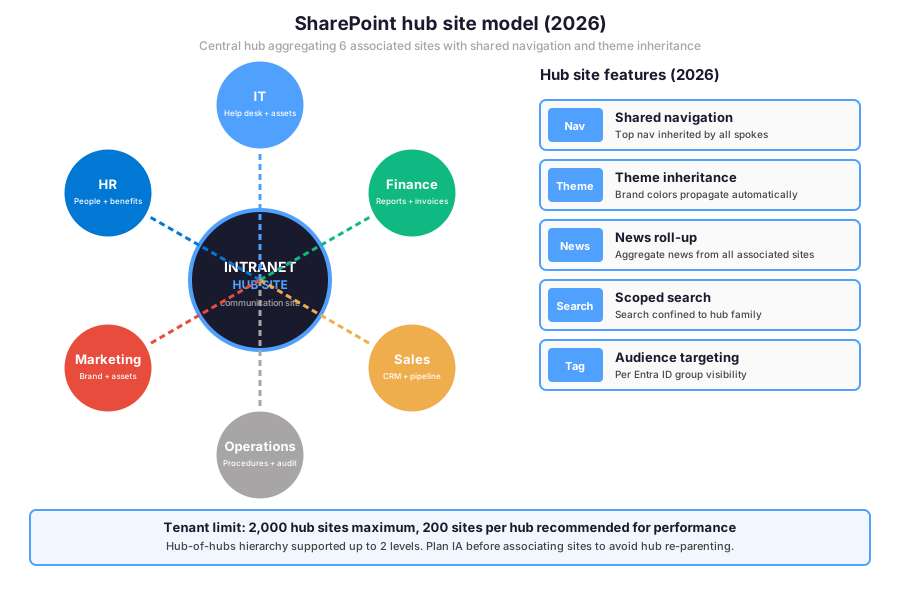
Furthermore, the hub-and-spoke architecture provides 5 inheritance features. First, shared navigation propagates from hub to all associated sites. Next, the theme inheritance applies brand colors automatically. In addition, the news roll-up aggregates news from associated sites onto the hub home page. Then the scoped search confines search results to the hub family. Finally, audience targeting filters per Entra ID group visibility.
Hub site limits and recommended sizing
| Limit | Maximum value | Wintive recommendation | Comment |
|---|---|---|---|
| Hubs per tenant | 2,000 | Under 50 for SMB | Plan IA before creation to avoid sprawl |
| Sites per hub | No hard limit | 200 max for performance | Beyond 200 search and roll-up degrade |
| Hub-of-hubs depth | 2 levels | 1 level for SMB | Depth beyond 2 not supported |
| Navigation items per hub | 500 | 20 top-level + 5 mega menu | UX research caps comprehension at 7 items |
| News articles per roll-up | 500 | 10 visible + paginated | Audience targeting filters before roll-up |
📋 Hub limits matrix — tighten well below the maximums for SMB performance and UX clarity.
🔁 Content propagation flow across intranet surfaces
Specifically, content authored in the SharePoint Online intranet flows from the source surface through the hub aggregation layer to multiple end-user surfaces. As a result, the Sankey-style diagram below shows the propagation pattern from 3 source types through the hub to 3 user surfaces.
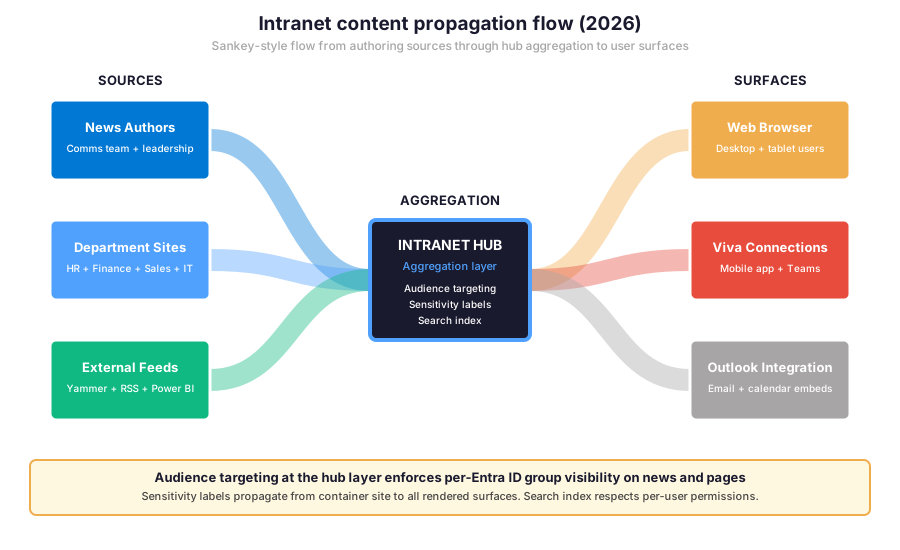
Furthermore, the hub aggregation layer applies three governance controls before content reaches end-user surfaces. First, audience targeting filters by Entra ID group membership. Next, sensitivity labels propagate from the source container to the rendered surface. Finally, the search index respects per-user permissions to ensure users only see results they have access to read.
🎨 Theme inheritance and brand consistency
Critically, theme inheritance from a hub site to its associated sites in 2026 propagates the brand color palette, the logo, and the navigation styling automatically. Specifically, the theme is configured at the hub level via the SharePoint admin centre brand panel or via PnP PowerShell, then cascades to all associated sites without per-site manual configuration.
PnP PowerShell theme inheritance setup
# PnP PowerShell — SharePoint hub site theme inheritance
Connect-PnPOnline -Url https://CONTOSO.sharepoint.com -Interactive

# 1. Define the corporate theme JSON
$theme = @{
  "themePrimary" = "#50A1FD"
  "themeLighterAlt" = "#F0F7FF"
  "themeLighter" = "#D2E5FA"
  "themeLight" = "#A7C8EE"
  "themeTertiary" = "#5392DC"
  "themeSecondary" = "#0078D4"
  "themeDarkAlt" = "#0070C7"
  "themeDark" = "#005FA8"
  "themeDarker" = "#00467C"
  "neutralLighterAlt" = "#FAFAFA"
  "neutralPrimary" = "#1A1A2E"
}

# 2. Add theme to tenant theme catalog
Add-PnPTenantTheme -Identity "Wintive Brand 2026" \`
  -Palette $theme \`
  -IsInverted $False \`
  -Overwrite

# 3. Apply theme to the hub site
Set-PnPWebTheme -Theme "Wintive Brand 2026" \`
  -WebUrl https://CONTOSO.sharepoint.com/sites/intranet-hub

# 4. Configure hub to enforce theme inheritance to associated sites
$hub_id = (Get-PnPHubSite -Identity \`
  https://CONTOSO.sharepoint.com/sites/intranet-hub).ID
Set-PnPHubSite -Identity $hub_id \`
  -EnablePermissionsSync $True \`
  -RequiresJoinApproval $True

# 5. Verify theme inheritance on associated sites
$associated = Get-PnPHubSite -Identity $hub_id | \`
  Select-Object -ExpandProperty AssociatedSites
foreach ($site in $associated) {
  Connect-PnPOnline -Url $site.SiteUrl -Interactive
  Write-Host "$($site.Title): theme = $((Get-PnPWebTheme).Theme)"
}
Specifically, the snippet above runs the canonical theme inheritance setup. First, define the corporate theme JSON with primary, secondary, and neutral palette values. Next, add the theme to the tenant theme catalog. In addition, apply the theme to the hub communication site. Then enable hub permission sync and join approval. Finally, verify the theme inheritance propagated to all associated sites.
📈 The Wintive baseline — SharePoint Online intranet across 60+ tenants
Specifically, after assessing 60+ Microsoft 365 SMB tenants between 2025 and 2026, Wintive captures the SharePoint Online intranet baseline against five governance dimensions. As a result, the table below shows where the audited SMB tenants typically land on each dimension.
Five governance dimensions per intranet
| Governance dimension | SMB baseline gap | Wintive target | Tooling |
|---|---|---|---|
| Documented information architecture | 82% no documented IA | Visio map locked at deployment | Visio + PnP provisioning template |
| Theme inheritance configured | 51% no inheritance | Tenant theme catalog applied | Add-PnPTenantTheme |
| Classic publishing sites retired | 67% still active | Migration to communication site | SharePoint Modernization Scanner |
| Audience targeting at hub level | 73% not configured | Per Entra ID group filtering | Set-PnPNavigationNode |
| Orphaned hub associations | 39% post-restructuring | Quarterly cleanup audit | Get-PnPHubSite + Remove-PnPHubSiteAssociation |
📋 Governance baseline — 5 dimensions, baseline gaps, Wintive targets, tooling.
Furthermore, the governance baseline table consolidates the SharePoint Online intranet posture audit findings into 5 dimensions. Specifically, each dimension maps to a measurable SMB baseline gap, a Wintive target value, and a recommended tooling path. As a result, the next callout summarises the Wintive intranet governance playbook with the 5 sequential workstreams that close the gaps in a 2-week sprint.
What the SharePoint Online intranet baseline reveals
Wintive insight
Specifically, across 60+ SMB Microsoft 365 tenants, the recurring pattern is a SharePoint Online intranet built without documented information architecture. 82% of audited tenants ship the intranet directly to production from a SharePoint admin’s whiteboard sketch. Therefore, the Wintive intranet governance playbook ships a 2-week sprint with five workstreams.
- Documented IA Visio map locked at deployment with versioned change control.
- Tenant theme catalog with branded palette applied at the hub level via PnP PowerShell.
- Classic publishing site migration audit with timeline for full retirement.
- Audience targeting on hub navigation and news roll-up per Entra ID group.
- Quarterly orphaned hub association cleanup with role-based assignment.
SharePoint Online intranet versus competing platforms
Furthermore, compared to Atlassian Confluence Cloud, AWS WorkDocs intranet alternatives, Okta-secured Notion teamspaces, Bloomfire intranet, or Simpplr, the Microsoft SharePoint Online intranet delivers the deepest integration with Entra ID Conditional Access, sensitivity labels in Microsoft Purview, and compliance audit logs. In effect, this integration eliminates the need for a separate intranet SaaS subscription. Critically, the per-user OpEx model with predictable Microsoft 365 licensing keeps no on-prem CapEx commitment for an SMB scaling beyond 50 users with JAMF or Intune-managed devices behind Conditional Access plus Duo MFA equivalents.
🔐 Hub sites and sensitivity classification tiers
Specifically, sensitivity labels from Microsoft Purview interact with SharePoint Online intranet hub sites through container labels applied at the site collection level. As a result, the sensitivity tier determines the external sharing posture, the guest expiration window, the anonymous link availability, and the allowed device compliance state.
External sharing per sensitivity tier on hub sites
| Sensitivity tier | External sharing | Guest expiration | Device compliance |
|---|---|---|---|
| Public intranet hub | New and existing guests | None | Any device |
| Internal intranet hub | Existing guests only | 180 days | Compliant or BYOD |
| Confidential intranet hub | Specific people only | 30 days | Compliant only |
| Highly Confidential hub | Internal members only | N/A | Compliant + Hybrid Joined |
| Regulated (HIPAA, GDPR) | Approved guests only | 7 days | Compliant + audit + Duo MFA |
📋 Sensitivity tiers — tighten progressively as the intranet hub classification rises.
Therefore, the sensitivity tier matrix gates external sharing on every hub. Specifically, the takeaway anchors on aligning the hub sensitivity classification with the actual content sensitivity. Furthermore, the prerequisites checklist Wintive runs on every audit captures the operational baseline before the production rollout.
Prerequisites for the SharePoint Online intranet hub deployment in 2026: Active Microsoft 365 tenant with SharePoint Online plan. Modern communication site provisioned for the central hub. Microsoft Entra ID P1 or P2 for Conditional Access integration. SharePoint admin role at the tenant level for hub registration. Microsoft Purview Information Protection license for sensitivity labels and retention labels. Microsoft Defender for Cloud Apps optional for activity audit. Power Platform admin role for Viva Connections integration. HIPAA + SOC 2 audits expect quarterly hub site association cleanup report and monthly orphaned site detection. Predictable per-user OpEx with no on-prem CapEx for the intranet stack. TCO modelled in the Microsoft 365 Pricing Calculator before the production commitment for the hub-and-spoke topology.
🔁 Migrate classic publishing sites to modern SharePoint Online intranet
Furthermore, many SMB tenants in 2026 still carry classic publishing sites from the SharePoint 2013 or 2019 era. Specifically, the legacy publishing site uses master pages, page layouts, and the content query web part for news roll-up. As a result, the migration to a modern SharePoint Online intranet hub unlocks the responsive layout, the audience targeting, and the integration with Viva Connections for mobile.
PowerShell migration audit for classic publishing sites
# PnP PowerShell — Classic publishing sites audit and migration plan
Connect-PnPOnline -Url https://CONTOSO.sharepoint.com -Interactive

# 1. Inventory all sites with publishing infrastructure feature enabled
$publishing_sites = @()
$all_sites = Get-PnPTenantSite | Where-Object { \`
  $_.Template -match "BLANKINTERNETCONTAINER|CMSPUBLISHING|BLANKINTERNET" \`
}
Write-Host "Classic publishing sites: $($all_sites.Count)"
$all_sites | Select-Object Url, Template, StorageUsageCurrent | \`
  Format-Table -AutoSize

# 2. Inventory pages still using master pages and page layouts
foreach ($site in $all_sites) {
  Connect-PnPOnline -Url $site.Url -Interactive
  $pages = Get-PnPListItem -List "Pages" -PageSize 500
  Write-Host "$($site.Url): $($pages.Count) classic pages"
}

# 3. Run SharePoint Modernization Scanner for migration assessment
# Download from: https://aka.ms/sharepointmodernizationscanner
# .\SharePoint.Modernization.Scanner.exe \`
#   -t "PublishingPortal" \`
#   -u "https://CONTOSO.sharepoint.com" \`
#   -i "sites.csv"

# 4. Provision new modern communication site as hub
New-PnPSite -Type CommunicationSite \`
  -Title "Wintive Intranet 2026" \`
  -Url "https://CONTOSO.sharepoint.com/sites/intranet-hub" \`
  -SiteDesign Topic

# 5. Register the new site as a hub
Register-PnPHubSite -Site \`
  https://CONTOSO.sharepoint.com/sites/intranet-hub

# 6. Plan content migration with PnP Provisioning template
# Save the new hub structure as PnP template
Get-PnPSiteTemplate -Out "intranet-template.xml"
# Then re-apply on staging tenant for validation:
# Invoke-PnPSiteTemplate -Path "intranet-template.xml"

# 7. Schedule classic publishing site retirement post-migration
foreach ($site in $all_sites) {
  Set-PnPTenantSite -Url $site.Url \`
    -LockState NoAccess -ErrorAction SilentlyContinue
  Write-Host "$($site.Url): locked NoAccess pending retirement"
}
Critically, the migration sequence proceeds in 7 phases. First, inventory all classic publishing sites in the tenant. Next, audit pages still using master pages and page layouts. In addition, run the SharePoint Modernization Scanner for a per-page migration assessment. Then provision a new modern communication site as the intranet hub. After that, register the site as a hub and plan content migration with PnP provisioning templates. Finally, schedule the classic publishing site retirement post-migration.
🚨 5 SMB SharePoint Online intranet hub pitfalls
Specifically, the five pitfalls below cover the anti-patterns Wintive consistently observes during SharePoint Online intranet hub audits. A common mistake assumes the hub site automatically inherits all parent tenant policies, but each hub needs explicit theme registration, audience targeting setup, and external sharing configuration aligned with the sensitivity classification. Furthermore, comparing SharePoint Online intranet with Atlassian Confluence Cloud, AWS WorkDocs, Okta-secured Notion, or Bloomfire shows Microsoft delivers the deepest Entra ID and Purview integration but the operational depth requires deliberate admin work behind Conditional Access plus Duo MFA equivalents.
No documented information architecture before hub creation (82% gap)
Specifically, 82% of audited tenants ship the SharePoint Online intranet directly to production from a SharePoint admin’s whiteboard sketch without a documented information architecture. As a result, the hub topology drifts within months as departments request new associated sites, the navigation balloons past 50 items, and the search relevance degrades. Therefore, the fix is the IA Visio map locked at deployment with versioned change control, peer review by the comms team, and quarterly review with the IT leadership.
Classic publishing sites still active (67% gap)
Furthermore, 67% of audited tenants still run classic publishing sites alongside the modern SharePoint Online intranet hub. As a result, end users navigate two parallel intranets with inconsistent UX, mobile responsiveness is broken on the classic side, and Viva Connections integration only covers the modern surfaces. Therefore, the fix is the migration audit via the SharePoint Modernization Scanner, the per-page migration plan, and the classic publishing site retirement timeline aligned with the corporate communication.
No theme inheritance configured (51% gap)
Critically, 51% of audited tenants have hub sites without theme inheritance configured at the tenant theme catalog level. Therefore, each associated site renders with the default Microsoft palette instead of the corporate brand, the visual identity feels fragmented, and end users perceive the intranet as inconsistent. The fix has two steps. First, define the corporate theme JSON via Add-PnPTenantTheme. Next, apply the theme at the hub level so it cascades to all associated sites automatically.
No audience targeting on hub navigation (73% gap)
Specifically, 73% of audited tenants do not configure audience targeting on the SharePoint Online intranet hub navigation or news roll-up. Therefore, every employee sees every navigation item and every news article, the cognitive load on the home page becomes overwhelming, and adoption metrics suffer. The fix has two paths. First, define Entra ID security groups per audience (HR, Finance, Sales, External). Next, apply audience targeting on each navigation node and on the Highlighted Content web part for news.
Orphaned hub associations after restructuring (39% gap)
Furthermore, 39% of audited tenants have orphaned hub associations after departmental restructuring or company acquisitions. As a result, sites continue to associate with hubs that no longer match the new organisational chart, theme inheritance applies the wrong brand identity, and search relevance points to outdated content. Therefore, the fix is the quarterly orphaned hub association cleanup audit via Get-PnPHubSite, the role-based assignment to a SharePoint admin, and the Remove-PnPHubSiteAssociation execution for confirmed orphans.
Automated Tenant Health Check — $97
Audit your SharePoint Online intranet posture in 30 minutes
The Automated Tenant Health Check audits your Microsoft 365 tenant against the 40+ SharePoint intranet checks Wintive runs on every audit, including the documented information architecture status, the hub site association inventory, the theme inheritance configuration, the audience targeting on navigation and news, the classic publishing site retirement progress, and the sensitivity label container assignment. Findings are tagged Critical, High, Medium, or Low and delivered as a PDF with two emails of direct support within 48 hours.
❓ SharePoint Online intranet FAQ
Core intranet hub questions
Hub patterns and architecture
Specifically, the Wintive recommendation for SMB tenants under 500 employees in 2026 is the single hub pattern. First, all department sites associate to one central communication site that becomes the intranet hub. Next, the shared navigation, theme inheritance, and news roll-up apply consistently across the entire intranet. In addition, this pattern fits 70% of SMB use cases. Critically, scale to the hub-of-hubs pattern only when the organisation reaches 500 to 2,000 employees with clear divisional autonomy. Furthermore, reserve the specialised hub pattern for regulated content (HIPAA, GDPR, financial services) where compliance posture must remain segmented from the broader intranet experience.
Furthermore, the technical limit per hub in 2026 is no hard cap on associated sites. Specifically, Microsoft does not enforce a maximum number of associated sites per hub. However, the Wintive recommendation caps at 200 associated sites per hub for performance reasons. Critically, beyond 200 sites the hub navigation becomes unwieldy, the search index aggregation slows, and the news roll-up performance degrades. In addition, the tenant-wide limit is 2,000 hub sites maximum. Therefore, plan the information architecture before hub creation to avoid sprawl, and consider the hub-of-hubs pattern when divisional growth pushes any hub above the 200-site recommendation.
More intranet hub questions
Theme, governance, and migration
Specifically, theme inheritance in SharePoint Online intranet 2026 works through the tenant theme catalog plus the hub site theme assignment. First, the admin defines the corporate theme JSON via Add-PnPTenantTheme with primary, secondary, and neutral palette values. Next, the theme is applied to the hub site via Set-PnPWebTheme. In addition, the hub propagates the theme to all associated sites automatically without per-site configuration. Critically, 51% of audited tenants have hubs without theme inheritance configured, so each associated site renders with the default Microsoft palette instead of the corporate brand. Furthermore, the recommended approach uses the SharePoint admin centre brand panel for visual configuration plus PnP PowerShell for code-as-config in the deployment pipeline.
Furthermore, Viva Connections is the Microsoft mobile app and Teams panel that surfaces the SharePoint Online intranet hub on mobile devices and within Microsoft Teams. First, the admin pins the intranet hub URL in the Viva Connections experience configuration. Next, the news, documents, and dashboards from the hub render natively in the Viva Connections mobile app and Teams panel. In addition, the audience targeting from the SharePoint hub propagates automatically to filter content per user. Critically, the deployment requires Microsoft 365 E3, E5, or Business Premium plus the SharePoint Online plan. Therefore, Viva Connections is the recommended path to extend the desktop intranet to mobile knowledge workers without rebuilding the experience.
📚 Related Microsoft 365 reading
SharePoint Online intranet and the wider Microsoft 365 stack
Power Platform and content surfaces
The full guide is at our Power Apps SharePoint Embed Admin Guide covering the 3 embed models (web part, iframe, SPFx), the Power Platform license tier distribution, and the governance via Power Platform DLP and COE Starter Kit on tenants combining SharePoint intranet hubs with Power Apps for citizen developer workflows on department sites.
The full guide is at our SharePoint List Web Parts Admin Guide covering the 5 modern list patterns (default, filtered, Highlighted Content, Document Library, Quick Links), JSON column and view formatting, and the threshold limits that affect performance when lists rendered on intranet hub pages exceed 5,000 items.
SharePoint Online intranet and infrastructure
Identity, compliance, and storage
The complete Entra ID guide is at our Microsoft Entra ID Complete Guide covering the B2B guest invitation flow, the guest expiration policy, and the Conditional Access policies that gate guest access to SharePoint Online intranet hub sites based on tenant location, device compliance, and sensitivity classification.
The full guide is at our Microsoft Teams Security Compliance Admin Guide covering the 6 Microsoft Purview pillars (sensitivity labels, DLP, Communication Compliance, retention, eDiscovery, Information Barriers) and how the same retention label framework applies to SharePoint pages and documents rendered inside intranet hub sites.
The full guide is at our Azure CDN Admin Guide covering the migration from Azure CDN classic to Azure Front Door Standard or Premium, including the Private Link integration that pairs with admin endpoints when serving SharePoint intranet content to global users behind a content delivery network with reduced latency.