Azure networking is the layer that decides whether your workloads are reachable, secure, and compliant. Specifically, this guide breaks down VNets, subnets, NSGs, peering, VPN gateway, ExpressRoute, and the hub-spoke topology pattern. Moreover, every recommendation comes from what Wintive observed across 60+ Microsoft 365 and Azure tenant audits.
💡 Why Azure networking matters in 2026
Azure networking is rarely the loudest topic in a cloud migration. However, it is consistently the layer where SMBs hit the most painful blockers. Specifically, undersized address spaces, missing NSG rules, and unplanned peering lock teams into multi-week refactors twelve months down the line.
Beyond connectivity, networking decisions shape compliance posture. Furthermore, choices like private endpoints, NSG flow logs, and Azure Firewall scope determine whether you can pass an ISO 27001 or HIPAA audit. Therefore, getting the foundation right at provisioning time saves real audit pain later.
🛡️ Free: M365 Tenant Security Audit Checklist
17-page PDF with 50 hands-on checks covering Entra ID, Exchange Online, SharePoint, Teams, Intune, license waste, and audit logging. PowerShell commands included. Built from 60+ real tenant audits at Wintive.
🧭 VNet anatomy and traffic flow
A Virtual Network (VNet) is the regional container that holds your Azure workloads. Specifically, every VM, Container, App Service Environment, or private endpoint plugs into a subnet inside a VNet. Furthermore, traffic between resources in the same VNet stays on the Microsoft backbone and never touches the public internet.
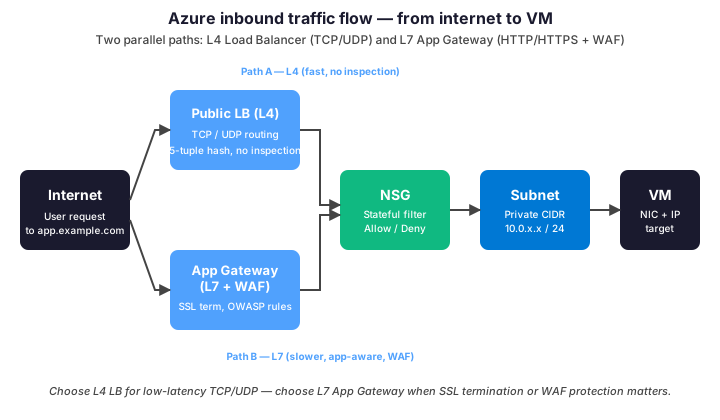
The traffic chain matters because each layer is a defense opportunity. Crucially, skipping the App Gateway means losing WAF protection for HTTP workloads. Notably, skipping NSG rules at the subnet level means trusting every VM to police its own traffic. Therefore, build the chain as a defense-in-depth stack, not as alternatives.
📋 Subnets and IP address planning
Subnets segment a VNet into smaller CIDR ranges, each holding a specific tier of workload. Specifically, separate subnets per tier (web, app, data) let you apply distinct NSG rules. Beyond that, certain Azure services (Bastion, Firewall, Gateway) require a dedicated subnet with reserved names.
| VNet size | CIDR range | Total IPs | Typical use |
|---|---|---|---|
| Small dev VNet | 10.50.0.0/24 | 251 usable | Single subnet, dev/test only |
| Medium prod VNet | 10.10.0.0/20 | 4 091 usable | SMB production, 4-6 subnets |
| Large hub VNet | 10.0.0.0/16 | 65 531 usable | Hub-spoke hub, multi-tenant peering |
| Reserved per subnet | 5 IPs | x.x.x.0-3, x.x.x.255 | Network, gateway, DNS, broadcast, reserved |
| AzureFirewallSubnet | Minimum /26 | 59 usable | Required name, hosts firewall instances |
| GatewaySubnet | Minimum /27 (recommend /26) | 27-59 usable | Required name, hosts VPN/ER gateway |
One trap costs SMBs real time: undersizing the VNet at creation. Indeed, you cannot expand a VNet beyond its initial address space without recreating it. Therefore, always provision /16 for hub VNets and /20 minimum for production spokes — even if you start with two subnets.
🛡️ NSG vs ASG vs Azure Firewall
Three filtering layers exist in 2026 and they overlap partially. Specifically, NSG handles stateful Layer 4 rules at the subnet or NIC level. In contrast, ASG groups VMs logically so NSG rules can target groups rather than IPs. Furthermore, Azure Firewall sits at the hub and adds Layer 7 inspection, threat intelligence, and FQDN filtering.

NSG: Layer 4 stateful filtering
An NSG is a list of allow/deny rules evaluated by priority. Specifically, each rule matches on source/destination IP or service tag, port range, and protocol. Beyond that, NSGs are stateful — outbound responses to allowed inbound traffic do not need explicit return rules. Consequently, NSG configurations stay compact compared to classic stateless ACLs.
Apply NSGs at subnet level for tier-wide policies. In contrast, attach NSGs to individual NICs only when one VM in the subnet needs unique rules. Crucially, when both subnet and NIC NSGs apply, traffic must pass both — a frequent source of unexpected blocks during troubleshooting.
Azure Firewall: Layer 7 + threat intelligence
Azure Firewall is a managed PaaS firewall designed for centralized inspection in hub-spoke topologies. Specifically, it adds three capabilities NSGs lack: FQDN-based application rules, threat intel deny lists from Microsoft Defender, and TLS inspection for egress. Furthermore, it supports IDPS (intrusion detection and prevention) on the Premium SKU.
Pricing matters here. Indeed, Azure Firewall Standard runs around $1.25/hour plus data processing, which translates to roughly $900/month minimum. Therefore, justify the cost with concrete needs — centralized egress filtering across multiple spokes, FQDN allowlisting, or compliance frameworks that mandate L7 inspection.
🔗 VNet peering, VPN, and ExpressRoute
Three options connect a VNet to other networks. Specifically, peering links two Azure VNets directly. In contrast, VPN gateway tunnels traffic over the public internet. Beyond that, ExpressRoute provides a private fiber link via a Microsoft partner. The table compares trade-offs.
| Option | Latency | Bandwidth | Cost (monthly est.) | Best for |
|---|---|---|---|---|
| VNet peering | < 1 ms | VM NIC limit | Egress charges only | Hub-spoke, cross-VNet inside Azure |
| Site-to-Site VPN (VpnGw1) | 10-30 ms | 650 Mbps | ~$150 + egress | Branch offices, dev/test backhaul |
| Site-to-Site VPN (VpnGw5) | 10-30 ms | 10 Gbps | ~$3 750 + egress | HQ to Azure with high throughput |
| ExpressRoute (50 Mbps) | 2-5 ms | 50 Mbps | ~$55 + carrier fees | Compliance, latency-sensitive apps |
| ExpressRoute (1 Gbps) | 2-5 ms | 1 Gbps | ~$300 + carrier fees | Hybrid production, predictable SLAs |
Most SMBs land on Site-to-Site VPN with VpnGw1 or VpnGw2. Indeed, the public internet path is acceptable for non-real-time workloads with appropriate encryption. Conversely, reserve ExpressRoute for finance, healthcare, or any workload where unpredictable latency would hurt SLAs.
🏛️ Hub-spoke topology pattern
The hub-spoke topology is the reference architecture for any Azure deployment beyond a single VNet. Specifically, a central hub VNet hosts shared services like firewall, DNS, VPN gateway, and identity. In contrast, spoke VNets host workloads and peer back to the hub for shared services and egress.
# PowerShell: provision a minimal hub-spoke setup
# Prerequisites: Az.Network module 5.x or later

Connect-AzAccount
Set-AzContext -Subscription 'your-subscription-id'

$rgName   = 'rg-network'
$location = 'eastus'

# 1. Hub VNet (shared services)
$hub = New-AzVirtualNetwork -ResourceGroupName $rgName -Location $location \`
    -Name 'vnet-hub' -AddressPrefix '10.0.0.0/16' \`
    -Subnet (
        New-AzVirtualNetworkSubnetConfig -Name 'GatewaySubnet'      -AddressPrefix '10.0.0.0/26'
        New-AzVirtualNetworkSubnetConfig -Name 'AzureFirewallSubnet' -AddressPrefix '10.0.0.64/26'
        New-AzVirtualNetworkSubnetConfig -Name 'snet-shared'        -AddressPrefix '10.0.1.0/24'
    )

# 2. Spoke VNet (production workloads)
$spoke = New-AzVirtualNetwork -ResourceGroupName $rgName -Location $location \`
    -Name 'vnet-prod' -AddressPrefix '10.10.0.0/20' \`
    -Subnet (
        New-AzVirtualNetworkSubnetConfig -Name 'snet-web'  -AddressPrefix '10.10.1.0/24'
        New-AzVirtualNetworkSubnetConfig -Name 'snet-app'  -AddressPrefix '10.10.2.0/24'
        New-AzVirtualNetworkSubnetConfig -Name 'snet-data' -AddressPrefix '10.10.3.0/24'
    )

# 3. Bidirectional peering (hub <-> spoke)
Add-AzVirtualNetworkPeering -Name 'hub-to-prod'  -VirtualNetwork $hub   \`
    -RemoteVirtualNetworkId $spoke.Id -AllowForwardedTraffic -AllowGatewayTransit
Add-AzVirtualNetworkPeering -Name 'prod-to-hub'  -VirtualNetwork $spoke \`
    -RemoteVirtualNetworkId $hub.Id   -AllowForwardedTraffic -UseRemoteGateways
Two flags matter for the peering: AllowGatewayTransit on the hub and UseRemoteGateways on the spoke let workloads in the spoke reach on-premises through the hub VPN. Furthermore, AllowForwardedTraffic permits traffic forwarded by Azure Firewall to cross the peering. As a result, these three flags unlock the hub-spoke transit pattern in production.
🚀 VNet migration phases
Migrating workloads to a fresh VNet is rarely a one-day project. Specifically, Wintive engagements run 5 phases over roughly 8 weeks for typical SMB migrations. Crucially, each phase has explicit gates — skipping the validation phase to cut over early causes most production incidents.
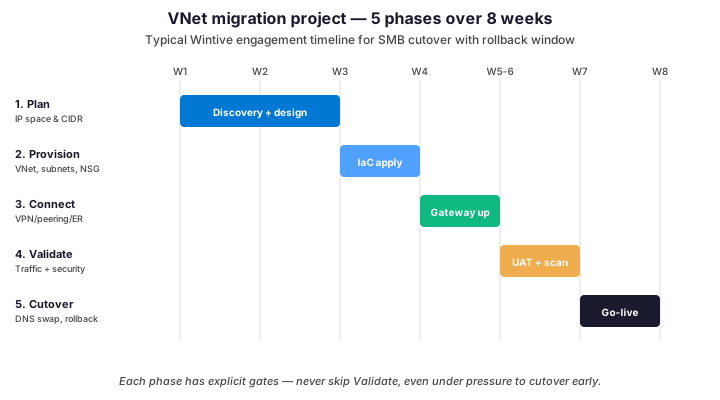
The two riskiest gates sit at validate-to-cutover and cutover-to-decommission. Indeed, premature cutover skips DNS TTL warm-up and breaks downstream integrations. In contrast, premature decommission of the old network removes your rollback path within hours of go-live. Therefore, hold the old network for at least 7 days post-cutover before any teardown.
✅ Best practices for SMBs
Across 60+ tenant audits, the same six patterns repeat at SMBs. Notably, each row below has fixed an actual production issue or audit finding at a real client.
| Practice | What to do | Why it matters |
|---|---|---|
| Oversize the hub VNet | Provision /16 minimum on the hub, /20 on each spoke. | You cannot expand a VNet without recreation — costs days of work later. |
| Use ASGs in NSG rules | Tag VMs with ASGs (web-tier, app-tier, data-tier) and reference them in NSGs. | Adding a new VM auto-inherits the right rules — no per-IP edits. |
| Enable NSG flow logs | Stream flow logs to Storage + Log Analytics with Traffic Analytics on. | Required for incident forensics and visualizing actual traffic patterns. |
| Reserve gateway subnets | Always pre-create GatewaySubnet (/26) and AzureFirewallSubnet (/26). | Future VPN or Firewall rollouts won’t require renumbering subnets. |
| Disable public IP by default | Workloads use private endpoints + Bastion. No public IPs except WAF/LB. | Cuts public attack surface to near zero. |
| Tag every network resource | CostCenter, Environment, Owner, Application as required tags on VNets, NSGs, gateways. | Cost reports allocate cleanly — orphan resources surface fast. |
Among these six items, ASG-driven NSG rules deliver the biggest operational win. Indeed, switching from per-IP NSG rules to ASG-based rules typically cuts NSG maintenance time by 70 percent. Therefore, pull this lever first when refactoring an existing network.
🚨 Troubleshoot common issues
Most networking incidents trace back to four root causes. Specifically: NSG misconfiguration, route table override, peering misalignment, and DNS resolution. The script below covers the Wintive triage workflow in order of frequency.
# PowerShell: Azure networking triage
# Replace with your VM and resource group names

$rgName  = 'rg-prod-app'
$vmName  = 'vm-app-01'
$nicName = (Get-AzVM -ResourceGroupName $rgName -Name $vmName).NetworkProfile.NetworkInterfaces[0].Id.Split('/')[-1]

# 1. Effective NSG rules on the NIC (combines subnet + NIC NSGs)
Get-AzEffectiveNetworkSecurityGroup -NetworkInterfaceName $nicName \`
    -ResourceGroupName $rgName | Select-Object -ExpandProperty EffectiveSecurityRules \`
    | Format-Table Name, Access, Direction, DestinationPortRange, Priority

# 2. Effective routes (UDR + system routes + BGP)
Get-AzEffectiveRouteTable -NetworkInterfaceName $nicName \`
    -ResourceGroupName $rgName | Format-Table AddressPrefix, NextHopType, NextHopIpAddress

# 3. Peering health (must be Connected on both sides)
Get-AzVirtualNetworkPeering -ResourceGroupName $rgName -VirtualNetworkName 'vnet-prod' \`
    | Format-Table Name, PeeringState, AllowGatewayTransit, UseRemoteGateways

# 4. DNS resolution test from the VM (private DNS zones)
Invoke-AzVMRunCommand -ResourceGroupName $rgName -Name $vmName \`
    -CommandId 'RunPowerShellScript' \`
    -ScriptString 'Resolve-DnsName privatelink.blob.core.windows.net'

# 5. Connection Monitor for end-to-end path probe
Get-AzNetworkWatcherConnectionMonitor -NetworkWatcherName 'NetworkWatcher_eastus' \`
    -ResourceGroupName 'NetworkWatcherRG' | Format-Table Name, MonitoringStatus
If a VM cannot reach a private endpoint, check effective routes first. Specifically, a misconfigured UDR pointing at a non-existent firewall NVA blocks all traffic silently. Therefore, always verify EffectiveRouteTable before chasing NSG rules — the route layer wins over the rule layer.
❓ Azure networking — FAQ
Partially. You can add additional CIDR ranges to an existing VNet, but you cannot shrink the original range or fully replace it. Therefore, plan address space generously upfront. Adding ranges still requires updating peering and route tables on connected networks.
For most SMBs no. NSGs cover Layer 4 stateful filtering at near-zero cost. Add Azure Firewall when you need Layer 7 inspection, FQDN allowlisting, threat intel deny lists, or centralized egress control across multiple spokes. The break-even is typically 4+ spokes or specific compliance requirements.
Peering links two Azure VNets directly over the Microsoft backbone with sub-millisecond latency and no encryption overhead. VPN tunnels traffic over the public internet with IPsec encryption. Peering only works between VNets in Azure. VPN connects Azure to on-premises or another cloud provider.
Typically 3 to 6. One hub VNet with shared services (firewall, DNS, gateway, identity), plus one spoke per environment (prod, staging, dev) and optionally per major application. Going beyond 10 VNets without a clear segmentation reason adds operational overhead with no real security benefit.
🔗 Keep exploring
Need help designing your Azure VNet topology, NSG strategy, or hub-spoke migration? Book a free 30-minute consultation with our Microsoft 365 and Azure experts.