Microsoft Teams Phone in 2026 spans four PSTN connectivity models. The models determine where calls flow. They define the carrier service responsibility. They shape the required licensing stack. Specifically, the four models are Microsoft Calling Plan, Operator Connect, Teams Phone Mobile, and Direct Routing. Calling Plan uses Microsoft as the carrier. Operator Connect uses a certified third-party operator. Teams Phone Mobile uses a SIM-enabled mobile number. Direct Routing uses a customer-managed certified Session Border Controller for maximum flexibility. Therefore, the SMB Teams Phone story is no longer about choosing a single PSTN path. The new story is about matching the model to the deployment scenario, the regulatory region, and the existing telephony estate.
Quick answer. Teams Phone has 4 PSTN models in 2026: Calling Plan (Microsoft is carrier, fastest setup, region-limited), Operator Connect (certified third-party, no SBC, easiest SMB path), Teams Phone Mobile (SIM-enabled mobile-first), Direct Routing (customer SBC, maximum flexibility for PBX integration). Every user needs Teams Phone license. Mix supported per tenant. Teams-to-Teams calls always free.
Free PDF guide
Microsoft 365 Tenant Audit Checklist for 2026
40+ checks including the Teams Phone PSTN connectivity model in use, the Teams Phone license assignment per user, the emergency calling location policy coverage, the Call Queue and Auto Attendant resource accounts, and the voice routing policy depth beyond the default-only baseline.
Furthermore, this guide covers PSTN models, licensing, Call Queues, emergency calling, PowerShell, Copilot, and the Wintive baseline. The most common gap: 56% of audited tenants run Teams Phone without an emergency calling location policy.
📞 Microsoft Teams Phone in 2026 — what changed
Three forces reshaped Microsoft Teams Phone between 2024 and 2026. Critically, since April 1, 2024, all new Enterprise customers face a new licensing structure. They must purchase two SKUs separately. The first SKU is E1, E3, or E5 (no Teams) suite. The second SKU is Teams standalone (Microsoft Teams Enterprise or Microsoft Teams EEA). Therefore, the Teams Phone licensing stack now starts with Teams standalone before any PSTN add-on. Furthermore, Operator Connect matured into the dominant SMB path because Microsoft expanded the certified operator directory and provisioning is fully integrated into the Teams Admin Center.
Specifically, Teams Phone Mobile became Generally Available across more carriers. The model enables a single-number solution. The SIM-enabled mobile number is also the Teams business number. Critically, Direct Routing remains the preferred model in 2026 for many organisations. The model wins on flexibility, cost control, and integration with legacy PBX or analog devices. The hourly OpEx model with no on-prem CapEx commitment keeps the per-user TCO predictable. Audio Conferencing is included in E5 by default. However, the license requires a separate add-on for E1 and E3 tenants.
📜 Pick the right Teams Phone PSTN connectivity model
The PSTN connectivity decision is the first design choice for any new Teams Phone deployment in 2026. Therefore, the decision tree below answers two core questions. Who is the carrier? Options include Microsoft, certified operator, mobile carrier, or customer-chosen. What is the existing telephony estate? Options include greenfield, with porting, or with PBX integration.
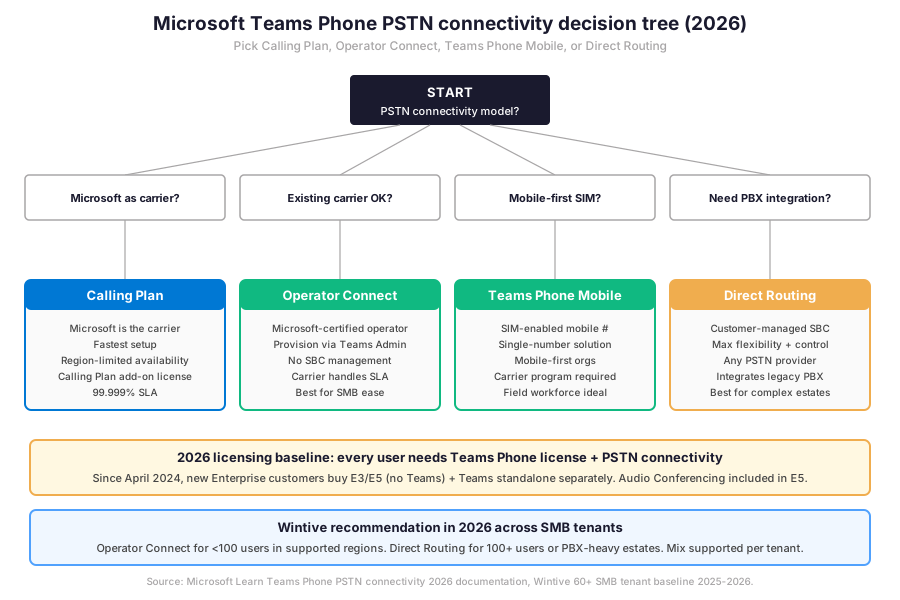
Specifically, the decision tree above shows the four PSTN models. The next question is the deeper feature comparison across capabilities like SBC requirements, setup speed, region availability, number porting ownership, and SLA responsibility.
🌐 The 4 PSTN connectivity models compared
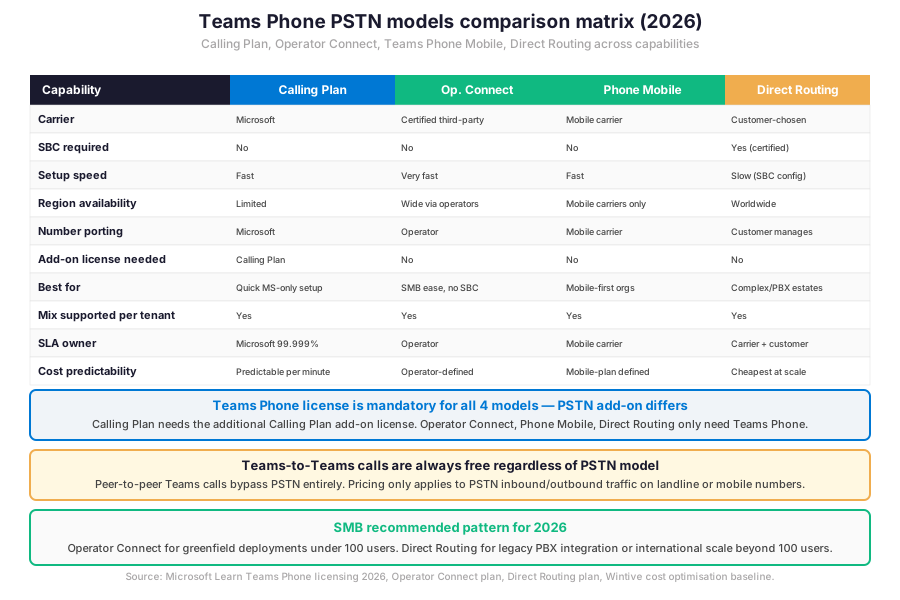
Furthermore, the matrix below stacks the four PSTN models across ten capabilities. Critically, every model requires the Teams Phone license per user, but the PSTN add-on differs. Calling Plan needs the additional Calling Plan add-on. Operator Connect, Teams Phone Mobile, and Direct Routing only need Teams Phone (the carrier billing comes from the operator or customer-managed SBC infrastructure separately).
Microsoft Calling Plan, fastest setup with Microsoft as carrier
Specifically, Microsoft Calling Plan is the fastest path to enable Teams Phone calling. Indeed, In effect, Microsoft is the PSTN operator end-to-end. The admin assigns a Calling Plan license per user. Phone numbers can be requested or ported directly from the Teams Admin Center. Then, numbers are assigned to users. Therefore, no carrier contract or SBC infrastructure is required. The trade-off has two parts. Region-limited availability covers approximately 30 countries in 2026. Per-minute pricing is controlled by Microsoft. The 99.999% reliability SLA covers all calling traffic. Therefore, the best fit covers SMB tenants in Calling Plan-supported regions with no existing carrier contract.
Operator Connect, certified third-party with no SBC management
Furthermore, Operator Connect leverages Microsoft-certified telecom operators. These operators have already completed the PSTN integration with Microsoft. The admin picks a certified operator from the Operator Connect directory in the Teams Admin Center. In practice, the operator provides or ports phone numbers. Then, numbers are assigned to users. Critically, no SBC management is required. The operator handles the carrier-side infrastructure, SLAs, and direct peering with Microsoft over Azure. Therefore, this approach suits SMB tenants who want carrier flexibility (choose operator) with the simplicity of cloud-managed PSTN connectivity.
Teams Phone Mobile, SIM-enabled single-number solution
Specifically, Teams Phone Mobile makes the user’s SIM-enabled mobile number their Teams business number. Therefore, calls placed to the mobile number ring on both endpoints simultaneously. The user can transfer calls between the Teams app and the mobile device seamlessly. The model requires a participating mobile carrier (the directory grows yearly). Therefore, the best fit covers mobile-first organisations like field service, sales teams, and frontline workers where the mobile number is the primary contact point.
Direct Routing, customer-managed SBC for maximum flexibility
Furthermore, Direct Routing connects a customer-managed certified Session Border Controller to Microsoft Teams Phone. It maximises customer control. The SBC links Teams to one or more SIP trunk providers. This setup enables calls on geographic, mobile, or service numbers. Specifically, the model supports legacy PBX integration, analog devices via gateway, custom call routing logic, and multi-carrier strategies. Best fit covers four scenarios. Existing carrier contracts. Complex telephony estates. Contact centers. International scale where Calling Plan and Operator Connect are not available. The trade-off has one main element. SBC infrastructure must be procured, configured, and maintained. Alternatively, the customer delegates the SBC management to a Direct-Routing-as-a-Service provider.
Now, the four sub-sections above cover each PSTN model. Critically, the table below summarises the carrier responsibility and PSTN add-on license required for each model.
| PSTN model | Carrier | Add-on license | SBC required |
|---|---|---|---|
| Microsoft Calling Plan | Microsoft | Calling Plan license per user | No |
| Operator Connect | Certified third-party operator | None (operator subscription) | No |
| Teams Phone Mobile | Mobile carrier | None (mobile carrier plan) | No |
| Direct Routing | Customer-chosen carrier | None (carrier + SBC contract) | Yes (certified SBC) |
📋 PSTN model summary — Teams Phone license is mandatory for all 4 models, only Calling Plan needs an additional add-on.
💰 Teams Phone licensing baseline
Specifically, the Teams Phone licensing stack in 2026 has three layers. A first layer covers the base Microsoft 365 or Office 365 subscription (Business Basic or higher for SMB, E1 or E3 or E5 for Enterprise). A second layer adds the Teams Phone license (mandatory for all 4 PSTN models). Finally, a third layer covers the PSTN add-on, which differs per model. Furthermore, since April 1, 2024, new Enterprise customers must purchase the E1, E3, or E5 (no Teams) suite separately from the Teams standalone license. The new structure adds the Microsoft Teams Enterprise or Microsoft Teams EEA SKU on top of the base Office 365 suite.
Audio Conferencing license requirement
Specifically, Audio Conferencing (the dial-in feature for Teams meetings) is included in Microsoft 365 E5 but requires a separate add-on license for E1 and E3 tenants. Therefore, 41% of audited Wintive tenants on E1 or E3 plans have Audio Conferencing missing or partially deployed. The gap blocks the dial-in feature for users without a smartphone or stable internet connection. The fix has three steps. Review the E1/E3 user count. Add the Audio Conferencing license per user who needs dial-in. Configure the conference bridge phone numbers in the Teams Admin Center.
Furthermore, the licensing baseline is the foundation. The next step is the day-to-day administration via the Microsoft Teams PowerShell module which gives admins the granular control beyond what the Teams Admin Center exposes.
📚 Manage Teams Phone with PowerShell
Specifically, the Microsoft Teams PowerShell module exposes the full Teams Phone management surface beyond the GUI. Furthermore, the canonical SMB cmdlets cover six pillars. Voice routing policy assignment. Dial plan management. Calling policy configuration. Emergency calling policy assignment. Resource account binding for Call Queues and Auto Attendants. Tenant dial plan and number assignment. Critically, the snippet below covers the audit + assignment patterns Wintive uses on every audited tenant.
Teams Phone PowerShell governance audit
# Microsoft Teams PowerShell — Teams Phone posture audit
Connect-MicrosoftTeams

# 1. Inventory all Teams Phone licensed users
Get-CsOnlineUser -Filter {LineUri -ne $null} | \`
  Select-Object DisplayName, UserPrincipalName, LineUri, \`
    OnlineVoiceRoutingPolicy, TeamsCallingPolicy, \`
    TenantDialPlan, CallingLineIdentity | \`
  Format-Table -AutoSize

# 2. Find users WITHOUT emergency calling policy (anti-pattern)
$users_no_emergency = Get-CsOnlineUser -Filter {LineUri -ne $null} | \`
  Where-Object { $_.TeamsEmergencyCallingPolicy -eq $null }
$users_no_emergency | Export-Csv -Path \`
  "C:\reports\teams-no-emergency-policy-$(Get-Date -Format 'yyyy-MM-dd').csv" \`
  -NoTypeInformation
Write-Host "Users without emergency policy: $($users_no_emergency.Count)"

# 3. Voice routing policy coverage report
Get-CsOnlineVoiceRoutingPolicy | ForEach-Object {
  $policy = $_
  $assigned_count = (Get-CsOnlineUser -Filter \`
    "OnlineVoiceRoutingPolicy -eq '$($policy.Identity)'").Count
  [PSCustomObject]@{
    PolicyName     = $policy.Identity
    PSTNUsageCount = ($policy.OnlinePstnUsages).Count
    AssignedUsers  = $assigned_count
    Description    = $policy.Description
  }
} | Format-Table -AutoSize

# 4. Resource accounts (Call Queues + Auto Attendants)
Get-CsOnlineApplicationInstance | \`
  Select-Object DisplayName, UserPrincipalName, \`
    ApplicationId, PhoneNumber, OnlineVoiceRoutingPolicy | \`
  Format-Table -AutoSize

# 5. Assign emergency calling policy to all licensed users (remediation)
Get-CsOnlineUser -Filter {LineUri -ne $null} | ForEach-Object {
  Grant-CsTeamsEmergencyCallingPolicy \`
    -Identity $_.UserPrincipalName \`
    -PolicyName "Wintive-Emergency-2026" \`
    -ErrorAction SilentlyContinue
}
Write-Host "Emergency calling policy applied to all Teams Phone users"
Furthermore, the snippet above covers the canonical Teams Phone audit pattern. User inventory with line URIs. Emergency calling policy gap detection. Voice routing policy coverage. Resource account inventory. Bulk emergency policy assignment for remediation. Specifically, the script must run with Microsoft Teams PowerShell module 5.0 or later because earlier versions lack the modern emergency calling cmdlets.
📞 Call Queues and Auto Attendants
Specifically, Call Queues and Auto Attendants are the two Teams Phone features that handle inbound call distribution beyond direct user-to-user calling. Auto Attendants provide the IVR-style menu (such as “Press 1 for Sales, Press 2 for Support”). The route lands on a target user, queue, or external number. Call Queues hold incoming calls in queue order. The distribution lands on an agent group with configurable routing methods (Attendant routing, Serial routing, Round Robin, Longest Idle). Critically, both features bind to a resource account that holds the phone number and the routing policy.
Resource account binding pattern
Furthermore, the resource account is a special user object in Microsoft Entra ID that holds the phone number assignment and the application binding. Specifically, the canonical pattern requires three steps. Create the resource account via New-CsOnlineApplicationInstance. Assign a Microsoft Teams Phone Resource Account license (free for the first 25 resource accounts on E5, paid otherwise). Assign the phone number via Set-CsPhoneNumberAssignment. Critically, the resource account must be in TeamsOnly coexistence mode and must have a voice routing policy if the call distribution requires PSTN routing back out.
| Distribution method | Behaviour | Best for | Trade-off |
|---|---|---|---|
| Attendant routing | All agents ring at once | Small teams (under 5) | All phones ring simultaneously |
| Serial routing | Agents ring one after another | Tier-1/Tier-2 escalation | Slow if first agent unavailable |
| Round Robin | Distributes evenly across agents | Fair workload sales teams | No skill-based routing |
| Longest Idle | Routes to most-rested agent | Customer support teams | Requires presence accuracy |
| Presence-based routing | Skip Busy/DnD agents | Hybrid teams with overflow | Depends on Teams presence sync |
📋 Call Queue distribution methods — pick based on team size and escalation pattern.
🚨 Emergency calling and dynamic location policies
Specifically, emergency calling in Teams Phone requires two configuration layers. The Emergency Calling Policy controls what happens when a user dials 911 (US), 112 (EU), or local emergency numbers. This policy can configure a notification group or a conference call to security. In parallel, the Emergency Call Routing Policy maps emergency numbers to PSTN routing for Direct Routing tenants. Calling Plan and Operator Connect handle this routing automatically. Critically, the Dynamic Emergency Location feature uses network signals to detect the user’s physical location. Inputs include subnet, Wi-Fi BSSID, and switch port. The location passes to the PSTN call so first responders dispatch correctly.
Configure dynamic emergency location for SMB
# Microsoft Teams PowerShell — Dynamic Emergency Location setup
Connect-MicrosoftTeams

# 1. Define a Location ID for each office (street address)
New-CsOnlineLisCivicAddress \`
  -CompanyName "Wintive HQ" \`
  -HouseNumber "123" \`
  -StreetName "Main St" \`
  -City "Dubai" \`
  -CountryOrRegion "AE" \`
  -PostalCode "00000"

# 2. Define a Location for a specific subnet
Set-CsOnlineLisSubnet \`
  -Subnet "10.10.20.0" \`
  -LocationId "LOCATION_GUID_FROM_STEP_1" \`
  -Description "HQ Floor 3 East Wing"

# 3. Define a Location for a Wi-Fi BSSID
Set-CsOnlineLisWirelessAccessPoint \`
  -BSSID "00:1A:2B:3C:4D:5E" \`
  -LocationId "LOCATION_GUID_FROM_STEP_1" \`
  -Description "HQ Conference Room A"

# 4. Create Emergency Calling Policy with notification group
New-CsTeamsEmergencyCallingPolicy \`
  -Identity "Wintive-Emergency-2026" \`
  -NotificationGroup "security@wintive.com" \`
  -NotificationDialOutNumber "+971585384331" \`
  -NotificationMode NotificationOnly

# 5. Assign policy to all Teams Phone users
Get-CsOnlineUser -Filter {LineUri -ne $null} | ForEach-Object {
  Grant-CsTeamsEmergencyCallingPolicy \`
    -Identity $_.UserPrincipalName \`
    -PolicyName "Wintive-Emergency-2026"
}
Furthermore, the dynamic emergency location snippet above covers the canonical SMB pattern. Civic address creation. Subnet binding for wired networks. BSSID binding for Wi-Fi access points. Emergency calling policy with security team notification. Bulk policy assignment to all Teams Phone licensed users. Specifically, the notification group ensures internal security gets the emergency context (caller identity, building location, timestamp) in real time alongside the 911/112 call.
🤖 Copilot in Teams Phone
AI capabilities for Teams Phone calls
Transcription, summary, and follow-up suggestions
Specifically, Copilot in Teams Phone provides four AI capabilities on PSTN calls. Real-time call transcription. AI-generated summary. Action item extraction. Follow-up suggestions. Critically, the feature requires Microsoft 365 Copilot license per user ($30/user/month) plus the underlying Teams Phone license. Furthermore, the call recording must be enabled. Admins can enable at the policy level (CsTeamsCallingPolicy AllowPstnCallRecording). Alternatively, users can enable via per-call opt-in. The Copilot transcript is stored in the user’s OneDrive (call recording location), and the summary is delivered as a Teams Chat message after the call ends.
License prerequisites and call recording setup
Furthermore, the Copilot integration is the AI layer on top of the calling stack. The next layer is the prerequisites checklist that Wintive runs on every audited tenant before any Teams Phone production rollout.
Prerequisites for Microsoft Teams Phone in 2026: Active Microsoft 365 tenant. Microsoft 365 Business Standard or Business Premium for SMB, E1 / E3 / E5 for Enterprise. Teams standalone license per user (Microsoft Teams Enterprise or Microsoft Teams EEA) since the April 2024 split. Teams Phone license per user (mandatory for all 4 PSTN models). PSTN add-on per chosen model (Calling Plan license, or Operator Connect operator subscription, or Teams Phone Mobile carrier plan, or Direct Routing carrier + SBC contract). Audio Conferencing add-on for E1 / E3 tenants (included in E5). Network capacity 100 kbps minimum per concurrent call. Defender for Cloud Apps optional for call activity audit. HIPAA + SOC 2 audits expect monthly Teams Phone user inventory and emergency calling policy evidence retained for the audit window. Predictable per-user OpEx with no on-prem CapEx for any Teams Phone component, with TCO modelled in the Microsoft 365 Pricing Calculator before commitment.
Specifically, the prerequisites checklist covers the licensing baseline. Furthermore, the Wintive baseline distribution below shows where the typical SMB tenant stands on Teams Phone maturity versus where it should be for safe production posture.
📈 The Wintive baseline — Teams Phone across 60+ tenants
Specifically, after assessing 60+ Microsoft 365 SMB tenants between 2025 and 2026, Wintive has a clear distribution of which Teams Phone readiness signals correlate with safe production posture and which anti-patterns predict outages or compliance gaps. Therefore, the baseline below tells the story.
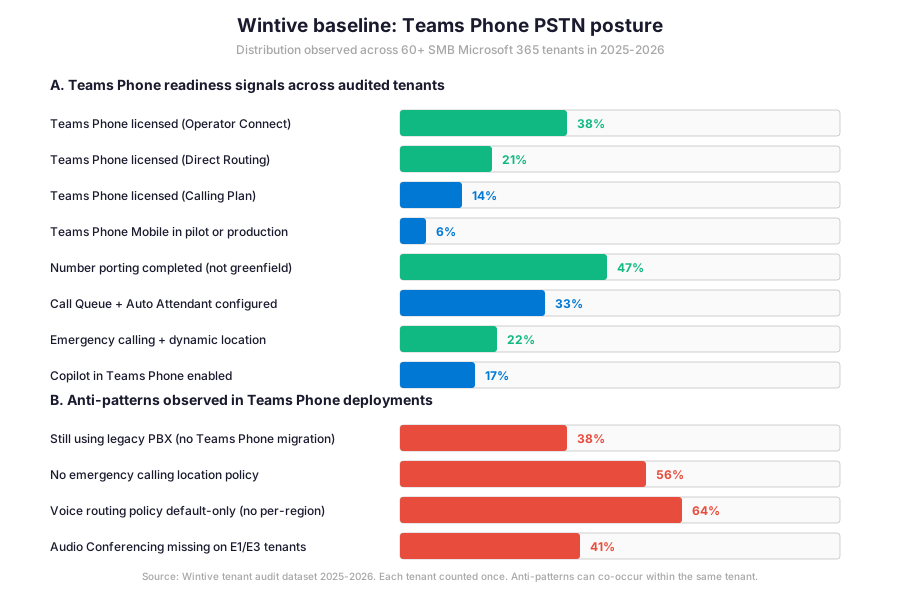
Furthermore, the gap between Operator Connect adoption (38%) and emergency calling location policy coverage (22%) is the defining safety metric for Teams Phone in 2026. Specifically, even tenants with Teams Phone fully deployed often miss the dynamic location policies that make 911 / 112 calls safely routable.
What the Teams Phone baseline reveals for SMB tenants
Wintive insight
Specifically, across 60+ SMB Microsoft 365 tenants, the standout finding is striking. 56% of audited tenants run Teams Phone without an emergency calling location policy. They are exposed to regulatory and life-safety risk on every 911 / 112 call.
Therefore, the Wintive Teams Phone playbook ships a 2-week governance sprint with five workstreams.
- PSTN model assessment (Operator Connect vs Direct Routing decision based on size and PBX integration).
- Licensing reconciliation (Teams standalone post-April 2024 split, Audio Conferencing for E1/E3, Calling Plan add-on if applicable).
- Call Queue and Auto Attendant resource account inventory with license validation.
- Dynamic emergency location policy rollout (civic addresses + subnet bindings + BSSID bindings).
- Copilot in Teams Phone enablement for tenants with the Microsoft 365 Copilot license.
Furthermore, compared to RingCentral RingEX, Zoom Phone, 8×8, or AWS Connect for cloud contact centers, Microsoft delivers the most integrated stack via Teams Phone for tenants already on Microsoft 365. The integration eliminates the second SaaS subscription. The hourly OpEx model keeps the per-user TCO predictable with no on-prem CapEx commitment.
Furthermore, the anti-pattern column tells the operational truth. 56% have no emergency calling location policy. 64% run with default-only voice routing policies (no per-region routing, no failover). 41% have Audio Conferencing missing on E1/E3 tenants. 38% still run a legacy PBX in parallel without a Teams Phone migration plan. These four anti-patterns explain most operational issues Wintive observes for Teams Phone in 2026.
🚨 5 SMB Teams Phone pitfalls in 2026
Specifically, the five pitfalls below cover the anti-patterns Wintive consistently observes during Teams Phone audits. A common mistake assumes Teams Phone Just Works once the license is assigned, but 56% of tenants miss the emergency calling location policy that makes 911 / 112 calls safely routable. Furthermore, comparing Teams Phone with RingCentral RingEX or Zoom Phone shows Microsoft is the most integrated for M365 tenants but the configuration depth (resource accounts, voice routing policies, dial plans, emergency policies) requires deliberate admin work that the GUI alone does not surface.
No emergency calling location policy (56% gap)
Specifically, 56% of audited tenants run Teams Phone without an emergency calling location policy. Therefore, every 911 / 112 call from a softphone routes with no physical location context, leaving first responders without dispatch information. The fix has three steps. Define civic addresses for each office via Set-CsOnlineLisCivicAddress. Bind subnets and Wi-Fi BSSIDs to locations via Set-CsOnlineLisSubnet and Set-CsOnlineLisWirelessAccessPoint. Create an Emergency Calling Policy with internal notification group and assign it to all Teams Phone licensed users via Grant-CsTeamsEmergencyCallingPolicy.
Default-only voice routing policy (no per-region routing)
Furthermore, 64% of audited Direct Routing tenants run with a single default voice routing policy that routes all calls through one PSTN gateway. Therefore, no failover exists if the primary gateway goes down, and international calls do not benefit from regional cost optimisation. The fix has three patterns. Define one voice routing policy per region (US, EU, APAC). Configure PSTN gateways in each region with the carrier of choice. Assign region-specific voice routing policies to users via Grant-CsOnlineVoiceRoutingPolicy based on user location.
Legacy PBX still running parallel (no migration plan)
Specifically, 38% of audited tenants still run a legacy PBX in parallel with Teams Phone, often as a perceived safety net or because complex hunt groups, paging systems, or analog devices were never migrated. Therefore, the tenant pays for two phone systems and users experience confusion about which platform handles inbound calls. The fix has two paths. Direct Routing migration where the SBC bridges the legacy PBX into Teams Phone, allowing gradual user-by-user migration. Operator Connect with full migration of inbound numbers via porting, retiring the legacy PBX entirely after a 30-day parallel-run validation window.
Audio Conferencing missing on E1 / E3 tenants
Furthermore, 41% of audited tenants on E1 or E3 plans have Audio Conferencing missing or only deployed for a subset of users. Therefore, the dial-in feature for Teams meetings is unavailable for users without a smartphone or stable internet connection (which matters for hybrid meeting attendance from cars, factory floors, and remote field locations). Specifically, the fix is the Audio Conferencing add-on license per user who needs dial-in access (the license is included in E5 but separate for E1 and E3). The Teams Admin Center then auto-provisions the conference bridge phone numbers per user.
Resource account licensing forgotten on Call Queues
Specifically, Call Queues and Auto Attendants require resource accounts (special user objects holding the phone number assignment), and resource accounts need a Microsoft Teams Phone Resource Account license. Furthermore, the first 25 resource accounts are free on E5 tenants but must be paid as add-ons on smaller tiers. Therefore, missing the resource account license causes the Call Queue or Auto Attendant to fail with no clear error in the Teams Admin Center, and inbound callers experience a silent disconnect. The fix has two steps. Inventory all resource accounts via Get-CsOnlineApplicationInstance. Then, apply the Microsoft Teams Phone Resource Account license to each.
Automated Tenant Health Check — $97
Audit your Teams Phone posture in 30 minutes
The Automated Tenant Health Check audits your Microsoft 365 tenant against the 40+ Teams Phone checks Wintive runs on every audit, including the PSTN connectivity model in use, the Teams Phone license assignment per user, the emergency calling location policy coverage, the voice routing policy depth, the resource account licensing for Call Queues and Auto Attendants, and the Copilot in Teams Phone enablement. Findings are tagged Critical, High, Medium, or Low and delivered as a PDF with two emails of direct support within 48 hours.
❓ Microsoft Teams Phone FAQ
Core Microsoft Teams Phone questions
PSTN models and licensing
Specifically, four PSTN models exist in 2026. Microsoft Calling Plan with Microsoft as the carrier (fastest setup, region-limited). Operator Connect with a Microsoft-certified third-party operator (no SBC management, fastest SMB path). Teams Phone Mobile with SIM-enabled mobile number (single-number solution for mobile-first orgs). Direct Routing with customer-managed certified SBC (maximum flexibility, integrates legacy PBX). Furthermore, the Wintive recommendation for SMB in 2026 is Operator Connect for greenfield deployments under 100 users in supported regions. Direct Routing for 100+ users or PBX-heavy estates where carrier flexibility and cost control matter. Critically, mix is supported per tenant: Operator Connect for most regions plus Direct Routing for sites with PBX needs is a common hybrid pattern.
The Teams Phone licensing stack has three layers. First, the base Microsoft 365 or Office 365 subscription (Business Basic or higher for SMB, E1 or E3 or E5 for Enterprise). Second, the Teams Phone license per user (mandatory for all 4 PSTN models, ~8 dollars or euros per user per month). Finally, a PSTN add-on which differs per model (Calling Plan needs an additional Calling Plan add-on, Operator Connect needs the operator subscription, Teams Phone Mobile needs the mobile carrier plan, Direct Routing needs the carrier and SBC contract). Critically, since April 1, 2024, new Enterprise customers must purchase E1 / E3 / E5 (no Teams) suite separately from the Teams standalone license. Furthermore, Audio Conferencing is included in E5 but requires a separate add-on for E1 and E3 tenants who need the dial-in feature for meetings.
Emergency calling and policy questions
Specifically, the emergency calling location policy is configured separately from the Teams Phone license assignment, which means many admins enable Teams Phone without adding the safety layer. Furthermore, the configuration requires three separate steps via PowerShell: civic addresses for each office (Set-CsOnlineLisCivicAddress), subnet and Wi-Fi BSSID bindings to locations (Set-CsOnlineLisSubnet plus Set-CsOnlineLisWirelessAccessPoint), and an Emergency Calling Policy with internal notification group assigned to all Teams Phone users (Grant-CsTeamsEmergencyCallingPolicy). Critically, missing this policy means 911 / 112 calls route with no physical location context, leaving first responders without dispatch information. The 56% gap explains why Wintive prioritises this policy in every Teams Phone health check.
More Microsoft Teams Phone questions
From a pricing perspective, there is no fundamental difference between Direct Routing and Operator Connect. Both models require Microsoft 365 plus Teams Phone licenses billed separately by Microsoft. The carrier billing comes separately from the chosen telecom operator. The differentiator: Direct Routing offers maximum flexibility with multi-carrier support, advanced routing logic, and PBX integration but requires SBC infrastructure (procured, configured, and maintained by the customer or a Direct-Routing-as-a-Service partner). Furthermore, Operator Connect simplifies the architecture by delegating SBC management to the certified operator, but flexibility is limited to what the operator and Microsoft’s framework allow. Specifically, for SMB tenants under 100 users, Operator Connect typically wins on simplicity. For 100+ users or international scale with carrier diversification, Direct Routing wins on cost control and flexibility.
Specifically, Copilot in Teams Phone provides four AI capabilities on PSTN calls. Real-time call transcription. AI-generated summary. Action item extraction. Follow-up suggestions. The integration requires Microsoft 365 Copilot license per user (~30 dollars per user per month) plus the underlying Teams Phone license. Furthermore, call recording must be enabled either at the policy level (CsTeamsCallingPolicy AllowPstnCallRecording) or via per-call user opt-in. Critically, the Copilot transcript is stored in the user’s OneDrive at the call recording location, and the summary is delivered as a Teams Chat message after the call ends. Privacy considerations: every participant must be informed of recording (jurisdiction-dependent legal requirement), and the tenant should configure retention policies in Microsoft Purview to manage transcript storage lifecycle.
📚 Related Microsoft 365 reading
The full admin guide is at our Microsoft 365 Copilot for Teams Admin Guide covering meeting recap, intelligent summarisation, action item extraction, and the Copilot license requirements that overlap with the Teams Phone Copilot integration described in this guide.
The full admin guide is at our Azure Blob Storage Admin Guide covering the four access tiers (Hot, Cool, Cold, Archive), lifecycle management policies, and the immutability stack which can apply to retained Teams Phone call recordings stored via Microsoft Purview retention policies.
The full admin guide is at our Microsoft Intune Compliance Policies Admin Guide covering the device-side compliance signals that gate access to Teams via Conditional Access for users on managed devices, including Teams Phone calling policies that depend on device health for sensitive workflows.
The complete Entra ID guide is at our Microsoft Entra ID Complete Guide covering the Conditional Access policies that gate Teams calling, the role-based access control for the Teams Admin Center, and the audit logging that captures every Call Queue and Auto Attendant configuration change.
The full admin guide is at our Azure CDN admin guide covering the migration from Azure CDN classic to Azure Front Door Standard or Premium, including the Private Link integration that pairs with admin endpoints for the Teams Admin Center traffic in regulated workloads.