Specifically, Security Copilot in Microsoft Intune in 2026 is more than an embedded chat experience. It goes beyond natural language queries. It is now a Security Copilot agentic surface with four purpose-built agents. The agents are: Change Review, Device Offboarding, Policy Configuration, and Vulnerability Remediation. Furthermore, the SCU consumption model has predictable per-hour cost. Critically, a major licensing shift starts April 20, 2026 when Security Copilot inclusion lands across all Microsoft 365 E5 tenants.
Furthermore, this Copilot in Microsoft Intune admin guide covers the four Security Copilot agents, the SCU licensing decision tree, the on-behalf-of authentication model, and the Wintive baseline. The baseline draws from 60+ SMB Intune tenant audits in 2025-2026. The most urgent takeaway: the Device Offboarding Agent is being retired June 1, 2026.
Quick answer. Copilot in Microsoft Intune runs on Security Copilot SCUs at $4 per hour standalone, or free with Microsoft 365 E5 inclusion (400 SCU per month per 1,000 paid E5 licenses, capped at 10,000 SCU, rolling out tenant-by-tenant April 20-June 30, 2026). Four agents: Change Review (GA), Device Offboarding (RETIRING June 2026), Policy Configuration (GA), Vulnerability Remediation (GA). Authentication is on-behalf-of, so Copilot inherits user permissions. Pre-activation checklist: Capacity Owner role, Owners + Contributors Entra groups, data sharing reviewed, SCU budget estimated.
🛡️ Free: M365 Tenant Security Audit Checklist
17-page PDF with 50 hands-on checks covering Entra ID, Exchange Online, SharePoint, Teams, Intune, license waste, and audit logging. PowerShell commands included. Built from 60+ real tenant audits at Wintive.
📅 Security Copilot in Microsoft Intune in 2026
Specifically, three forces have reshaped Security Copilot in Microsoft Intune admin work. The shift unfolded between 2024 and 2026. First, Microsoft announced the E5 inclusion at Ignite 2025. The phased tenant activation rolls out April 20-June 30, 2026. Therefore, most SMB tenants on M365 E5 will get Security Copilot access without buying standalone SCUs. Second, four Security Copilot agents reached general availability inside the Intune admin center. Each agent runs on the shared Security Copilot SCU pool. Third, the Device Offboarding Agent is being retired. The setup is gone April 30, 2026. Full removal from the Intune admin center happens on June 1, 2026.
Furthermore, the authentication model matters in 2026. Critically, it shapes every Copilot interaction. Copilot in Intune uses on-behalf-of authentication, so it inherits the user permissions across Intune and Windows 365 Cloud PC data. Therefore, an admin on the Intune Administrator role gets full Copilot access by default, while a Helpdesk role gets a scoped Copilot view. The Intune-specific role boundary still applies: Copilot does not bypass Microsoft Entra ID role assignments.
🤖 The 4 Security Copilot agents in Microsoft Intune
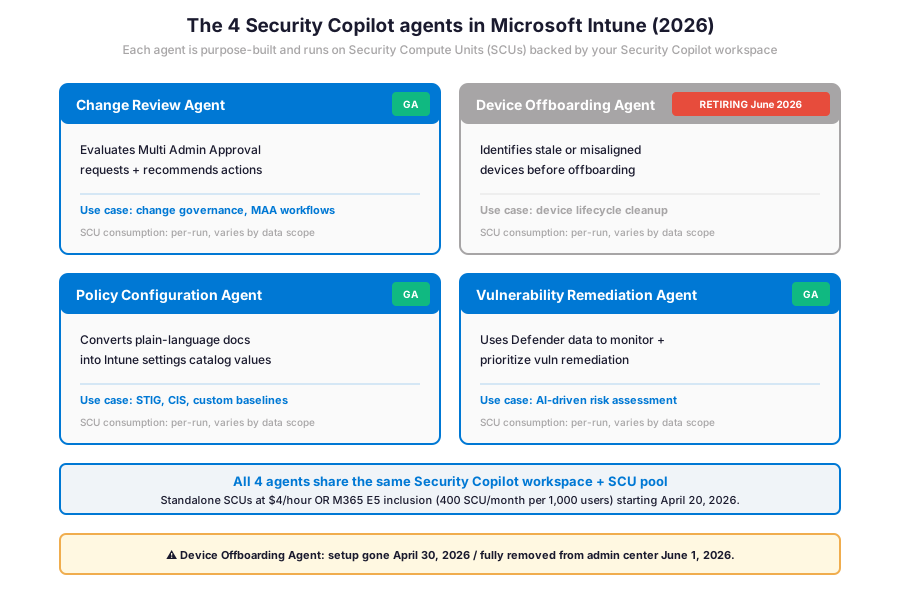
Specifically, the four Security Copilot agents in Intune are purpose-built. Each agent targets a distinct admin scenario. Each agent observes the relevant Intune workload. It reasons about the data using the Security Copilot generative AI engine. Furthermore, it recommends actions with admin oversight. Therefore, the agents do not change tenant settings without explicit admin approval, and every agent run consumes Security Compute Units (SCUs) from the shared workspace pool.
Change Review Agent: MAA workflow recommendations
Specifically, the Change Review Agent evaluates Multi Admin Approval (MAA) requests in Intune and recommends actions. Therefore, when one admin requests a configuration change, the agent reviews three dimensions: the request context, the historical pattern, and the device scope. The agent then recommends approve, reject, or escalate. The Wintive baseline pattern: enable Change Review Agent only for Conditional Access policies and compliance policy changes. The reason: the blast radius is largest if a configuration change is wrong in those areas.
Device Offboarding Agent: retiring June 2026 (do not adopt)
Importantly, the Device Offboarding Agent will not graduate from preview. The agent surfaces stale, duplicated, or out-of-sync devices between Intune and Entra ID before offboarding. The Microsoft retirement schedule is firm: setup gone April 30, 2026 and full removal from the Intune admin center on June 1, 2026. Therefore, do not adopt this agent in 2026 unless a short-term cleanup is needed before the deadline.
Policy Configuration Agent: baseline imports and STIG mapping
Specifically, the Policy Configuration Agent converts inputs into Intune settings catalog values. Inputs supported: plain-language documents (CIS baselines, STIG, vendor security guides) and free-text instructions. Furthermore, the agent supports two input modes: import a structured baseline document, or write the requirements in plain English. Therefore, the agent maps each requirement to a setting in the Intune settings catalog and reports a confidence score per match.
Vulnerability Remediation Agent: Defender-backed remediation
Furthermore, the Vulnerability Remediation Agent uses Microsoft Defender data. Therefore, it monitors vulnerabilities and prioritizes remediation with AI-driven risk assessments. Therefore, the agent does three things. First, it surfaces the highest-risk CVEs. Second, it maps them to the affected Intune-managed devices. Third, it recommends a remediation playbook. The Wintive deployment pattern is Vulnerability Remediation Agent enabled tenant-wide once the Defender baseline is at least 80% device-coverage.
💰 SCU licensing matrix for Copilot in Intune
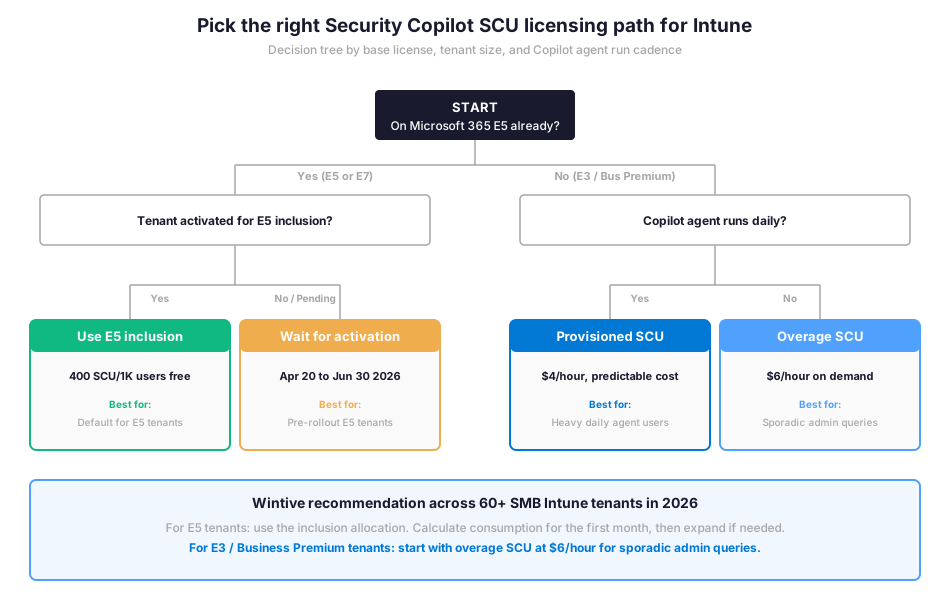
Specifically, Copilot in Microsoft Intune is included with Security Copilot. There is no Intune-specific Copilot license, no Intune Suite requirement for Copilot, and no separate per-user Copilot price for Intune. Therefore, the licensing question is entirely about how to fund Security Compute Units (SCUs): standalone provisioning at $4 per hour, M365 E5 inclusion (free up to a cap), or M365 E7 inclusion (E5 plus M365 Copilot plus Entra Suite plus Agent 365 in one SKU at $99 per user per month).
SCU consumption realities and cost predictability
Specifically, SCU consumption per agent run varies by data scope and prompt complexity. A simple natural language query against the Intune device list might consume 0.1 SCU. A Policy Configuration Agent run that imports a 50-page CIS baseline can burn 3-5 SCU. Therefore, the M365 E5 inclusion allocation of 400 SCU per 1,000 users covers most SMB Intune workflows comfortably, while heavy agentic deployments need supplemental provisioned SCUs at $4 per hour to avoid throttling at end-of-month.
Furthermore, the SCUs do not roll over month-to-month. The model is strict. The use-it-or-lose-it model means an admin should track consumption against the monthly allocation and compare predictable per-user/month TCO with the variable SCU consumption pattern. The total cost of ownership remains predictable for E5 tenants because the inclusion is free and the allocation is hard-capped. For E3 or Business Premium tenants, the OpEx model with overage SCUs at $6 per hour is the cheapest path before any on-prem or CapEx alternative.
🎯 Natural language queries against Intune data
Specifically, Copilot Chat is accessible from any page in the Intune admin center via the Copilot button on the top banner. Therefore, an admin can ask natural language questions about Intune data. Topics covered: devices, users, apps, policies, updates, and compliance. No KQL or PowerShell required. Furthermore, the intelligent search matches the request to a built-in prompt library. The library covers most common admin scenarios. Therefore, Copilot summarizes the results and recommends actions to take.
| Admin scenario | Natural language prompt | Underlying data | Typical SCU cost |
|---|---|---|---|
| Device compliance triage | Show me non-compliant devices in the past 7 days | Compliance state + check-in time | 0.1 to 0.3 SCU |
| Policy gap analysis | Which devices do not have BitLocker encryption configured | Configuration policy + device state | 0.2 to 0.5 SCU |
| App deployment investigation | Why did the Adobe Reader install fail on these 12 devices | App deployment status + device logs | 0.3 to 0.8 SCU |
| Update ring health | Show me devices stuck on a Windows feature update | Windows Update for Business + device telemetry | 0.2 to 0.6 SCU |
| Custom group build | Add devices in branch X to the Conditional Access exclusion group | Device list + Entra group membership | 0.4 to 1.0 SCU |
Specifically, the prompts above are illustrative starting points. Therefore, the natural language model adapts to the actual phrasing the admin uses, including French and other languages where Microsoft has rolled out localised support. Furthermore, the Copilot output includes a recommended action button per result, which can update an Entra security group, kick off a sync, or open the relevant policy edit pane.
⚙ Configure Copilot in the Intune admin center
Specifically, the Copilot configuration in Intune has a single home. The path: Tenant administration > Copilot in the admin center. Therefore, an admin checks the Security Copilot workspace status, the Capacity Owner role, and the data sharing toggle on this single page. Furthermore, the role required to access this page is Intune Administrator. This role has access to Copilot in Intune by default. The mapping is per the Microsoft Entra ID role definition.
Pre-activation checklist before E5 inclusion lands
- Identify Capacity Owner. Decide which Global or Security Admin holds the Capacity Owner role. The default lands on the Global Administrator who triggers the workspace provisioning, which is rarely the right long-term owner.
- Create Owners + Contributors Entra security groups. Build two Entra ID security groups before activation. Owners control SCU budget and data sharing settings. Contributors run prompts and agents.
- Review the data storage location. Check the data residency setting immediately after the workspace is provisioned. Compliance-bound tenants need EU or specific regional storage.
- Turn off data sharing if compliance requires it. The default is data sharing ON for Microsoft model improvement. HIPAA, financial services, and government tenants typically turn this OFF.
- Estimate the SCU budget. Use the Microsoft Security Copilot SCU usage documentation and the in-product calculator to model per-month consumption against the included allocation.
# Microsoft Graph PowerShell — Verify Copilot in Intune setup + provision Owners/Contributors groups
Connect-MgGraph -Scopes "Group.ReadWrite.All","Directory.Read.All","DeviceManagementConfiguration.Read.All"

# 1. Verify Intune Administrator role assignment for the current admin (Copilot in Intune access)
$intuneRole = (Get-MgRoleManagementDirectoryRoleDefinition -Filter "displayName eq 'Intune Administrator'").Id
Get-MgRoleManagementDirectoryRoleAssignment -Filter "roleDefinitionId eq '$intuneRole'" | \`
  Select-Object PrincipalId, RoleDefinitionId

# 2. Create the Security Copilot Owners group (pre-activation prep)
New-MgGroup -DisplayName "SecurityCopilot-Owners" \`
  -MailEnabled:$false -SecurityEnabled:$true -MailNickname "sec-copilot-owners" \`
  -Description "Security Copilot Capacity Owners (manages SCU + workspace settings)"

# 3. Create the Security Copilot Contributors group
New-MgGroup -DisplayName "SecurityCopilot-Contributors" \`
  -MailEnabled:$false -SecurityEnabled:$true -MailNickname "sec-copilot-contrib" \`
  -Description "Security Copilot Contributors (run prompts + agents)"

# 4. Inspect Intune Copilot tenant status
# Navigate to: Intune admin center > Tenant administration > Copilot
🔐 Copilot in Intune data boundary and on-behalf-of authentication
On-behalf-of authentication and RBAC inheritance
Specifically, Copilot in Intune uses on-behalf-of authentication. Therefore, it inherits the signed-in user permissions across Intune and Windows 365 Cloud PC data sources. Therefore, an Intune Helpdesk role gets a scoped Copilot view limited to their assigned device collections. An Intune Administrator gets the full tenant view. Furthermore, Copilot does not bypass Microsoft Entra ID role-based access control. The agent reads what the admin can see. Critically, it writes only what the admin can already write.
| Audit dimension | Where the data lives | Retention | Access role |
|---|---|---|---|
| Copilot prompt and response | Security Copilot workspace audit log | 90 days default, 1 year with Purview Premium | Capacity Owner + Audit reviewer |
| Agent run history (4 agents) | Intune admin center + Security Copilot portal | Per-tenant retention setting | Intune Administrator |
| SCU consumption per run | Security Copilot usage dashboard | Real-time + historical | Capacity Owner |
| Data sharing toggle | Security Copilot workspace settings | Tenant-wide setting | Capacity Owner |
| Microsoft Purview oversight | Microsoft Purview compliance portal | Per Purview retention policy | Purview Compliance Admin |
Audit log retrieval with PowerShell and Microsoft Purview
Furthermore, every Copilot prompt and response is captured in the Security Copilot workspace audit log with a 90-day default retention. Therefore, organisations on Microsoft Purview Premium can extend retention to 1 year. The 1-year retention covers most SOC 2 audit windows.
PowerShell audit log queries for Copilot interactions
The audit data is searchable from the Security Copilot portal under Audit. Furthermore, it can be exported for eDiscovery or compliance investigation. The PowerShell snippets below cover the most common admin investigation queries.
# Microsoft Graph PowerShell — Audit log query for Copilot in Intune interactions
Connect-IPPSSession

# Search the unified audit log for Copilot-related events in the past 30 days
Search-UnifiedAuditLog \`
  -StartDate (Get-Date).AddDays(-30) \`
  -EndDate (Get-Date) \`
  -RecordType CopilotInteraction \`
  -ResultSize 5000 | \`
  Where-Object { $_.Workload -eq "Intune" } | \`
  Select-Object CreationDate, UserIds, Operations | \`
  Export-Csv -Path "C:\reports\copilot-intune-audit.csv" -NoTypeInformation

# Filter for agent runs specifically (Change Review, Policy Configuration, Vulnerability Remediation)
Search-UnifiedAuditLog \`
  -StartDate (Get-Date).AddDays(-7) \`
  -EndDate (Get-Date) \`
  -Operations "AgentRun" \`
  -ResultSize 1000

# Quick count of Copilot prompts per user (top 10 active admins)
Search-UnifiedAuditLog \`
  -StartDate (Get-Date).AddDays(-30) \`
  -RecordType CopilotInteraction \`
  -ResultSize 5000 | \`
  Group-Object UserIds | \`
  Sort-Object Count -Descending | \`
  Select-Object -First 10 Count, Name
Specifically, the audit log queries above cover the most common admin investigation paths after Copilot in Intune is enabled tenant-wide. Therefore, before turning on the agents in production, the prerequisites checklist below covers the licensing, role assignment, group provisioning, and compliance baseline that Wintive runs on every audited tenant.
Prerequisites for Security Copilot in Microsoft Intune:
Microsoft 365 E3, E5, or Business Premium base license. Microsoft Intune license assigned to admins (Intune Administrator role grants Copilot access by default). Microsoft Entra ID (Azure subscription required only for standalone Security Copilot workspace). Capacity Owner role identified before workspace provisioning. Owners + Contributors Entra ID security groups created before activation. Data residency setting reviewed for compliance-bound tenants. SCU budget estimated using the Microsoft Security Copilot SCU calculator. In HIPAA-aligned tenants, the Microsoft BAA must cover Security Copilot, audit logs retained for 6 years (Purview Premium), and prompt-and-response data flagged with PHI sensitivity labels. SOC 2 audits require Copilot governance documented in change management evidence. NIST AI RMF alignment expects Copilot use cases inventoried, risk classified, and continuous monitoring established before tenant-wide agent enablement.
Specifically, the Wintive baseline distribution below shows where the typical SMB Intune tenant stands on Copilot adoption versus where it needs to be for safe agentic workflows. Therefore, comparing the deployment counts with the anti-pattern counts highlights the governance gap that defines the Copilot in Intune admin work in 2026.
📈 The Wintive baseline — Copilot in Intune patterns across 60+ tenants
Therefore, after assessing 60+ Microsoft 365 SMB Intune tenants for Copilot readiness between 2025 and 2026, Wintive has a clear distribution of which readiness signals correlate with safe agentic adoption and which anti-patterns predict SCU overconsumption or governance incidents. The baseline below tells the story.
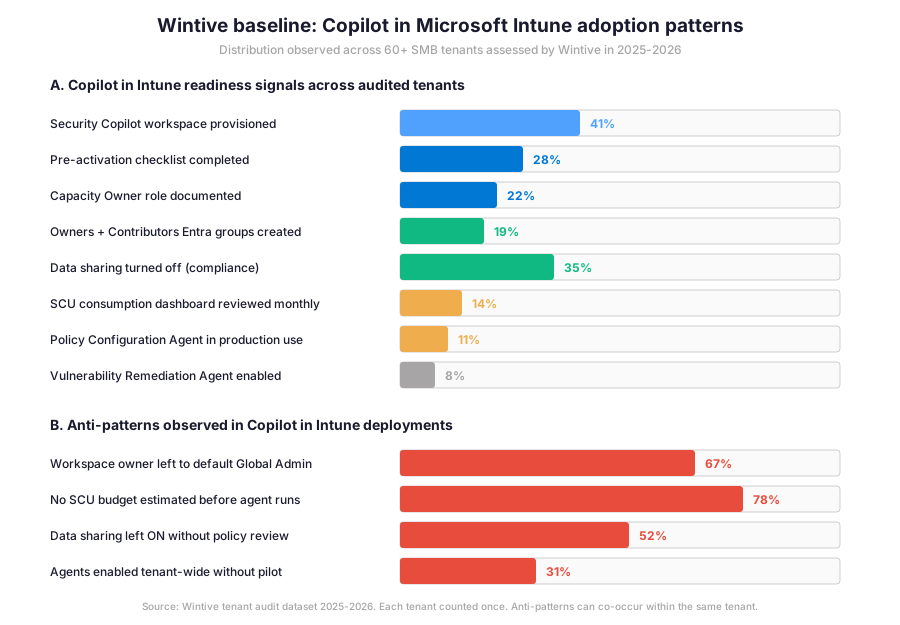
Specifically, the gap between Security Copilot workspace provisioning (41%) and pre-activation checklist completion (28%) is the defining operational metric for Copilot in Intune in 2026. Furthermore, the insight callout below distils what that gap means for SMB admin practice and where the typical 2-week activation sprint focuses its remediation effort.
Wintive insight
Across 60+ SMB Intune tenants, the standout finding is that 78% never estimated their SCU budget before running agents. Therefore, the Wintive Copilot in Intune playbook ships a 2-week activation sprint covering Capacity Owner assignment, Owners + Contributors group provisioning, data sharing review, SCU calculator pass, and a 30-day pilot before tenant-wide agent enablement. The pre-activation work is light, around 30 minutes if the prep groups are already in place.
Furthermore, the anti-pattern column tells the operational truth: 67% of audited tenants left the workspace owner as default Global Admin (a least-privilege violation), 78% never estimated SCU budget, 52% left data sharing ON without policy review, and 31% enabled agents tenant-wide without a 30-day pilot. These four anti-patterns explain most year-one cost overruns and most CIO escalations Wintive sees in 2026.
🚨 5 SMB Copilot in Intune deployment pitfalls
The five pitfalls below cover the anti-patterns Wintive consistently observes during Copilot in Intune pre-deployment audits. A common mistake is treating Copilot in Intune as a free productivity feature once the E5 inclusion lands. Admins struggle with this gotcha because Copilot looks free at the surface. The reality is different. Specifically, Copilot consumes SCUs that count against the inclusion allocation cap. If the cap is hit, throttling kicks in at end-of-month. Furthermore, comparing Microsoft Security Copilot governance with on-prem AI tools or AWS-native equivalents reveals a key difference. The Microsoft stack uniquely couples the AI assistant with the role-based access control plane: Entra + Intune RBAC + Purview audit. Therefore, most SMB Copilot in Intune incidents are governance issues rather than model issues.
Workspace owner left to default Global Admin
Specifically, 67% of audited tenants left the Capacity Owner role as default Global Admin. This default violates the principle of least privilege. The Wintive remediation has three steps. First, create a dedicated SecurityCopilot-Owners Entra group. Second, populate it with 2-3 named admins. Third, assign the group as Capacity Owner before any agent run.
No SCU budget estimated before agent runs
Therefore, 78% of audited tenants never used the Microsoft Security Copilot SCU calculator. The gap: no estimate of monthly consumption against the included or provisioned allocation. The fix is a 30-minute SCU budget pass during pre-activation. Three items to catalogue: the agents that will run, the average SCU per run, and the expected monthly cadence. Document the budget in the change management ticket for the Copilot rollout.
Data sharing left ON without policy review
Furthermore, the Security Copilot workspace defaults to data sharing ON for Microsoft model improvement. The Wintive default for SMB tenants without explicit data sharing approval: turn the toggle OFF during the workspace setup. This is a one-click fix. HIPAA, financial services, and government tenants always turn the toggle OFF. Critically, this is a per-tenant setting and is not enforced by any policy template.
Agents enabled tenant-wide without 30-day pilot
Specifically, 31% of audited tenants enabled all 4 Security Copilot agents in Intune tenant-wide without a 30-day pilot phase. The Wintive default is a 5-admin pilot for the first 30 days. Furthermore, weekly SCU consumption review is part of the pilot. The pilot phase is critical. The reason: the Policy Configuration Agent and the Vulnerability Remediation Agent both have variable SCU costs. The variable depends on the data scope.
Adopting Device Offboarding Agent in 2026
Importantly, the Device Offboarding Agent will not graduate from preview. Therefore, do not build a long-term process around it: setup is gone April 30, 2026 and the agent disappears from the Intune admin center on June 1, 2026. The Wintive recommendation is to use Microsoft Entra ID Access Reviews and Intune device cleanup playbooks instead.
❓ Security Copilot in Microsoft Intune FAQ
Copilot in Microsoft Intune itself has no per-user license cost. Therefore, the cost is entirely about Security Compute Units (SCUs) consumption. Standalone provisioned SCUs cost $4 per hour. Overage SCUs cost $6 per hour. M365 E5 inclusion provides 400 SCU per month per 1,000 paid E5 users (capped at 10,000 SCU per month) for free starting April 20-June 30, 2026 phased rollout. M365 E7 ($99 per user per month, GA May 1, 2026) bundles E5 plus M365 Copilot plus Entra Suite plus Agent 365 with the same Security Copilot entitlement.
Four agents are available in 2026: Change Review Agent (evaluates Multi Admin Approval requests), Device Offboarding Agent (RETIRING June 1, 2026 — do not adopt), Policy Configuration Agent (converts plain-language docs into Intune settings catalog values), and Vulnerability Remediation Agent (Defender-backed CVE prioritisation). Each agent runs on the shared Security Copilot SCU pool and respects on-behalf-of authentication. The Wintive recommendation: Change Review for governance, Policy Configuration for baselines, Vulnerability Remediation once Defender coverage is at least 80%.
There is no built-in Intune role for Copilot. Therefore, access is managed through Security Copilot or Microsoft Entra ID roles. The Intune Administrator role in Microsoft Entra ID has access to Copilot in Intune by default. The Capacity Owner role in Security Copilot manages SCU budget and workspace settings. The Wintive baseline pattern is to create dedicated SecurityCopilot-Owners and SecurityCopilot-Contributors Entra security groups before workspace provisioning, then assign the Owners group as Capacity Owner.
More Security Copilot in Microsoft Intune questions
No. Specifically, all 4 Security Copilot agents in Intune observe and recommend, but do not change tenant settings without explicit admin approval. Therefore, the Change Review Agent recommends approve, reject, or escalate on Multi Admin Approval requests, but the human admin clicks the final action. The Policy Configuration Agent recommends settings catalog values with confidence scores, but the admin reviews and saves the policy. This admin-in-the-loop design is intentional and is critical for the SOC 2 change management evidence trail.
The phased rollout runs April 20-June 30, 2026 per the Microsoft Message Center notification MC1261596. Therefore, every M365 E5 tenant receives a 30-day advance notification before activation. Existing Security Copilot customers retain their provisioned capacity until the inclusion lands. The Wintive recommendation is do not cancel existing Security Copilot capacity before the E5 inclusion is confirmed active in your tenant. Use the pre-activation checklist (Capacity Owner, Owners + Contributors groups, data sharing review, SCU budget estimate) to prepare during the 30-day notification window.
📚 Related Microsoft 365 Copilot reading
The full admin guide is at our Microsoft 365 Copilot for Teams Admin Guide covering licensing, the Purview governance gates (sensitivity labels + DLP for Copilot + Restricted Content Discovery), meeting transcription policies, and the Wintive baseline across 60+ tenants.
The step-by-step deployment guide is at our Deploy Microsoft 365 Copilot with Intune Step-by-Step Admin Guide covering license assignment, Intune device targeting, Endpoint DLP for Copilot output, and the Conditional Access scoping for the Copilot app.
The complete Entra ID guide is at our Microsoft Entra ID Complete Guide covering the Suite, the Agent ID, and the role-based access control that Copilot in Intune inherits via on-behalf-of authentication.
The compliance policy admin guide is at our Intune compliance policies admin guide covering the device compliance settings that the Vulnerability Remediation Agent reads when prioritising remediation actions.
The dynamic groups guide is at our Entra ID dynamic groups for Intune admin guide covering the security group rules that scope which devices the Copilot agents observe and act on.
This tutorial covered one focused Intune workflow. For a complete picture of how your full Microsoft 365 environment — device compliance, identity, and security — performs against best practices:
🔍 Want a complete audit of your Microsoft 365 tenant?
The Automated Tenant Health Check scans your M365 environment in under 10 minutes: license waste, security posture, MFA coverage, compliance gaps, license rightsizing opportunities. Full PDF report with prioritized recommendations delivered instantly.