

A SharePoint online intranet is the company portal you already own and probably under-use: the home page everyone opens, the news that replaces all-staff email, the search that finds any policy in seconds. Most teams pay vendors thousands for an intranet, yet Microsoft 365 already ships every part needed to build a great one. The trick is knowing how to assemble it.
This guide shows exactly that. Wintive runs Microsoft 365 for 60+ tenants, therefore we cover what the product brochures and the dry docs skip: the site architecture, an honest native-versus-third-party verdict, the capabilities that actually matter, governance, and a controlled rollout. Every section answers a real question, so you can build a portal people use rather than ignore.
🛡️ Free: M365 Audit Checklist
19-page PDF with 50 hands-on checks across Entra ID, Exchange Online, SharePoint, Teams and Intune. Run it before you build the intranet, so you start from a clean tenant. PowerShell commands included. Built from 60+ real tenant audits at Wintive.
🏢 What a SharePoint online intranet is
Quick answer. A SharePoint online intranet is a company portal built from SharePoint sites: one home site as the front door, hub sites that group related content and share navigation, and team or communication sites underneath. It delivers news, search, documents and apps on web and mobile, it is included in Microsoft 365, and it needs no third-party product for most businesses.
An intranet is not one site; it is an architecture of sites that feel like one place. The home site is the destination, hubs are the wayfinding, and the individual sites are the rooms. Get that structure right and people navigate without thinking. Get it wrong and you build a maze nobody returns to.
Intranet versus a single site
People confuse a SharePoint online intranet with a single SharePoint site, and the difference matters. A site holds one team or topic, whereas the intranet ties many sites together with shared navigation, branding and search. You start by learning to create a SharePoint site, then you connect those sites into a portal. The whole becomes far more useful than the sum of its parts.
🏗️ SharePoint online intranet architecture
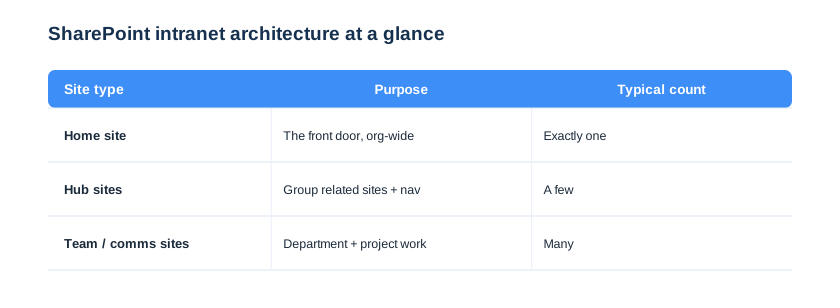
Architecture is the decision that makes or breaks a SharePoint online intranet, and it is worth ten minutes of planning before you build anything. There are three building blocks, and the matrix below shows how they fit together. Decide the shape first, then the content has somewhere sensible to live.
Home, hub and team sites
The home site is the single front door, the place every employee lands and where company news lives. Hub sites sit below it and group related sites, such as all of HR or all of a region, sharing navigation and a theme. Team and communication sites attach to the right hub and inherit that structure. A new project site instantly belongs somewhere, instead of floating alone.
There is a naming discipline that pays off here too. We name sites and hubs by function rather than by team, so a reorganisation does not orphan a URL. The HR hub survives a department rename, and the payroll site simply moves under it. As a result, the SharePoint online intranet keeps working through the messy reality of a growing business.
Keep the hierarchy flat
The classic mistake is a deep tree of subsites, which Microsoft itself now discourages. Modern architecture is flat: many sites, connected by a few hubs, not nested inside each other. You can move a site between hubs without breaking links. The intranet reorganises as the business changes, rather than ossifying around an old org chart.
Plan for growth from the first hub. We sketch the hub map for where the business will be in two years, not just today, so new departments slot into an existing shape. Adding a region later is a five-minute job, not a redesign. The intranet scales with headcount instead of needing a rebuild every time the company grows.
⚖️ Native SharePoint versus a third-party intranet
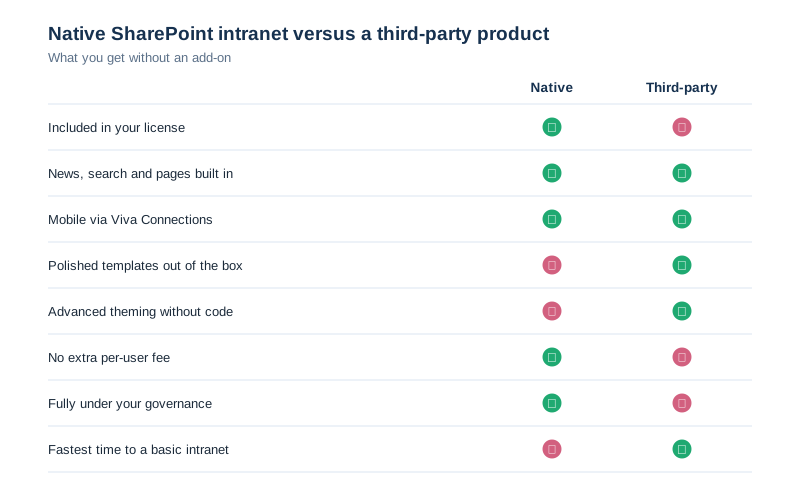
Before spending a budget, ask the honest question: do you need a third-party intranet product at all? The comparison below is the one we run with every client, and for most small and mid-sized businesses the answer is no. Weigh what an add-on really buys before you sign.
When native is enough
For the vast majority of businesses, native SharePoint delivers everything an intranet needs at no extra cost. News, search, pages, documents and mobile are all included, and they are governed entirely by you. The honest trade is polish and speed. A product ships prettier templates faster, but you pay per user forever for what SharePoint already does. We steer most clients to native and reinvest the saved licence money into content.
Budget aside, native also wins on control. Because everything lives in your own tenant, your data, your governance and your compliance settings apply with no third party in the loop. There is no extra vendor to vet, no separate data processor, and no new attack surface. Native is usually the easier answer for security and compliance reviews, not just for the finance team.
When a product earns its place
A third-party intranet can be worth it in narrow cases. A large enterprise that wants advanced theming with zero internal skills, or very specific employee-experience features, may justify the spend. But that is the exception, not the rule. We treat a product as something to prove the need for, not a default purchase.
There is also a hidden cost to a third-party layer that buyers miss. An add-on sits on top of SharePoint, so every Microsoft update risks breaking it, and you depend on the vendor to keep up. Native content stays compatible by definition, while a product becomes a thing to maintain. The cheaper path is usually the more durable one too.
🧩 The capabilities an intranet needs
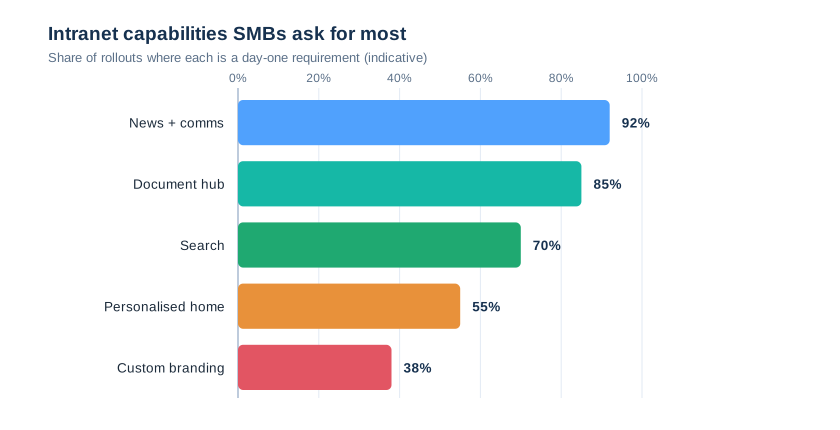
A good intranet does a handful of jobs extremely well, and chasing exotic features is how projects stall. The chart shows what businesses actually ask for on day one, so you can build those first and add the rest later. You ship value early instead of polishing things nobody requested.
Start with news and documents
Two capabilities carry most of the value: company news and a findable document hub. We build those first, wiring real files from a document library into the home page and turning announcements into news posts. The intranet earns daily visits in week one, which is the only thing that makes the rest worth building.
Resist the urge to launch with every capability switched on. A wall of half-finished features confuses people more than a small, polished set. We ship news, documents and search first, then add personalisation once those land. Staff learn the intranet in stages instead of bouncing off a cluttered first impression.
🛠️ How to build a SharePoint online intranet
Building a SharePoint online intranet is an assembly job, not a coding project. You stand up the home site, connect hubs, wire navigation, add news and search, then apply branding and governance. The table below is the build checklist we work through on every engagement, in order.
| Build step | What it delivers | Tooling |
|---|---|---|
| Home site | The org-wide front door | Comms site + Set-SPOHomeSite |
| Hub sites | Grouping and shared nav | Register as hub |
| Global navigation | Wayfinding everywhere | Home site app bar |
| News + search | Comms and findability | News web part, search |
| Branding | Recognisable identity | Site theme |
Build on pages, not custom code
The whole portal is assembled from SharePoint pages and web parts, with no custom development. An admin builds the home page from sections and web parts, exactly as for any page. The intranet stays upgrade-safe and editable by the business, instead of depending on a developer every time a link changes.
One more build principle saves rework later. We connect every new site to a hub on creation, rather than leaving it floating and fixing navigation afterwards. The site inherits the theme and the top nav from day one. As a result, the SharePoint online intranet stays consistent automatically, instead of drifting as each team builds its own corner.
🏠 The home site is the front door
The home site is the most important site you will build, because it is where everyone starts. You designate one communication site as the home site, and it gains org-wide navigation, the app bar and a prominent place in search. Microsoft explains the planning in its home site guide. Choose it deliberately and design it for the widest possible audience.
Designating the home site is a single command, but it carries weight. We set it deliberately once the site is built, because the home site drives global navigation and search across the whole portal. The snippet below promotes a communication site to the home site.
# Designate the org-wide home site (SharePoint Online Shell)
Connect-SPOService -Url https://contoso-admin.sharepoint.com
Set-SPOHomeSite -HomeSiteUrl https://contoso.sharepoint.com/sites/home
Design your SharePoint online intranet home page
The home page must work for the receptionist and the regional manager alike. We lead with company news, quick links and a search box, then use audience targeting so each department also sees what is relevant to it. One page serves the whole company without becoming a cluttered noticeboard.
Editing rights on the home page deserve special care, because it is the one page everyone sees. We keep the table below as the rule of thumb: most people read, departments edit their own sites, and only a small intranet team touches the front door and global navigation. A stray edit can never deface the page the whole company lands on.
| Role | Read intranet | Edit a site | Manage the portal |
|---|---|---|---|
| Employee | Yes | No | No |
| Site member | Yes | Yes | No |
| Site owner | Yes | Yes | No |
| Intranet admin | Yes | Yes | Yes |
🔗 Hub sites, navigation and news
Hubs and navigation are what turn a pile of sites into a portal people can actually use. A hub gives its family of sites shared top navigation, a common theme and rolled-up news, so moving between related sites feels seamless. The user never feels the seams between separate SharePoint sites, all mapped in our SharePoint vs OneDrive guide.
| Layer | Navigation it provides | Best for |
|---|---|---|
| Home site app bar | Global, org-wide links | The whole company |
| Hub navigation | Links across a hub family | A department or region |
| Site navigation | Links within one site | A single team |
Roll news up to the home page
News is most powerful when it gathers in one place. The News web part on the home site rolls up posts from across hubs, so a single feed shows what matters company-wide. Staff stop hunting through sites for updates. The home page becomes the habit that pulls people back every morning.
Search is the quiet workhorse behind all of this. Because every site, page and document is indexed, one search box on the home site finds anything across the SharePoint online intranet. People stop asking colleagues where a file lives and simply search. The portal saves time even for the staff who never browse it.
🎨 Branding, themes and mobile
A SharePoint online intranet should look like your company, and reach staff wherever they are. Native theming applies your colours and logo across every connected site without code, which is enough for most brands. You get a coherent identity without a design project. Polish comes from consistency, not from custom development.
💡 Wintive insight
The intranets that fail are not the ugly ones; they are the ones nobody can find anything in. We spend our first day on architecture and navigation, not on colours. A plain but well-structured SharePoint online intranet beats a beautiful maze every single time, and the polish can always come later.
Apply your theme without code
Branding a whole intranet sounds heavy, yet it is a theme, not a project. You define a company theme once and apply it across every connected site, so colours and logo stay consistent. We script the theme so a new site is on-brand the moment it joins a hub. The snippet below adds and applies a tenant theme.
# Add and apply a company theme (SharePoint Online Shell)
Add-SPOTheme -Name "Contoso" -Palette $palette -IsInverted $false
Set-SPOTheme -Name "Contoso" `
    -Web https://contoso.sharepoint.com/sites/home
Reach the frontline with Viva Connections
Most staff live on a phone, so mobile is not optional. Viva Connections surfaces the intranet inside Teams and on mobile as a branded app, with a dashboard of cards for common tasks. Frontline and deskless staff reach news and tools without a browser. The intranet finally includes the people who never sat at a desk.
Getting the frontline onto a phone changes who the intranet serves. Deskless staff have always been the hardest to reach with company news, and a mobile app finally closes that gap. A shift worker sees the same announcement as head office, on the device already in their pocket. The portal becomes a tool for the whole company, not just the office.
🔐 SharePoint online intranet governance
Governance is what keeps a SharePoint online intranet healthy a year after launch, when the excitement has faded. Without it, sites sprawl, navigation rots and nobody trusts the content. The card below is the governance baseline we apply on every tenant, then tune per organisation.
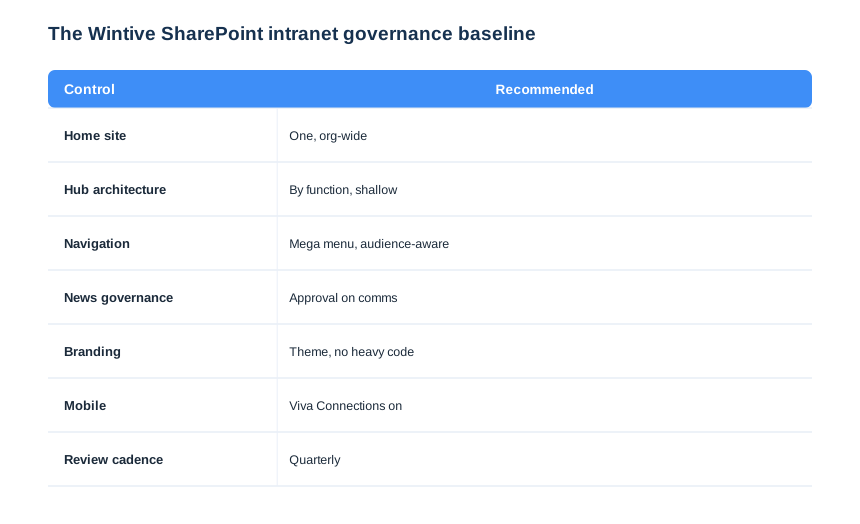
Each control on this card heads off a specific failure we have cleaned up on other tenants. One home site stops the “which portal is real” confusion, a shallow hub model keeps navigation sane, and a quarterly review catches dead sites before they pile up. Governance is not bureaucracy; it is the maintenance that keeps the intranet trusted. The portal still feels owned a year after launch, instead of abandoned.
Run a SharePoint online intranet from PowerShell
At scale you set this baseline in script, not screen by screen. We register hubs and apply themes with the SharePoint Online and PnP modules, so every site gets the same governance. The snippet below registers a hub site and joins a team site to it.
# Register a hub and join a site to it (PnP PowerShell)
Connect-PnPOnline -Url https://contoso-admin.sharepoint.com -Interactive
Register-PnPHubSite -Site https://contoso.sharepoint.com/sites/hr-hub
Add-PnPHubSiteAssociation -Site https://contoso.sharepoint.com/sites/payroll `
    -HubSite https://contoso.sharepoint.com/sites/hr-hub
Own the navigation and the news
Two things must stay curated: the global navigation and the company news. We limit who edits the home site and global nav to a small intranet team, while every department owns its own sites. The front door stays clean and trustworthy even as hundreds of people contribute behind it.
🚀 Rolling out a SharePoint online intranet
A rollout is where good intranets are won or lost, because technology is the easy part and adoption is the hard one. The six steps below take a SharePoint online intranet from a plan to a launched, measured portal. Treat launch as a campaign, not a switch you flip.
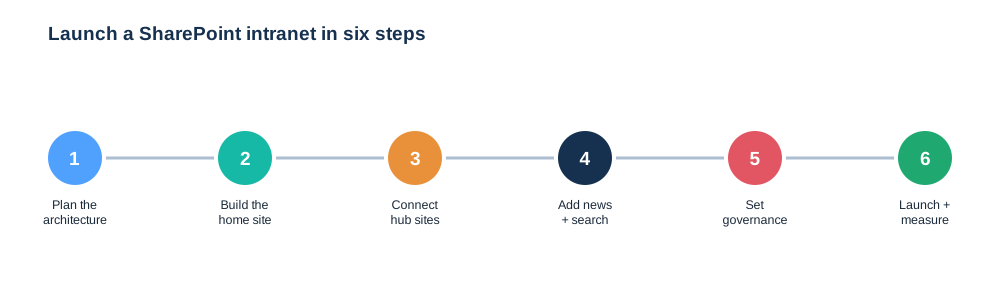
Launch your SharePoint online intranet with content
The fastest way to kill an intranet is to launch it empty. We seed real news, key documents and working links before go-live, so the first visit is useful. We measure visits and search terms to see what people want next. The intranet improves on evidence rather than guesswork, and adoption climbs instead of stalling.
Adoption needs a human nudge, not just good technology. We pair the launch with a short campaign: a launch news post, a quick demo, and a few visible leaders using it first. The intranet feels alive from day one rather than imposed. The habit forms in the first fortnight, which is when most portals either stick or quietly die.
📦 Migrating from a classic intranet
Many businesses already have an old classic intranet, and the goal is to modernise without losing content. We map the old structure to the new flat hub model, migrate documents into clean libraries, and rebuild pages as modern SharePoint pages rather than lifting the old ones. The new portal is faster and mobile-ready, not a tired site in new paint.
Do not migrate the mess
A migration is a chance to leave the clutter behind. We archive dead sites, consolidate duplicate libraries, and keep version history intact so nothing important is lost, as covered in our version history guide. The new intranet starts lean. You modernise the content, not just the technology.
Plan the cutover so nobody loses access mid-move. We run the old and new intranet side by side for a short window, redirect the busiest links first, and retire the classic site only once traffic has shifted. There is no hard switch that strands people on a dead page. The migration feels like an upgrade, not a disruption.
Keep the old intranet read-only for a grace period rather than deleting it on launch day. A frozen archive lets people find anything the migration missed, without letting them add new content to a dead system. Nobody is stranded, and you still get a clean cut-over to the new SharePoint online intranet. Trust in the new portal grows instead of being dented by a missing page on day one.
🚨 Common SharePoint online intranet mistakes
Buying a product you did not need
The costliest mistake is paying for a third-party intranet before testing native SharePoint. Prove the gap first, because for most businesses there is not one. You keep the budget and still get the portal you wanted.
Deep subsites and tangled navigation
The classic technical mistake is a deep tree of subsites with hand-built menus. Links break, reorganising is painful, and people get lost. Build flat with hubs and curated navigation instead. The intranet flexes with the business rather than fighting it.
Launching empty and never measuring
An intranet with no content and no measurement quietly dies. Launch with real news and documents, then watch visits and search. You fix what people actually struggle with, and the portal earns its place in the working day.
📚 More for Growing Businesses
🔍 Building an intranet and want the tenant checked first?
The M365 Instant Audit scans your tenant in under 10 minutes: license waste, plan right-sizing, MFA coverage, security posture and compliance gaps. You get a full PDF report with prioritized fixes, delivered instantly.
❓ SharePoint Online Intranet: Frequently Asked Questions
It is a company portal built from SharePoint sites: one home site as the front door, hub sites that group related content and share navigation, and team or communication sites beneath. It delivers news, search, documents and apps on web and mobile, and it is included in Microsoft 365.
Yes. For most small and mid-sized businesses, native SharePoint Online delivers everything an intranet needs: home site, hubs, navigation, news, search, pages and mobile through Viva Connections, all in your license. A third-party product mainly adds polish, at a per-user cost.
Use a flat architecture: one home site as the front door, a small number of hub sites that group related sites and share navigation, and many team or communication sites attached to the right hub. Avoid deep subsites, which Microsoft now discourages.
More questions about a SharePoint Online intranet
A home site is the one communication site you designate as the front door of your intranet. It gains org-wide navigation, the app bar and prominence in search, so it is where company news lives and where employees land.
A solid native intranet for an SMB can be live in a few weeks: a few days to plan the architecture and home site, then iterative building of hubs, news and navigation. Launching with real content matters more than chasing every feature.