

Choosing your office suite is a decision you live with for years, so it pays to get it right. This honest comparison of Google Workspace vs Office 365 skips the brochure and gives you the verdict we reach after running both for small businesses. You will see where each suite genuinely wins, what the real costs are, and a simple flow to pick the right one for your team.
We are a Microsoft 365 partner, so we will be upfront about that bias. But we run Google Workspace tenants too, and we audit both every week. So the data here comes from 60+ real small-business audits, not a vendor deck. Where Workspace is the better call, we say so plainly.
One thing to settle before the details. There is no single winner for everyone. The right answer depends on your industry, your tools, and how your team likes to work. So the goal of this guide is not to crown a champion. It is to help you choose with confidence.
🛡️ Free: M365 Audit Checklist
19-page PDF with 50 hands-on checks covering Entra ID, Exchange Online, SharePoint, Teams, Intune, license waste, and audit logging. PowerShell commands included. Built from 60+ real tenant audits at Wintive.
🧭 Google Workspace vs Office 365: the honest verdict
In the Google Workspace vs Office 365 debate, Microsoft 365 wins for most small businesses that need desktop Office, strong security, or compliance. Google Workspace wins for web-native teams that value real-time collaboration and simple administration. Both cover the same core apps. The difference is depth: Microsoft 365 goes deeper on Excel, Outlook, and security tooling, while Google Workspace is faster to learn and lighter to run. Price is close at every tier, so the decision comes down to fit, not cost.
Here is the short version before we prove it. Pick Microsoft 365 if you live in Excel, need Teams Phone, or face compliance rules. Pick Google Workspace if your team works in the browser and prizes speed over feature depth. The scorecard below ranks both across the six dimensions that decide it.
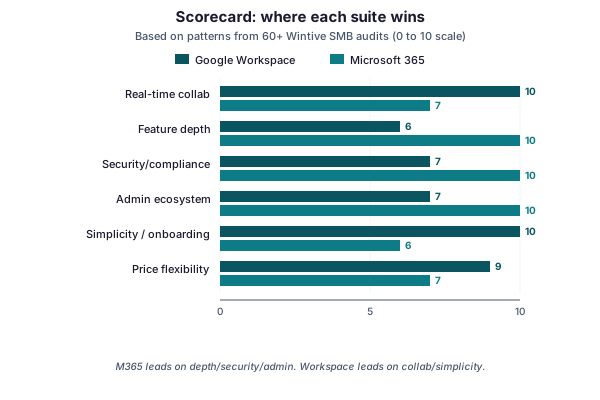
Read the scorecard as a profile, not a verdict. Microsoft 365 leads on feature depth, security, and the admin ecosystem. Google Workspace leads on real-time collaboration and simplicity. Price flexibility is close. So the right pick is the suite whose strengths match the work your team actually does.
Notice that no suite sweeps every row. That is the whole point of the Google Workspace vs Office 365 question. A design studio and a law firm will read the same chart and choose differently, and both will be right. So resist the urge to pick a winner in the abstract. Score your own team against these six rows, and the answer tends to fall out on its own.
🔗 What actually overlaps, and what does not
Most of the two suites is the same on paper. Both give you email, documents, spreadsheets, slides, calendars, video meetings, chat, and cloud storage. So a feature checklist will show near-parity, which is exactly why those comparisons mislead. The real story is in the unique edges.
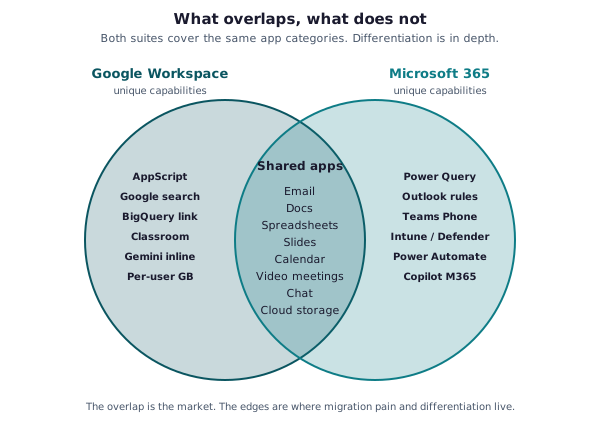
Look at the edges and the personalities appear. Google leans into AppScript, Classroom, BigQuery links, and inline Gemini. Microsoft leans into Power Query, Power Automate, Teams Phone, Intune, Defender, and Copilot. So the question is not which suite has more apps. It is which unique strengths your team will actually use.
That framing also predicts migration pain. The shared centre moves across easily, because both sides speak the same formats. The unique edges are where a move gets sticky, such as a business glued to AppScript or to Power Automate. So audit your edge tools before you switch either way.
It also reframes the AI question that dominates buyer chats. Both suites now ship an assistant: Gemini in Workspace, Copilot in Microsoft 365. Each lives in the same documents, mail, and meetings you already use. So AI is not a tiebreaker yet; it tracks the suite you pick rather than driving the choice. Judge the core apps first, and treat the assistant as a bonus that rides along.
📧 Email: Gmail versus Outlook
Email is where people feel the difference first, because they live in it all day. Gmail and Outlook take opposite approaches. One keeps the inbox lean and fast; the other folds email, calendar, and contacts into a single hub. So the better choice depends on how your team thinks about email.
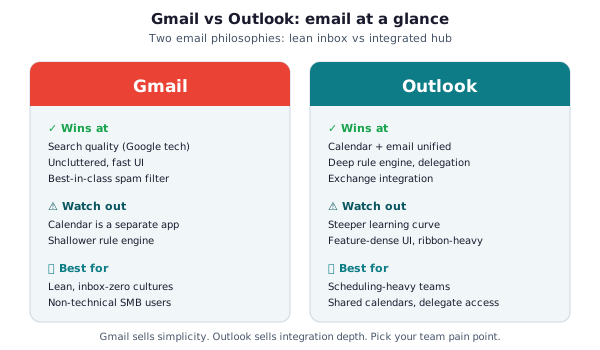
Gmail wins on search, a clean interface, and best-in-class spam filtering. Its weak spots are a separate calendar app and a shallower rule engine. Outlook wins on a unified calendar, deep rules, delegation, and Exchange integration. Its cost is a steeper learning curve and a denser interface. So lean inbox-zero teams favour Gmail, while scheduling-heavy teams favour Outlook.
There is a switching cost people forget, too. Email habits are muscle memory, so a forced move from one to the other always stings for a week or two. Shared mailboxes, delegate access, and complex rules need the most care in a migration. So if your team leans hard on delegation, Outlook is the safer landing spot. If they barely touch rules, Gmail will feel like a relief. Either way, plan a short training session so the new habits stick from day one.
📈 Spreadsheets: Sheets versus Excel
Spreadsheets decide more suite arguments than any other app. If your finance or operations team lives in advanced formulas, this section is your tiebreaker. Google Sheets is capable and collaborative. Microsoft Excel is simply deeper. The gap below shows how much.
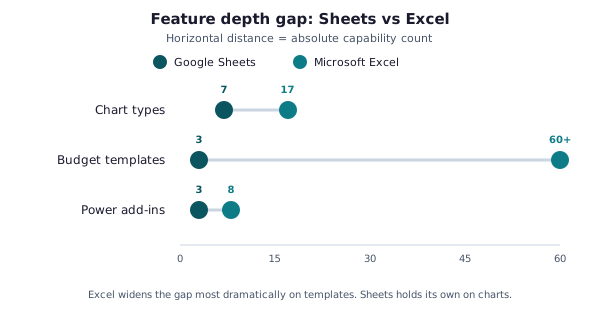
Excel pulls ahead most on templates and power add-ins. It ships far more chart types and a vast template library, plus Power Query for shaping data. Sheets answers with effortless real-time co-editing and a lighter feel. So a heavy modelling team should choose Excel, while a team that mainly shares simple trackers will be happy in Sheets.
Be honest about which team you really are. Most small businesses overrate how much Excel depth they use day to day. If your spreadsheets are budgets, lists, and simple dashboards, Sheets covers them comfortably. The depth only matters when you hit pivot-heavy models, macros, or large data shaping. So map your three most-used spreadsheets, then decide; do not buy Excel power you will never open.
Slides and documents follow the same pattern, by the way. PowerPoint and Word go deeper than Google Slides and Docs, with richer formatting and templates. But Google wins again on frictionless co-editing in the browser. For most teams the gap here is smaller than the spreadsheet one. So if Sheets meets your needs, the rest of the office apps rarely change the verdict on their own.
💰 Pricing and plans compared
Pricing is closer than the marketing suggests. At each tier the two suites sit within a dollar or two of each other. So price alone rarely decides the Google Workspace vs Office 365 question. What matters is what each tier includes, and where the top tiers pull apart.
| Tier | Google Workspace | Microsoft 365 | Best for |
|---|---|---|---|
| Entry | Business Starter (~$7, 30GB pooled) | Business Basic (~$6, web apps, 1TB) | Email and browser-only work |
| Mid | Business Standard (~$14, 2TB) | Business Standard (~$12.50, desktop apps, 1TB) | Most small businesses |
| Top | Business Plus (~$22, 5TB, Vault) | Business Premium (~$22, +Intune, +Defender) | Security and compliance needs |
Entry tiers are near-identical in spirit: cheap, web-first, light on storage. Mid tiers add the things most businesses actually need. At the top, the two pull apart. Microsoft 365 Business Premium bundles Intune and Defender. Google reserves its strongest controls for its higher tiers too. So compare top-tier security, not headline price.
Storage is the one number people misjudge. Google pools storage across the whole organisation, while Microsoft gives each user a fixed allowance. So a few heavy users can drain a Google pool, whereas Microsoft caps per person. Neither model is better in the abstract. It just changes who runs out first, so picture your real usage before you weigh the storage line.
🔒 Security and compliance
For a regulated small business, this section often ends the debate. Both suites are secure when configured well. But Microsoft 365 ships a deeper, more integrated security stack at the Business Premium tier. So if you handle sensitive data, weigh this axis heavily.
| Area | Google Workspace | Microsoft 365 |
|---|---|---|
| Endpoint security | Basic device management | Intune + Defender on Business Premium |
| Email threat protection | Gmail filtering (strong) + add-ons | Defender for Office 365 |
| Compliance / eDiscovery | Vault (Business Plus and up) | Purview, retention, DLP (Premium/E-tier) |
| Identity / access | 2-step verification, context-aware | Entra ID, Conditional Access, MFA |
| Data residency | Limited control on lower tiers | Multi-Geo and residency options |
The practical difference is integration. Microsoft 365 ties identity, device, email, and data protection into one console with Conditional Access at the centre. Google Workspace covers the same ground, but its strongest controls sit on the upper tiers. So a law firm or clinic usually lands on Microsoft 365 Business Premium for the compliance tooling alone.
Insurance and contracts increasingly force the issue. Cyber-insurance forms now ask for MFA, device management, and audited access by default. Microsoft 365 Business Premium answers those boxes out of the tier. Google Workspace can meet them too, but often needs a higher plan or an add-on. So check your insurer and your client contracts before you settle the Google Workspace vs Office 365 choice on features alone.
📊 What we actually see in SMB audits
Surveys are noisy, so we trust our own audit data instead. Across 60+ small businesses with 50 to 500 staff, the split is lopsided. The chart shows who runs what, and it carries a warning about the costly middle slice.
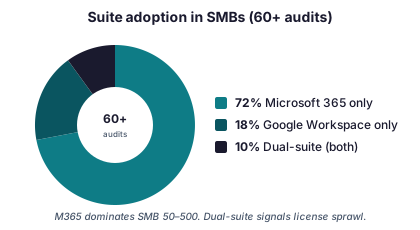
Microsoft 365 dominates this segment, with Google Workspace a clear second. The number that worries us is the dual-suite slice. Paying for both usually means a half-finished migration or shadow IT, not a strategy. So if you run both, that is a flag to consolidate, not a badge of flexibility.
Why does Microsoft lead so heavily here? It is rarely a fresh decision. Most of these businesses started on Office years ago, so staying is the path of least resistance. Google Workspace tends to win where a company is young, web-native, or design-led. So the market split reflects history as much as merit, which is why your own context matters more than any popularity score.
The dual-suite teams share a tell, too. There is almost always a department that quietly went its own way. Marketing adopts Google for shared docs while finance stays on Microsoft, and nobody reconciles it. So the fix is rarely technical; it is a single owner making one call for everyone. Until someone does, the bill keeps paying two vendors for one job.
💸 The hidden cost: license waste
Whichever suite you pick, the real money is lost after you buy it. In our audits, the typical tenant wastes 15 to 30 percent of its license spend. The breakdown below shows where it hides, and most of it is avoidable in an afternoon.
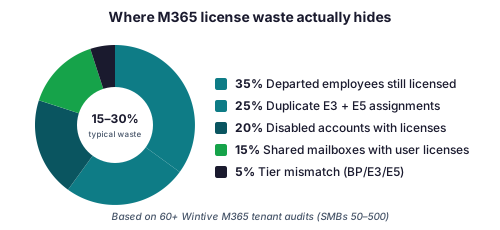
The biggest leak is people who left but kept their license. Next come duplicate plan assignments and disabled accounts that nobody reclaimed. So before you debate suites, audit what you already pay for. Two quick PowerShell calls surface most of it.
# Count what each Microsoft 365 SKU actually costs you (Graph PowerShell)
Connect-MgGraph -Scopes "Organization.Read.All"
Get-MgSubscribedSku |
  Select SkuPartNumber,
         @{N='Used';E={$_.ConsumedUnits}},
         @{N='Paid';E={$_.PrepaidUnits.Enabled}}
The first call shows every Microsoft 365 plan and how many seats you actually use. The second finds disabled accounts still holding a license. So you reclaim seats in minutes, and the saving often dwarfs any price gap between the two suites.
This is also why the headline-price debate is a trap. A few dollars per seat is noise next to a fifth of your bill leaking on unused licenses. The same waste hides in Google Workspace too, in suspended users nobody removed. So whichever suite you run, the bigger win is hygiene, not the sticker price. Clean up first, then compare what you genuinely spend per active user.
# Find the waste: disabled accounts that still hold a paid license
Get-MgUser -Filter "accountEnabled eq false" -All -Property DisplayName,AssignedLicenses |
  Where-Object { $_.AssignedLicenses.Count -gt 0 } |
  Select DisplayName, @{N='Licenses';E={$_.AssignedLicenses.Count}}
🔀 Which suite should you choose?
Strip away the noise and the decision comes down to three questions. We use this exact flow with clients, and the first YES usually settles it. Answer them honestly about your team, not your aspirations.
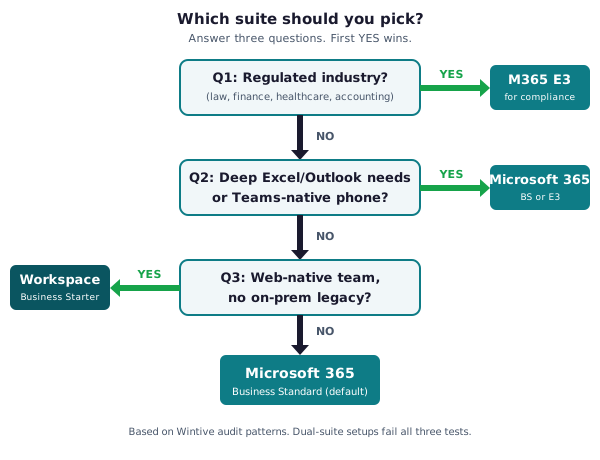
Are you in a regulated industry, such as law, finance, or healthcare? Then Microsoft 365 wins on compliance. Do you depend on deep Excel, Outlook, or Teams Phone? Microsoft 365 again. Are you a web-native team with no legacy baggage? Google Workspace fits beautifully. Everything else defaults to Microsoft 365 Business Standard.
The flow is deliberately strict because hedging is the expensive answer. People want to say “a bit of both”, and that is exactly how the dual-suite bill is born. So force a single answer, even when it feels close. A clear, slightly imperfect choice beats a split estate every time. You can always revisit it in a year, on purpose, rather than by drift.
Size nudges the same flow, too. Under about ten people, either suite runs fine, so lean on simplicity and price. From ten to fifty, admin and security start to matter, which tilts toward Microsoft 365. Past fifty, integrated identity and device control usually settle it. So weigh your headcount alongside the three questions, and the Google Workspace vs Office 365 answer sharpens further.
🔁 Migrating from Google Workspace to Microsoft 365
Most of our comparison conversations end in a move from Google to Microsoft. It is a well-trodden path, and the tooling is mature. The work is mostly mailboxes, files, and a clean DNS cutover. So the risk is low when you plan the waves properly.
The reverse move happens too, just far less often. A team may leave Microsoft 365 for Google Workspace to chase simplicity or a web-only workflow. The mechanics mirror each other: export, map, cut over DNS. So the direction is a business decision, not a technical wall. Either way, the suite you leave should be switched off promptly, so you stop paying for a tenant nobody uses.
Start by scoping what you actually have. List every Workspace user, spot the dormant ones, and decide who really needs a seat. The GAM command below exports that list in seconds, so you migrate people, not ghosts.
# Scope a Google Workspace move before you commit, with GAM
gam print users fields primaryemail, lastlogintime, suspended > workspace-users.csv
# Sort by lastlogintime to spot dormant accounts you should not migrate or pay for.
One sequencing tip saves most of the pain. Move files and identities before you cut the email over, so people are not locked out mid-day. Keep both suites live for a short overlap, then flip DNS once mailboxes are synced. So the team barely notices the switch, which is the whole goal of a clean cutover.
From there, our step-by-step guides take over. See G Suite migration to Office 365 for the full project, Gmail to Office 365 migration for the mailbox detail, and Office 365 cloud migration for the wider plan. If you would rather hand it off, our Office 365 migration service runs the whole cutover for you.
🪤 Mistakes people make choosing a suite
A few predictable errors turn a simple choice into an expensive one. They are easy to avoid once you name them. Watch for these before you sign anything.
- Comparing headline prices instead of top-tier security and features.
- Running both suites “for flexibility”, which just doubles the bill.
- Ignoring the edge tools your team relies on, like AppScript or Power Automate.
- Forgetting to reclaim licenses from people who already left.
- Picking on personal preference rather than what the business actually does.
Another trap is letting one loud voice decide. A single power user who loves Excel, or a founder who grew up on Gmail, can steer a choice that fits nobody else. The suite serves the whole team, not the loudest seat. So gather the real workflows before the opinions. Data from how people actually work beats preference every time.
Wintive insight. The costliest mistake we fix is not the wrong suite, it is paying for two. A team trials Google Workspace, never finishes the move off Microsoft 365, and quietly funds both for years. As a result, our first step in any review is to find the duplicate spend, not to argue the Google Workspace vs Office 365 merits. So decide, commit, and consolidate to one suite.
✅ Google Workspace vs Office 365: a clear way to decide
Pull it together into a routine you can act on this week. None of it needs a consultant, just an honest look at your team.
- Match the suite to your work: depth and security favour Microsoft 365; collaboration and simplicity favour Google Workspace.
- Compare the top tiers, where security and compliance actually diverge.
- Audit your edge tools before you switch in either direction.
- Commit to one suite; never fund both without a deadline to consolidate.
- Reclaim wasted licenses first, because that saving usually beats the price gap.
Write the decision down once you make it. A short note on why you chose the suite, and what would change your mind, saves the same debate next year. It also stops a new hire reopening it on instinct. So treat the choice as a documented call, not a vibe. That record is what keeps a small business off the dual-suite path.
A suite choice is the start of a tidy Microsoft 365 setup, not the end. If you are weighing the licensing side, our Exchange Online license guide goes deeper on tiers and right-sizing. For a neutral, vendor-backed view of both platforms, Microsoft publishes its own Microsoft 365 plan comparison, which is a useful cross-check against this guide.
📚 More for Microsoft 365 admins
These published Wintive guides go deeper on migration and licensing. Each one tackles a single step in plain terms, so you can move from deciding to doing. Therefore bookmark whichever fit your plan and return when the work starts.
🔍 Want a complete audit of your Microsoft 365 tenant?
The M365 Instant Audit scans your environment in under 10 minutes: license waste, security posture, MFA coverage, compliance gaps, and rightsizing. A full PDF report with prioritized fixes arrives instantly.
❓ Frequently Asked Questions
For most small businesses, yes, especially if you need desktop Office, Teams Phone, or compliance tooling. Google Workspace is the better fit for web-native teams that value real-time collaboration and simple administration.
Not meaningfully. At each tier the two sit within a dollar or two. The decision should rest on fit and top-tier features, not headline price.
You can, but it usually signals a half-finished migration and doubles your bill. Commit to one suite and consolidate unless you have a clear, temporary reason.
Excel is deeper, with more chart types, templates, and Power Query. Sheets is lighter and excels at real-time co-editing. Heavy modelling favours Excel.
No. It is a mature, well-tooled path covering mailboxes, files, and DNS. Plan the waves, scope dormant accounts first, and the risk stays low.
Both are secure when configured well, but Microsoft 365 Business Premium ships a deeper, integrated stack with Intune, Defender, and Conditional Access, which suits regulated businesses.
🚀 Your next step
Run the three-question flow with your team today, because the answer is usually clearer than the debate suggests. Then audit what you already pay for, so the suite you choose starts lean. When you want a second opinion or a clean migration, we are happy to help. We have walked dozens of small businesses through exactly this call.
If you remember only three things, make them these. First, match the suite to the work, not to a brand. Second, compare the top tiers, where security really diverges. Third, never fund both suites without a deadline to consolidate. Decide that way, and the Google Workspace vs Office 365 question stops being hard.