

An office 365 migration service plans and runs your move to Microsoft 365, so your team never feels the bumps. So the real question is rarely whether to move, but who should do it. Still, hiring blind wastes money, while a careless in-house attempt risks downtime. Therefore this guide shows what a good service includes, how providers price the work, and how to pick one with confidence.
We run these projects for small businesses, so the advice below comes from real engagements. First you will weigh an in-house move against a managed service. Then you will learn what to expect, what to pay, and which questions separate a safe provider from a risky one. Because the move touches every user, choosing well matters more than shaving a few dollars.
🛡️ Free: M365 Audit Checklist
19-page PDF with 50 hands-on checks covering Entra ID, Exchange Online, SharePoint, Teams, Intune, license waste, and audit logging. PowerShell commands included. Built from 60+ real tenant audits at Wintive.
🧭 What an office 365 migration service actually does
An office 365 migration service handles the whole move to Microsoft 365 for you. In short, a provider inventories your data, picks the right approach, pilots it, moves users in waves, and verifies nothing is lost. A good service also covers DNS, mail flow, security, and the after-hours cutover. The goal is simple. Your team signs in the next morning, and the work just continues.
At its heart, the service takes the migration off your plate. The provider owns the plan, the tooling, and the late nights. Meanwhile your staff keeps working, since the move runs quietly in the background. So you trade a fee for expertise and a predictable outcome.
It helps to separate two things a provider can sell. One is the project, a one-off move with a start and an end. The other is managed support, an ongoing relationship after go-live. Many SMBs buy both, since the same team that moves you can then run the tenant. So decide early whether you want a clean hand-off or a longer partnership.
Scope varies between providers, though. Some only move mailboxes, while others handle files, identity, security, and training too. Because that gap decides your result, you should pin down the scope before you sign. Next we will compare doing it yourself with hiring out.
A good service also sells you an outcome, not just hours. Typically the contract names a go-live date, a rollback plan, and a support window after the move. So you know exactly what “done” looks like before anyone starts. By contrast, a vague engagement drifts, and drift is where budgets quietly bleed. Therefore the clearest providers write the finish line into the quote.
🤔 In-house move or a managed service?
Plenty of teams try the move in-house, and small ones sometimes pull it off. Yet the hidden cost is time, since your admin stops doing everything else for weeks. Meanwhile one mistake on cutover night can erase the saving in a single morning.
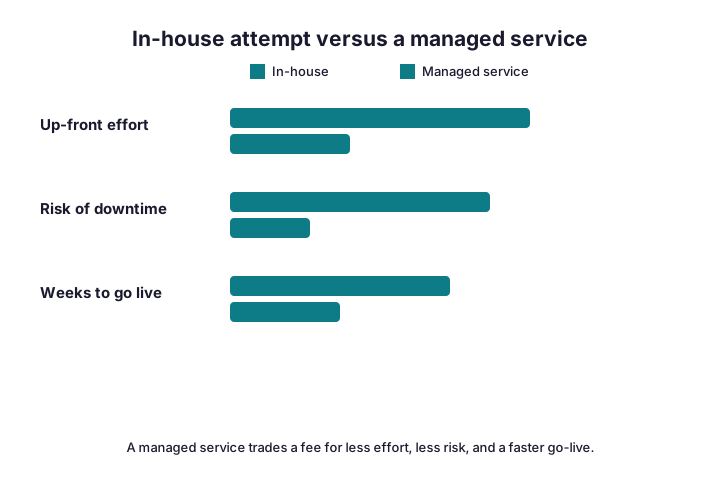
A managed service flips that trade. You pay a fee, and a specialist absorbs the effort, the risk, and the odd hours. For example, a provider has run the same playbook dozens of times, so surprises stay rare. Therefore the rule is simple: handle a tiny move yourself, but hire out anything business-critical.
Do the honest maths before you decide. An in-house move can swallow two or three weeks of your admin’s time, plus the evenings around each cutover. Meanwhile that person stops fixing laptops and answering tickets, so the rest of IT slips. Add one bad cutover, and the “free” option suddenly costs a lost day across the whole company. So the real comparison weighs the fee against your own hours and your tolerance for risk.
📋 What a good migration service includes
Before you compare quotes, know what “a migration” should cover. The cheap offers often stop at mailboxes, which leaves you to finish the hard parts. So read each scope carefully against the table below.
| Phase | DIY leaves it to you | A full service does |
|---|---|---|
| Discovery & inventory | You guess the scope | A documented audit |
| Wave planning | Ad hoc batches | A scheduled plan |
| The data move | Manual and watched by you | Tooled and monitored |
| Security setup | Often skipped | MFA, Conditional Access, hardening |
| Go-live support | Nobody on call | On-call cutover and week one |
Notice that security and support are where weak offers cut corners. Because those two phases protect the result, treat them as non-negotiable. If a quote omits them, it is not really a full service. So weigh scope first, then price.
Discovery is the phase buyers underrate the most. A real audit lists every mailbox, shared mailbox, and public folder, plus the apps that send mail. It also flags the awkward bits, such as a daytime support desk or a legacy scanner. Because that document drives the quote, insist on seeing it. Without it, any number is guesswork dressed up as a price.
🗺️ The engagement, step by step
A good engagement follows a clear shape, so you always know where things stand. First comes discovery. Then a fixed quote, a pilot, the migration, and support. Notably, the quote arrives after discovery, never before.
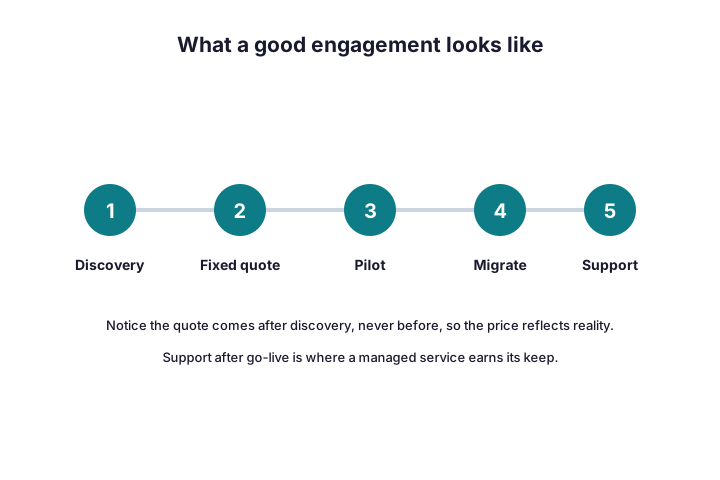
During the move, the provider runs each wave with native or third-party tools and watches it sync. The snippet below shows the kind of batch a provider starts and monitors on your behalf.
# The kind of batch a provider starts and monitors for you
New-MigrationBatch -Name "ClientMove-Wave1" -SourceEndpoint "OnPremEndpoint" -TimeZone "UTC" -AutoStart
Get-MigrationBatch | Format-Table Identity, Status, TotalCount, SyncedCount
When a wave hits one hundred percent, the team schedules its cutover after hours. So users sign off the old system and log back in to the cloud, usually without noticing a thing.
The pilot wave deserves special attention, because it proves the whole runbook. A good provider picks five to ten friendly users across different teams. Then they migrate that group, gather feedback, and fix the rough edges before anyone else moves. As a result, each later wave runs on a script that already works. So when something does surprise you, it surprises ten people, never the entire company.
Communication runs alongside every step, and the best providers plan it. Users hear what changes, when, and where to get help, all before the move reaches them. Meanwhile managers know the cutover date early, so nobody schedules a launch that weekend. Because surprise breeds resistance, a clear note beats a clever tool. So judge a provider partly on how it talks to your people.
💸 How an office 365 migration service is priced
Pricing comes in three shapes, and each suits a different buyer. A fixed quote gives certainty. Per-user pricing scales with headcount. Time and materials bills by the hour, which rewards trust but punishes surprises.
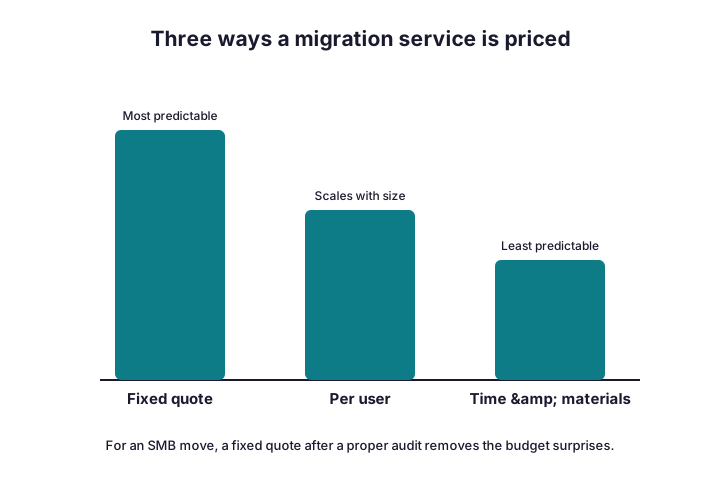
For a typical SMB move, a fixed quote after a proper audit wins. So the table below shows the ranges we see, and what each model suits best.
| Pricing model | Typical SMB range | Best for |
|---|---|---|
| Fixed quote (after audit) | $15–$40 per user | Most SMB moves |
| Per user | $10–$30 per user | Predictable headcount |
| Time and materials | $120–$200 per hour | Small or odd jobs |
| Discovery / audit | $0–$1,500 one-off | Scoping a larger move |
Beware a quote that lands before any discovery. Because the provider cannot know your data yet, that number is only a guess. Therefore a real price always follows an audit, not a sales call.
Several things move the final number. Data volume is the obvious one, since huge mailboxes take more nights to sync. The source matters too, because a tidy Exchange server is cheaper to move than a sprawl of PST files. A tight deadline raises the price, as it forces overtime or extra bandwidth. So when you compare quotes, compare the assumptions behind them, not just the totals.
One line often confuses buyers, so name it early. The migration fee and the Microsoft licences are separate costs. You pay the provider once to move you, then Microsoft monthly to host you. Because some quotes bundle the first month and others do not, ask which is which. Otherwise two fair quotes can look wildly different on paper.
❓ Questions to ask before you sign
A short list of questions quickly separates the pros from the chancers. Ask them early, and watch how confidently each provider answers.
- How many moves like ours have you run this year?
- Do you quote a fixed price after a documented audit?
- What happens to mail flow during the cutover?
- Which security controls do you turn on, and when?
- Who is on call on go-live night?
- Can we speak to two recent references?
Good answers are specific and calm. Vague ones, by contrast, are a warning sign. So trust the provider who walks you through the awkward parts without flinching.
References repay the five minutes they take. When you call them, ask about the cutover weekend, not the sales pitch. For instance, did mail keep flowing, and did anyone answer the phone at midnight? Because every provider looks good on a website, a recent reference is the cheapest insurance you can buy. So always ask for two, and actually ring them.
Write the answers down as you go, because memory fades across three sales calls. A simple grid, with providers in rows and your questions in columns, makes the gaps obvious. Then a weak answer in one cell stands out against a strong one beside it. So you compare like for like, rather than trusting whoever pitched last. That small habit turns a fuzzy choice into a clear one.
🪤 Red flags that should worry you
Some signals predict a painful project. None of them are subtle once you know the pattern. So treat any of these as a reason to keep looking.
- A firm quote before any discovery call.
- No mention of MFA, backups, or security.
- A daytime cutover “to save time”.
- Pressure to skip the pilot wave.
- No named contact for go-live night.
One red flag outweighs the rest: a provider who rushes discovery. Because the audit is where real risk hides, a quick “we will just move it” should worry you. Likewise, a firm that dodges your security questions is telling you something. So listen for what a provider skips, not only for what it promises.
Wintive insight. Across the moves we run, the data almost never fails; the plan does. For example, a daytime cutover or a forgotten shared mailbox causes most of the pain. As a result, the providers worth hiring spend more time on discovery than on the move itself. That is also why our quote comes after the audit, never before.
🔐 The security a service sets up
A fresh cloud tenant is a soft target on day one. So a good provider hardens it before anyone celebrates. They turn on multi-factor authentication, block legacy protocols, and review admin roles.
Conditional Access enforces those rules. The commands below show the first policy a provider builds for you.
# The first security policy a good provider builds (Microsoft Graph PowerShell)
Connect-MgGraph -Scopes "Policy.ReadWrite.ConditionalAccess"
# Then require MFA for all users via Conditional Access
# Portal path: Entra admin center > Protection > Conditional Access > New policy
After that, the team switches on audit logging and checks your Microsoft Secure Score. Because the cloud records everything, you will want those logs the day something goes wrong.
One myth deserves a straight answer here. Microsoft keeps the service running, yet it does not back up your data the way old tape did. So a good provider adds third-party backup for anything you cannot lose. Because a deleted mailbox or a ransomware hit waits for no one, treat recovery as part of the migration, not an afterthought.
Two quieter settings round out a safe handover. First, the provider disables legacy authentication, since old protocols slip past MFA. Second, they trim admin roles down to the few people who truly need them. Because attackers hunt for both gaps, closing them early matters. So ask any provider how it handles legacy auth and admin access, then listen for a clear answer.
📦 What the service covers across every workload
A full service does not stop at email. It moves files into SharePoint and OneDrive, identities into Entra ID, and calls into Teams. So the coverage grid below shows where a do-it-yourself effort leaves gaps.
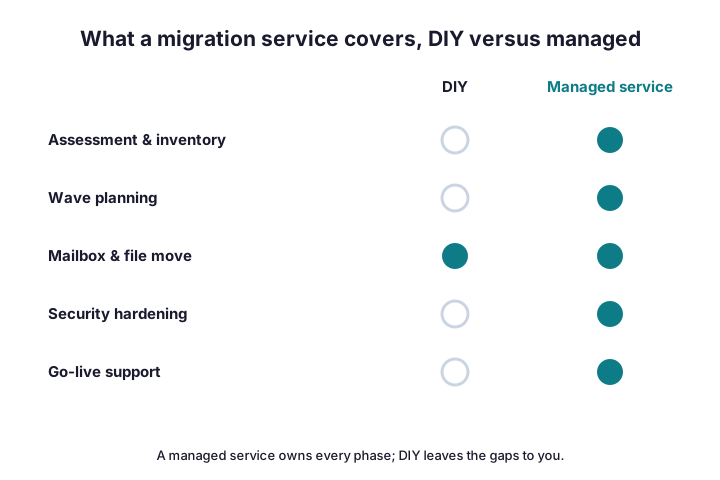
Notice the empty circles on the do-it-yourself side. Each gap is a job that lands back on you, usually at the worst moment. Therefore the value of a provider is breadth, not just the mailbox move everyone remembers.
Two workloads catch out in-house attempts most often. Identity comes first, since accounts and groups must be clean before they sync to Entra ID. Phones come next, because porting numbers into Teams takes lead time with your carrier. So a provider starts both conversations early, while a rushed move discovers them on cutover night. That timing difference alone often justifies the fee.
⏱️ How long the engagement takes
Timelines track size and data volume, yet the shape stays predictable. A small cutover often wraps inside a week. A phased move of a few hundred users runs across several weeks of batches.
The slow parts are rarely technical. Instead, decisions and clean-up eat the calendar. For example, agreeing a cutover window or chasing a shared mailbox adds days. Because of that, a good provider plans around your people, not just your data.
Two limits also cap the speed. First, your upload bandwidth decides how fast data leaves the building. Second, Microsoft throttles very large syncs. So a data-heavy tenant simply needs more nights, and no provider removes that ceiling.
A rough example helps you sanity-check a plan. A 25-user firm with average mailboxes usually finishes its initial sync over a single weekend. By contrast, an archive-heavy team might need a week of overnight batches before the cutover. So if a provider promises a same-day move for a large tenant, ask exactly how. The honest answer respects those physical limits.
🧰 When a tool beats a service
Sometimes you do not need a full service at all. A confident admin with a small, clean tenant can use native tools and keep the fee. So start by sizing the job honestly.
The command below exports every mailbox and its size, which tells you how big the move really is. Microsoft documents the native steps in its mailbox migration guide.
# Size the job before you decide: export every mailbox and its size
Get-EXOMailbox -ResultSize Unlimited |
  Get-EXOMailboxStatistics |
  Select DisplayName, TotalItemSize, ItemCount |
  Sort TotalItemSize -Descending | Export-Csv .\mailbox-sizes.csv -NoTypeInformation
Native tooling covers more than people expect. The Exchange admin centre runs mailbox batches, while the SharePoint Migration Tool handles files, both at no extra cost. For scattered PST archives or a messy Google estate, paid tools like BitTitan or ShareGate save real hours. So match the tool to the source, and let the time it returns justify any licence.
Above roughly fifty users, or with messy data, the maths changes. Because risk and hours climb fast, a service usually pays for itself. For the work itself, see our office 365 migration services overview.
There is also a middle ground worth naming. You can hire a provider for discovery and the cutover, then run the easy waves yourself. So you buy expertise where it matters and save money where it does not. Because this hybrid arrangement suits many SMBs, ask each provider whether they will work that way.
🧹 After go-live: the first week
The engagement is not over when the last batch syncs. The first week decides how users feel about the whole move. So a good provider checks mail flow, shared mailboxes, and calendar permissions while everyone is watching.
They also train people on OneDrive and Teams, since confused users open tickets. Fix the small things fast, because quick wins build trust. Then, once everything settles, the old servers retire for good and the contracts they carried get cancelled.
Watch one simple signal to judge success: the ticket curve. In a healthy move, questions spike on day one and then fall fast through the week. If they keep climbing instead, something slipped through the pilot, so a good provider digs in early. Because momentum matters, a quick win on Monday sets the tone for the whole rollout.
Book a short review about a month later, once the dust settles. By then you can spot license waste, unused features, and any security gap the rush left behind. So a thirty-day check turns a finished project into a tidy, optimised tenant. Because that final pass is cheap and high-value, a strong provider offers it without being asked.
📈 The business case for hiring out
Step back, and the decision is really about where your time is best spent. Your team knows your business, yet it rarely runs migrations for a living. A provider does the opposite, so it moves faster and trips less. Therefore hiring out is less about capability and more about focus.
Money tells the same story once you count everything. Add your admin’s hours, the risk of downtime, and the cost of a slow rollout. Against that, a fixed fee starts to look cheap, not expensive. So the honest question is not “can we do it ourselves”, but “should we”, while real work waits.
Picture a 25-person firm as an example. A partner-led move might cost around $1,000 once, after a short audit. Against that sits a week of your admin’s time and the risk of a botched Friday night. So for most owners, the fee buys a calm weekend and a clean result. That trade, not the sticker, is the real decision.
✅ Your provider-selection checklist
Keep this list beside you while you compare quotes. Work down it for each provider, and the right choice becomes obvious.
- Confirm Microsoft Partner status and recent, similar moves.
- Insist on a fixed quote after a documented audit.
- Check the scope covers security and go-live support.
- Ask who is on call on cutover night.
- Read two references, and actually call them.
- Agree a clear go-live date and a rollback plan.
- Pin down what happens to mail flow during the move.
Print the list, and use it as a scorecard during every call. When a provider clears each line without hedging, you have found your shortlist. If two of them tie, let the references and the go-live plan break it. So the decision rests on evidence, not on whoever had the slickest pitch.
If you would rather hand the whole thing over, a managed provider covers planning, the cutover, and the clean-up end to end. So you get the outcome without the late nights.
📚 More for migrating teams
These published Wintive guides go deeper on the questions a move raises next. Therefore bookmark the ones that fit your plan.
🔍 Want a complete audit of your Microsoft 365 tenant?
The M365 Instant Audit scans your environment in under 10 minutes: license waste, security posture, MFA coverage, compliance gaps, and rightsizing. A full PDF report with prioritized fixes arrives instantly.
❓ Frequently Asked Questions
It is a provider that plans and runs your move to Microsoft 365, covering discovery, the data move, security, and go-live support, so your team avoids downtime.
Most SMB projects run $15 to $40 per user as a fixed quote after an audit. A native-tool, in-house move costs less but carries more risk.
Migrate yourself only for a tiny, clean tenant. For anything business-critical, a service removes the risk and the late nights for a predictable fee.
You do not strictly need one, yet a Microsoft Partner brings proven access, training, and references. So partner status makes a strong shortlist filter.
Score each provider on partner status, a fixed post-audit quote, a written security plan, checkable references, and a clear go-live SLA.
Discovery, wave planning, the data move, security hardening, and first-week support. If a quote skips security or support, it is not a full service.
🧭 Your next step
Start with a short discovery call and a real inventory, because both decide the price and the plan. Once a provider understands your data, the quote, the schedule, and the risks become clear. When you are ready, we are happy to scope the whole move with you.
Related Wintive guides: Office 365 cloud migration guide, step-by-step migration checklist, and right migration tool.