

A tenant to tenant migration office 365 project follows a merger, a divestiture or a rebrand. Suddenly two Microsoft 365 tenants must become one, and every mailbox, file and Team has to move without breaking mail flow. However, the official docs are dense and the forums are full of half-answers.
Therefore this guide gives you the full picture from 60+ real moves. Specifically, you get what moves natively versus what needs a tool, the prerequisites, a step-by-step runbook with PowerShell, and the cutover. Moreover, every section answers a question people actually search, from “step by step” to “best tool”.
🛡️ Free: M365 Audit Checklist
19-page PDF with 50 hands-on checks across Entra ID, Exchange Online, SharePoint, Teams and Intune. Run it before you migrate, so you move a clean tenant. PowerShell commands included. Built from 60+ real tenant audits at Wintive.
📦 What a tenant to tenant migration office 365 actually is
Quick answer. A tenant to tenant migration office 365 moves users, mailboxes, files and Teams from one Microsoft 365 tenant into another, usually after a merger or rebrand. Native cross-tenant mailbox migration handles email; OneDrive, SharePoint and Teams still need a third-party tool. Plan for identity matching, a domain move and a short coexistence window.
When you actually need one
The trigger shapes the timeline. For example, a merger usually allows a planned, phased move over weeks, while a divestiture often comes with a hard legal deadline. Therefore the first question we ask is not “which tool” but “what is the real cutover date”, because that date drives every other decision. That date also sets the budget. For instance, a deadline measured in days almost always justifies a paid tool, while a relaxed timeline leaves room for the free native path. So we anchor the plan to the date, then choose tooling to fit it.
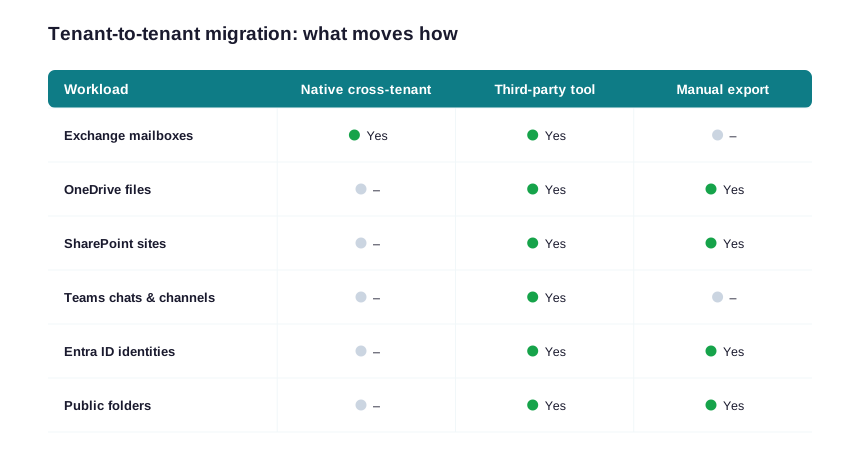
For users, the change should feel small. Their mailbox, files and Teams arrive in the new tenant, ideally over a weekend. However, their sign-in address often changes, and their sharing links break. Therefore clear communication matters as much as the technical move; we tell users what changes, and when, well before the cutover.
For admins, the work is mostly preparation. Specifically, you reconcile two directories, two sets of licenses and two security baselines into one. Because the target tenant becomes the single source of truth, every decision about naming, groups and policy is easier to make up front than to unpick later.
🆕 Native cross-tenant migration vs third-party tools
For years, email had no native path between tenants. Recently, however, Microsoft added native cross-tenant mailbox migration, which Microsoft documents in its tenant-to-tenant migration overview and which the Reddit threads celebrated. Therefore the real decision today is native for mail, a tool for everything else.
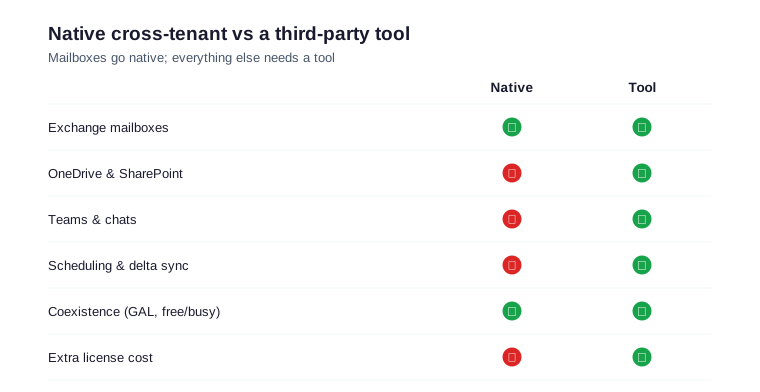
The two approaches also differ on cost and timeline. Native migration is free but mailbox-only, so a mixed move still needs a tool. A tool costs per user, yet it compresses weeks of manual work into a few automated waves. As a result, we price every move as native plus tool plus labour, then pick the lowest total that clears the scope.
The native cross-tenant option
Setup takes some patience. You register an application in the target tenant, grant it admin consent in the source, and configure an organisation relationship on both sides. Microsoft documents the exact steps in its cross-tenant mailbox migration guide. Then you scope a mail-enabled security group of users to move. Consequently, the trust is explicit and auditable, which is exactly what regulated clients want to see. The scoped group keeps the first wave small and safe. So you add a handful of friendly users, prove the path end to end, and only then widen the group for the bulk waves.
When a third-party tool earns its fee
OneDrive, SharePoint, Teams and identities still need a tool such as BitTitan, Quest or ShareGate. For a small mail-only move, native is enough and free. For a full-workload move, though, a tool saves days and adds scheduling, delta sync and reporting. So the choice is scope, not brand. Reporting is the other reason teams pay. For example, a tool gives auditable per-user logs, which matters in a regulated merger. Therefore the fee often buys evidence as much as automation. Speed matters too. Specifically, a tool runs many mailboxes in parallel, while a manual move crawls. Consequently, the bigger the move, the more the tool earns its price. In practice, most mid-sized moves end up mixed: native cross-tenant for mailboxes, plus one tool for files and Teams. Consequently, you get the free, secure path for mail and an automated path for everything that native cannot touch.
🧰 Which tool fits a tenant to tenant migration office 365
Tools overlap, yet each has a sweet spot; our Office 365 migration tool guide compares them in depth. The table below maps the leaders to the work they do best, so you shortlist before any demo. Overall, we pick the cheapest option that still clears the scope.
| Tool | Strongest at | Pricing | When we pick it |
|---|---|---|---|
| Native cross-tenant | Mailboxes only | Included | Mail-only moves |
| BitTitan MigrationWiz | Mail, OneDrive, Teams | Per license | Mixed workloads |
| Quest On Demand | Full tenant, coexistence | Subscription | Mergers, long coexistence |
| ShareGate | SharePoint, OneDrive, Teams | Per user / year | Heavy file and Teams moves |
Free and native options
You do not always need a paid tool. For a mail-only move, native cross-tenant migration is free with your existing licenses. For small file sets, a manual export and re-upload works too. However, free paths cost time and carry more risk at scale, so we reserve them for the smallest moves. Support is the hidden gap. Specifically, when a free script fails at 2 a.m., nobody answers the phone. As a result, we only trust free paths on moves small enough to redo by hand. In short, free is fine for a handful of mailboxes. Beyond that, a paid tool is cheaper than the risk. For example, a five-person move can succeed with native mail plus a manual file copy in a single weekend. Above twenty seats, though, the manual effort and error rate climb fast, so a tool quickly pays for itself.
Free tenant to tenant migration tools
People search for free tools, so here is the honest answer. The native cross-tenant mailbox migration is the only truly free, supported path. Some scripts and trial editions exist for files. However, they cap throughput and offer no support. Therefore we use free paths for tiny moves, and a paid tool the moment files or Teams are in scope.
Mailboxes
A few mailbox details still trip people. Specifically, archive mailboxes, litigation holds and very large mailboxes need extra time and sometimes a license check in the target. So we flag those during discovery and sequence them into their own wave, rather than letting them stall a general batch.
OneDrive, SharePoint and Teams
SharePoint sites carry the most metadata risk. For instance, custom permissions, versioning and managed metadata rarely survive a naive copy. Consequently, we map each source site to a target site up front, then validate a single site fully before the bulk run.
✅ Tenant to tenant migration office 365 prerequisites
Most failures trace back to skipped prep, not bad tools. So treat the prerequisites as gates, not suggestions. The five steps below have to pass before a single mailbox moves.
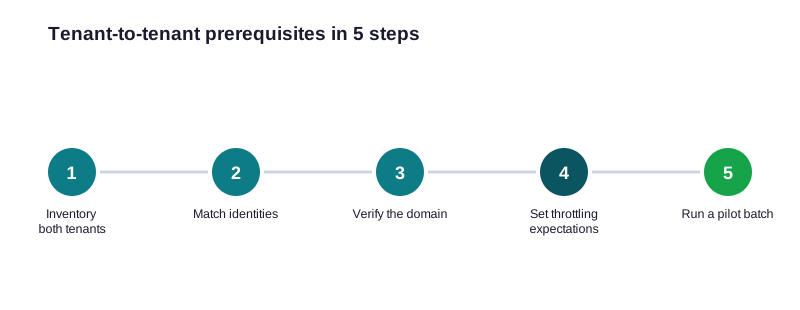
Match identities first
Identity is the foundation. First, you create or match every user in the target tenant. Then you map source to target addresses in a CSV. Groups and shared mailboxes belong in that map too. Notably, distribution lists and Microsoft 365 groups are easy to forget, yet they break workflows the moment they go missing. For that reason, we export both directories early and diff them. As a result, nothing quietly disappears between the two tenants. Because a mismatched identity breaks the whole batch, we verify the mapping twice before we start. We also decide the final sign-in name early. Specifically, users may keep their address if the domain moves with them, or switch to a new one if it does not. As a result, nobody is surprised by their login on Monday morning.
# Inventory source users and mailbox sizes before mapping (Exchange Online PowerShell)
# Run against the SOURCE tenant

Get-EXOMailbox -ResultSize Unlimited |
  Get-EXOMailboxStatistics |
  Select-Object DisplayName, PrimarySmtpAddress,
    @{N="GB";E={[math]::Round($_.TotalItemSize.Value.ToBytes()/1GB,2)}},
    ItemCount |
  Sort-Object GB -Descending |
  Export-Csv .\source-users.csv -NoTypeInformation
Licensing and admin access in the target
Before any mailbox lands, the target needs licenses and access. First, you assign the right Microsoft 365 license to every target user, because an unlicensed mailbox cannot receive content. Second, you confirm the migration admin has the roles the batch needs. The check below flags unlicensed users before they stall a wave.
# Target tenant: find users without a mailbox license (Microsoft Graph PowerShell)
# Connect-MgGraph -Scopes "User.Read.All"

Get-MgUser -All -Property DisplayName,UserPrincipalName,AssignedLicenses |
  Where-Object { $_.AssignedLicenses.Count -eq 0 } |
  Select-Object DisplayName, UserPrincipalName |
  Export-Csv .\\unlicensed-target-users.csv -NoTypeInformation
Run a pilot that proves the move
A pilot is small on purpose. You pick five friendly users. You move their mail, files and Teams. Then you ask them to work as normal for a day. If anything breaks, you fix it now, not during the bulk waves. As a result, the big waves stay boring.
Verify the domain and plan throttling
Admin access is the other quiet blocker. Specifically, the migration account needs the right roles in both tenants, and any conditional access policy that blocks legacy or app sign-in can stall the batch. Therefore we test the migration account end to end before the pilot, not during it.
🛠 Step by step: native cross-tenant mailbox migration
With prep done, the native move follows a clear path. First you establish trust between the tenants. Then you run a migration batch, exactly like an on-prem cutover. Finally, you complete the batch during the cutover window.
Set up the cross-tenant trust
The source and target tenants exchange consent through an application and an organisation relationship. In practice, you register an app in the target, grant it consent in the source, and scope a mail-enabled security group of users to move.
# Target tenant: create the migration endpoint for the cross-tenant move
# Connect-ExchangeOnline (target) first

$src = Get-Credential   # source tenant migration app credentials
New-MigrationEndpoint -Name "CrossTenant-Source" `
  -RemoteServer "outlook.office365.com" `
  -CrossTenant -Credentials $src

# Confirm the endpoint is ready
Get-MigrationEndpoint "CrossTenant-Source" | Format-List Identity, EndpointType
Common batch errors and quick fixes
A few errors show up on most projects. The most common is a missing target license, which stalls a user. Next, a blocked sign-in policy can halt the batch. Occasionally, a duplicate proxy address fails one mailbox. None of these is serious. Each one, though, is faster to fix before the wave than during it. So we run the licensing and identity checks first, every time.
Run and complete the batch
Completion is deliberate, not automatic. So you let the batch sync to near-100% in the background, then run the completion only when DNS and the domain move are ready. As a result, users experience one short switch rather than a long, uncertain outage.
# Target tenant: start the cross-tenant migration batch
New-MigrationBatch -Name "T2T-Wave1" `
  -SourceEndpoint "CrossTenant-Source" `
  -CSVData ([System.IO.File]::ReadAllBytes(".\source-users.csv")) `
  -TargetDeliveryDomain "target.onmicrosoft.com" -AutoStart

# Track, then complete during the cutover window
Get-MigrationBatch "T2T-Wave1" | Format-List Status, TotalCount, SyncedCount
Complete-MigrationBatch "T2T-Wave1"  # run only when DNS is ready
Verify the move before cutover
Never trust a batch you have not checked. So before the cutover, you confirm that every mailbox synced and that skipped items are understood. The command below surfaces anything that did not finish, which you investigate before you flip DNS, not after.
# Target tenant: surface mailboxes that have not finished syncing
Get-MigrationUser -BatchId "T2T-Wave1" |
  Where-Object { $_.Status -ne "Synced" } |
  Select-Object Identity, Status, SkippedItemCount, LastSyncTime |
  Sort-Object SkippedItemCount -Descending
A non-zero skipped count usually means oversized or corrupt items. Therefore you remediate those mailboxes, re-sync, and only then schedule them into the cutover wave.
🗂 Moving SharePoint, OneDrive and Teams
Files and Teams ride a different track. Native migration does not touch them, so a third-party tool does the heavy lifting. First, you map each source site to a target site. Then you run files in waves, and you finish Teams last because it depends on the underlying SharePoint sites.
Groups, public folders and the long tail
A few items always hide in the long tail. Distribution lists and Microsoft 365 groups need to be recreated or moved. Public folders need their own pass. Shared mailboxes need a license check. So we keep a simple punch list and clear it before sign-off. None of these is hard. Each one, though, ruins a cutover if it is forgotten.
🌐 The cutover: domain, DNS and coexistence
The cutover is the moment the move becomes real. You complete the mailbox batches, move the shared domain to the target tenant, and point MX, Autodiscover, SPF and DKIM at it. As a result, mail starts flowing into the new tenant.
| Cutover step | What changes | Watch out for |
|---|---|---|
| Complete mailbox batches | Mail delivers in target | Run only after final delta |
| Move the vanity domain | Domain leaves source tenant | Remove all references first |
| Repoint MX & Autodiscover | Inbound mail routes to target | Lower TTL a day ahead |
| Publish SPF & DKIM | Outbound stays trusted | Skip DKIM and you land in spam |
The first 48 hours after cutover
The move is not done when the sync ends. It is done when users work without noticing. So you test five things fast. First, send and receive external mail. Second, open a migrated calendar. Third, sync OneDrive on a real laptop. Fourth, post in a moved Team. Finally, watch the message trace for failures. Because problems show up early, a tenant to tenant migration office 365 ends calm, not chaotic.
Rollback if the cutover goes wrong
Always keep a way back. You keep mail flowing in both tenants during the delta window. You also lower the DNS time-to-live the day before. So if a record is wrong, you revert it in minutes. Because the source still works, a bad cutover becomes a pause, not a disaster. That safety net is also a sales point. So when you brief the client, you can promise a move with a way back, which turns a nervous decision into an easy one. In practice, that promise wins the project more often than the price does.
⏱ Where a tenant to tenant migration office 365 spends its time
Schedules slip when teams underestimate the early phases. The chart below sets honest expectations, because a clean cutover only works when the numbers support it.
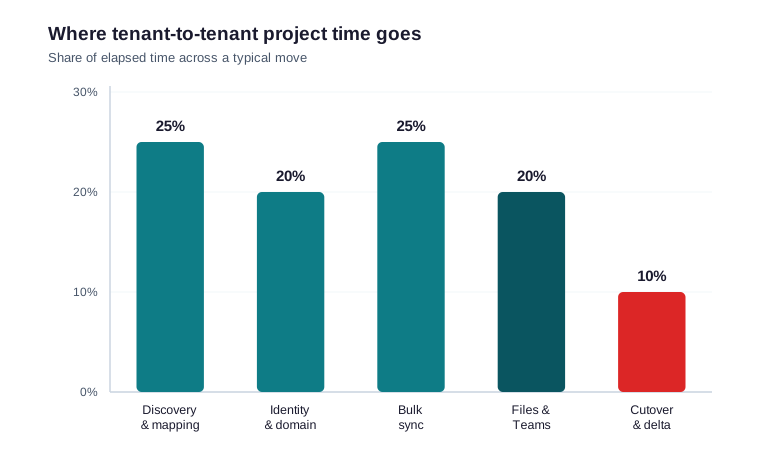
Throttling deserves respect rather than fear. It does not break a move; it simply paces it. So you spread large mailboxes across several days, and you let delta passes catch the stragglers. As a result, the cutover handles a small final sync instead of the whole estate.
🗓 A phased tenant to tenant migration office 365 plan
A clean move follows phases, each with an owner and an exit test. The schedule below assumes about 100 seats, yet the shape holds at larger sizes too.
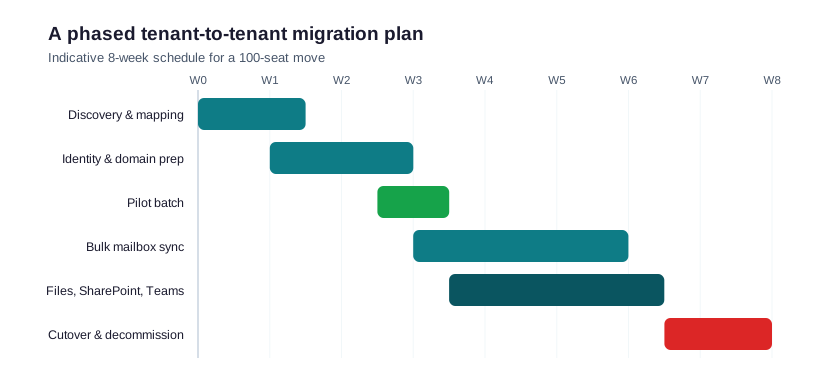
Each phase has an exit test. For example, the pilot phase ends only when a friendly user can send mail, open files and post in Teams from the target tenant. Therefore a phase never starts until the previous one provably works, which keeps the timeline honest. The phased shape also makes status easy to report. As a result, a non-technical stakeholder can see exactly where the project stands, which builds the trust that keeps a stressful move calm.
📈 The Wintive baseline across 60+ tenant moves
Patterns repeat across our migrations. For a mail-only move under 100 seats, native cross-tenant migration finishes the job cheaply. Above that, or when Teams and SharePoint move too, a tool pays for itself in saved hours. Overall, the cost of the tool is tiny next to the cost of a botched cutover.
How we right-size and rehearse every move
Wintive insight
Across 60+ Microsoft 365 moves, the costliest mistake in a tenant to tenant migration office 365 is treating it as a mailbox job. In several audits, teams moved mail cleanly, then discovered OneDrive, Teams and sharing links were never planned, which turned a weekend into a month. Therefore our runbook scopes every workload on day one, books a coexistence window, and runs a pilot before any wave. Critically, we rehearse the domain cutover, because that single step decides whether Monday is calm or chaos.
| What we standardise | Default we use | Why it matters |
|---|---|---|
| Identity map | CSV, verified twice | A bad map breaks the whole batch |
| Wave size | 25-50 mailboxes | Keeps throttling and risk low |
| Coexistence window | Until cutover | Free/busy keeps the business running |
| Pilot batch | Friendly users first | Proves the path before the bulk run |
| Rollback plan | Mail flow in both tenants | A glitch never becomes an outage |
One number sums up the payoff. In our moves, the projects that ran a pilot and a rehearsal finished on schedule far more often than the ones that skipped them. For that reason, we never quote a date without budgeting for both. Therefore we treat the pilot and the cutover rehearsal as non-negotiable, even on a tight timeline. We also write everything down. Each project keeps one runbook with the identity map, the waves and the cutover steps. As a result, any engineer can pick it up, and the next move starts faster than the last. Over time, this turns a hard project into a repeatable service.
🚨 Common tenant to tenant migration mistakes
Treating it as a mailbox-only move
Mail gets the spotlight, yet files and Teams hold just as much risk. Conversely, a plan that covers every workload from day one avoids a painful second project.
Moving the domain too early
The shared domain can live in one tenant at a time. Therefore you move it at cutover, not before, or inbound mail breaks for everyone.
Forgetting coexistence
Without cross-tenant free/busy, the two halves of the business cannot book meetings during the move. So enable coexistence early and retire it only after cutover.
Skipping the pilot
A bulk run without a pilot is a gamble. Therefore you always move a small group of friendly users first, fix what breaks, and only then scale. As a result, the bulk waves are boring, which is exactly the goal.
Underestimating throttling windows
Optimistic schedules ignore Microsoft throttling, so the weekend cutover spills into Monday. Instead, size the window from real throughput, and you keep the promise you made the business.
📚 More for Growing Businesses
🔍 Planning a tenant move and want it scoped first?
The M365 Instant Audit scans your tenant in under 10 minutes: license waste, plan right-sizing, MFA coverage, security posture and compliance gaps. As a result, you get a full PDF report with prioritized fixes, delivered instantly.
❓ Tenant to Tenant Migration Office 365: Frequently Asked Questions
Yes. Native cross-tenant mailbox migration moves mailboxes directly between tenants. However, it covers mailboxes only, so OneDrive, SharePoint and Teams still need a third-party tool.
Plan for four to eight weeks for a typical small move. Specifically, discovery takes the most time, while the bulk sync runs in the background and the cutover lasts a weekend.
It depends on scope. For mail only, the native option is enough. For full workloads, BitTitan and Quest lead on mailboxes, while ShareGate leads on SharePoint and Teams.
No. Native migration covers mailboxes only. Therefore SharePoint, OneDrive and Teams need a tool, and Teams should move last because it sits on a SharePoint site.
Native mailbox migration uses licenses you already own, so mail can be free. A tool adds a per-user fee for files and Teams. As a result, most of the real cost is labour and planning.
At the cutover, never before. The vanity domain lives in one tenant at a time, so you remove it from the source, then add and verify it in the target during the cutover window.
Skipped scope. Teams move mail cleanly but forget files, Teams and sharing links. Therefore a discovery pass and a pilot batch remove most of that risk before any data moves.